Kinsta Reviews
A complete review of Kinsta, a premium managed WordPress hosting provider, discussing its advantages and disadvantages, superior features, and performance. Suitable for users who want the best performance and expert support.
PLEASE NOTE: This review was last updated in 2025 and may no longer be accurate. Not recommended for use full reference in your decision making.
Disclosure: Your support helps keep this website running. I receive a commission of $50-$500 and 10% recurring from your hosting purchase via an affiliate link at no additional cost to you. Thank you for your support. Read more…
What is Kinsta
If you use WordPress as your website platform and want hosting with the best performance, you may have heard of Kinsta before.
Kinsta is a premium managed WordPress hosting provider that has been growing rapidly since 2013. They are known for:
- Outstanding performance (reliable uptime and super fast load time)
- Advanced infrastructure supported by Google Cloud Platform
- Exclusive focus on WordPress, making them experts in the field
- Advanced security features and automatic backup system
- MyKinsta control panel is intuitive and easy to use
What's interesting, since my last review in 2021, Kinsta has added to its hosting products. They now offer more than just WordPress hosting - they have evolved into a more comprehensive cloud hosting platform.
What Does Kinsta Do?
Kinsta was founded by Mark Gavalda and now has a global team with offices in various countries. They continue to innovate in the world of hosting, and here's what they're offering in 2024:
- Managed WordPress Hosting: This is their main service.
- Application Hosting: A new addition since 2022. You can now host Node.js, Python, and Go applications on Kinsta.
- Database Hosting: Another new service, lets you host MySQL and PostgreSQL databases separately.
- Static Hosting: A free hosting service that is ideal for static websites, landing pages, or small projects. Even though it's free, it still offers solid performance with a global CDN for fast content distribution.
Kinsta continues to optimize their hosting environment for WordPress. They use the latest technologies such as Nginx, PHP 8.2, LXD containers, MariaDB, and HTTP/3, all running on Google Cloud Platform infrastructure.
In the Kinsta review that I will update at the end of 2024, I will:
Shows you real performance data from the Kinsta test website (I tried their hosting in order to update this Kinsta review)
Thoroughly examine the advantages and disadvantages of Kinsta based on their latest developmentsExplains all of Kinsta's important features, including new ones added since 2021, that I'm sure you'll love (some of which you may not find on other hosting providers)
How to rent or payment methods that can be used at Kinsta
And most importantly, we'll discuss together the answer to the tens of thousands of dollars question: Is Kinsta the right hosting for you in 2024?
I will present all of this in one complete, updated review and guide.
Advantages of Using Kinsta
Kinsta has everything a managed WordPress hosting provider should have.
First, the technology used is the best, starting from Nginx, PHP 8.1, 8.2, 8.3, Kinsta's Edge Caching, Kinsta's CDN which has 260+ POPs, and it is all built on the infrastructure of Google Cloud Platform which is claimed to use the fastest CPU model.
Don't forget to also mention that to provide a greater sense of security to all its customers, support from Kinsta is directly supported by WordPress Experts.
1. Has Impressive Performance
In this Kinsta review update, I did not monitor uptime like I did in 2021 where I tried monitoring Kinsta uptime for 2 months to see how stable their server was. Why?
Well, Kinsta uses Google Cloud and I have no doubts about the stability of Google Cloud servers. That's right, there will definitely be downtime, there is no server that has no downtime at all, but even if there is downtime, for example there is a server maintenance task, Kinsta will do it at times when your website visitors are fast asleep from 2 to 5 in the morning.

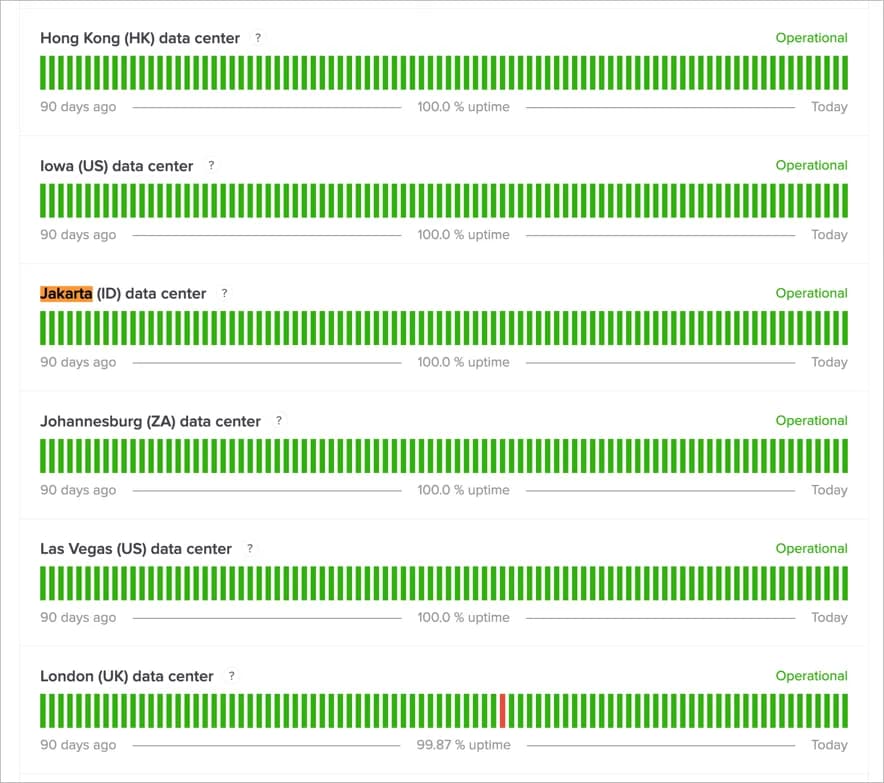
And if you look at Kinsta's status page, their average uptime is very good. So, when it comes to uptime or server stability, I don't think there's any need to doubt it.
So, what about Kinsta's speed? This would be very interesting to find out, but unfortunately, I couldn't test the capabilities of the Kinsta server raw, due to limitations where the server cache cannot be disabled.
For this reason, I carried out tests with two comparisons using the Performance Test tool from Grafana Cloud (k6.io). The following are the comparison results in tabular form:
| Metrics | Server Cache Only | All Active Features |
|---|---|---|
| Average response time | 54 ms | 44 ms |
| Total requests | 13,039 | 13,131 |
| Average requests/second | 38 | 39 |
| Peak RPS | 49.67 | 49.67 |
| HTTP Failure | 0 | 0 |
| Test duration | 5 minutes 30 seconds | 5 minutes 30 seconds |
| Total virtual users | 50 | 50 |
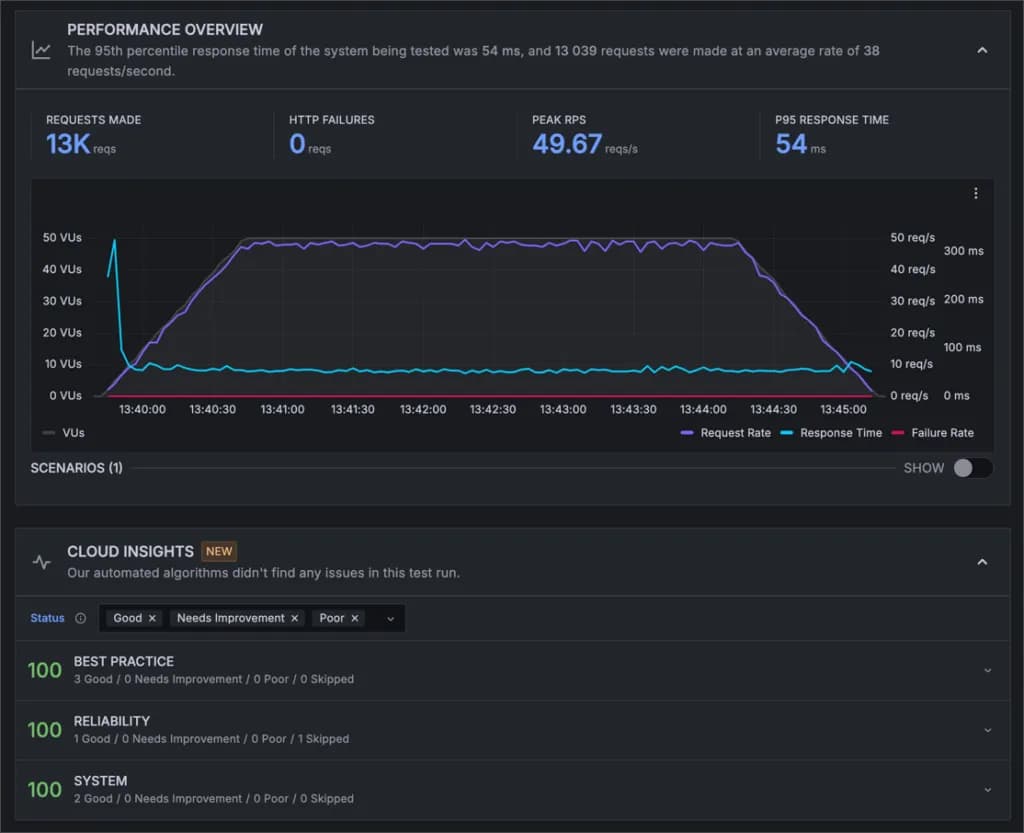
1. Load test with server cache active, but edge cache and CDN disabled
Test duration: 5 minutes 30 seconds Total virtual users: 50
Results:
- Average response time: 54 ms
- Total requests: 13,039
- Average requests per second: 38
- Peak RPS (Requests Per Second): 49.67
- HTTP failures: 0
2. Load test with server cache, edge cache and CDN all active
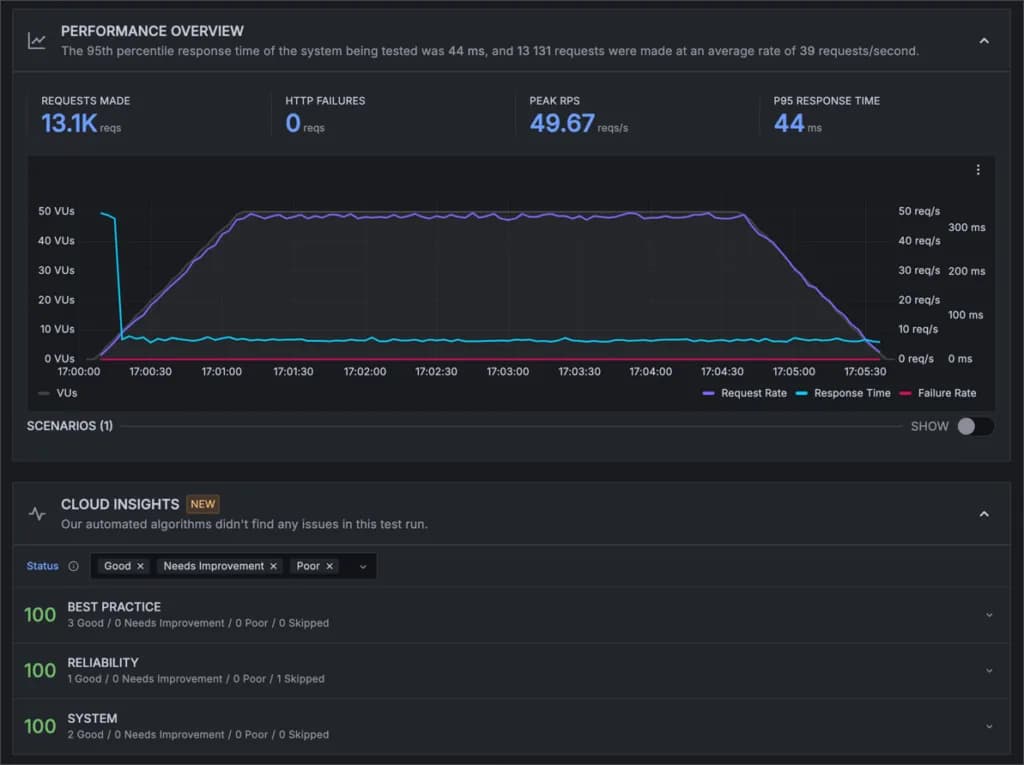
Test duration: 5 minutes 30 seconds Total virtual users: 50
Results:
- Average response time: 44 ms
- Total requests: 13,131
- Average requests per second: 39
- Peak RPS: 49.67
- HTTP failures: 0
From the results of this test, we can see several interesting things:
- Performance Improvement: By enabling edge cache and CDN, average response time decreases from 54 ms to 44 ms. This represents a performance increase of 18.5%.
- Consistency: Both tests show identical peak RPS (49.67), indicating consistent server performance even under high load.
- Reliability: The absence of HTTP failures in both tests indicates excellent system reliability.
- Scalability: The ability to handle an increase in requests (from 13,039 to 13,131) without performance degradation indicates good scalability.
- CDN Optimization: Use of CDN and edge cache not only increases speed but also allows handling more requests per second (from 38 to 39).
These results show that Kinsta does offer excellent performance, especially when all of their optimization features are enabled.
2. Beautiful, Intuitive and Beginner Friendly Control Panel
Kinsta is dissatisfied with existing control panels on the market, including the cPanel. That's why they created their own control panel which is different from other providers.
The control panel created by Kinsta is beautiful, intuitive and very beginner-friendly.
This is what the latest Kinsta update dashboard looks like:
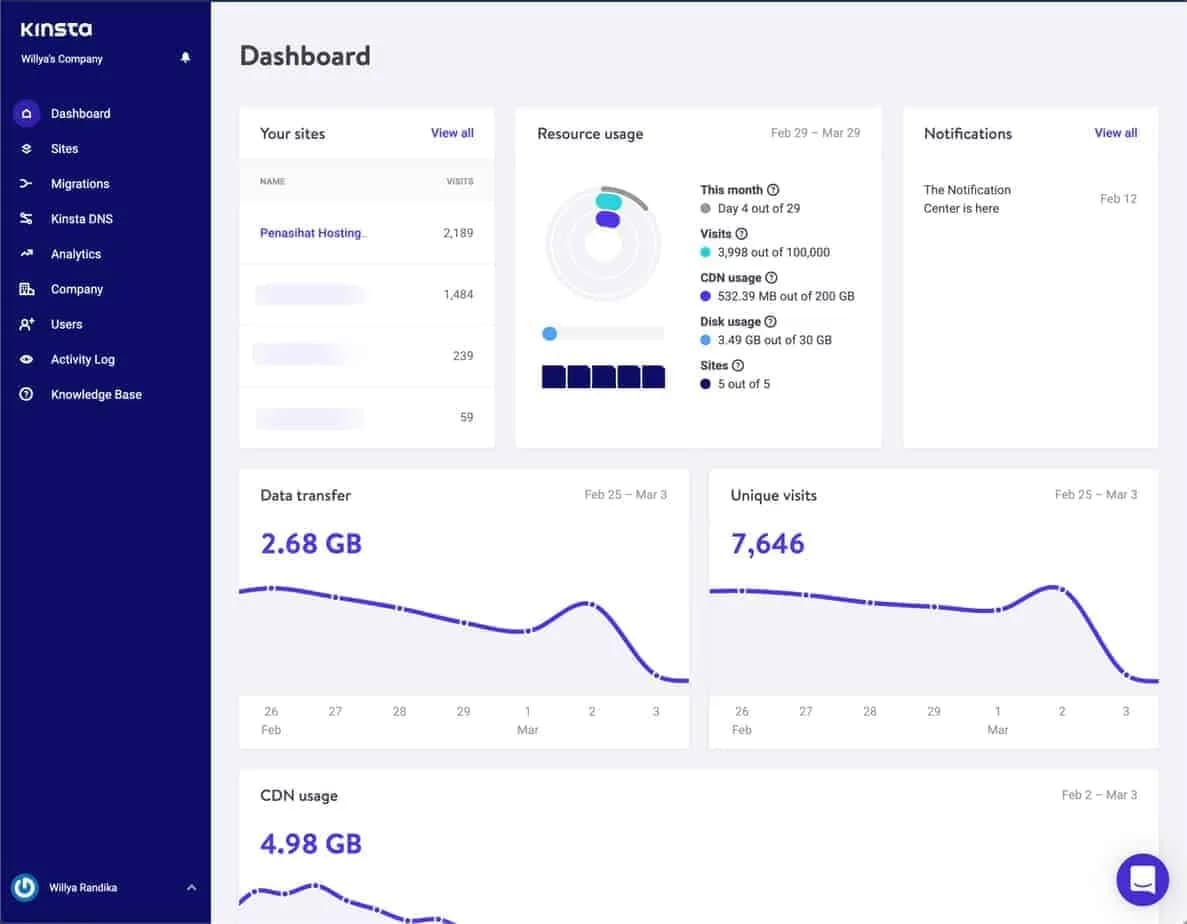
Oops... actually the design above is an old design that I captured in 2021. In fact, on December 8 2022, Kinsta carried out a re-branding by completely changing the design of their website including the dashboard or MyKinsta.
What's the latest appearance?
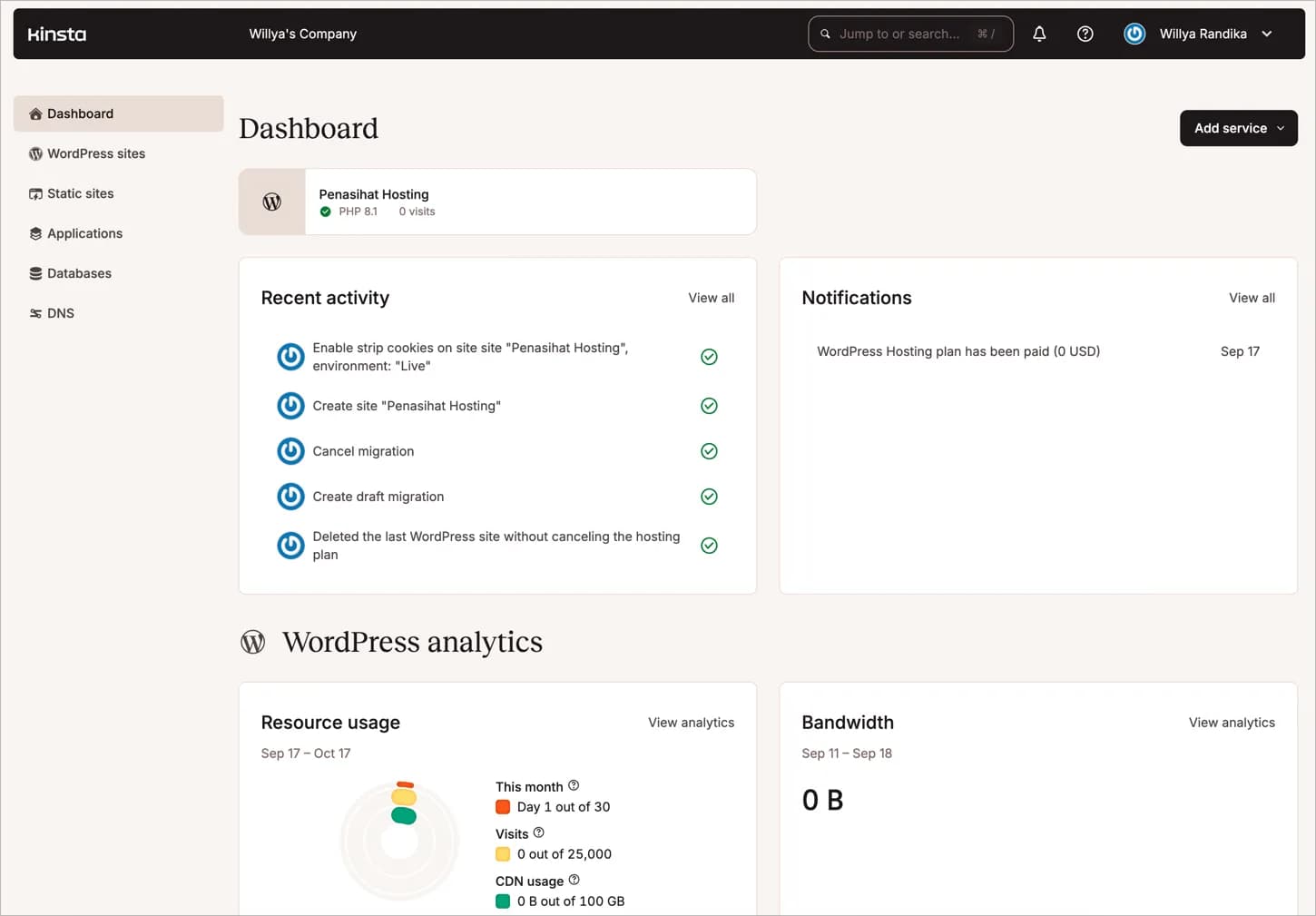
I think the new design is very bold, unique. It really has a different feel.
What I like about Kinsta's custom control panel is its clear focus on WordPress. They remove features that are not relevant to WordPress that you would normally encounter in cPanel, DirectAdmin, or Plesk. The result? An interface that is clean, easy to navigate, and completely optimized for WordPress site management.
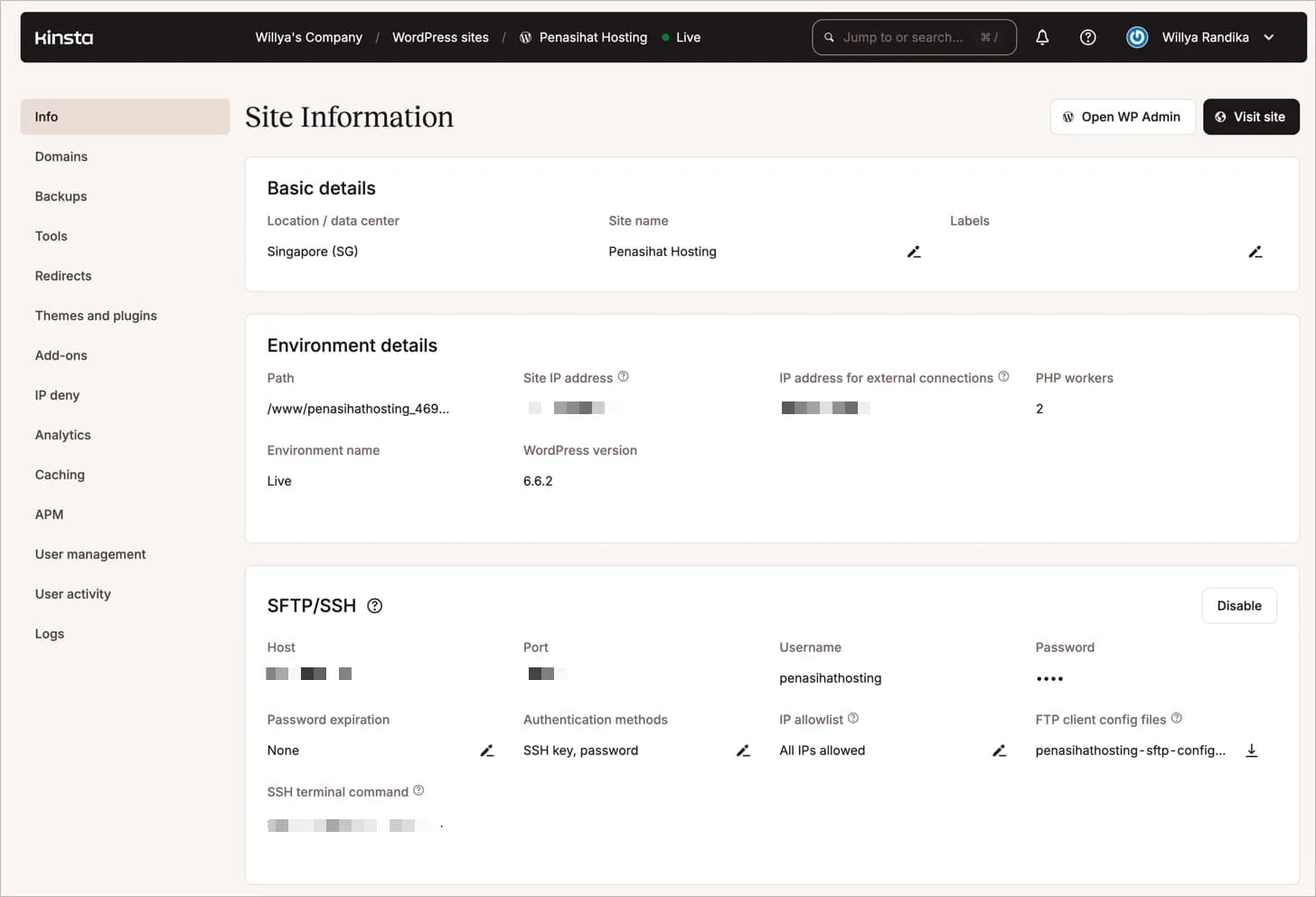
From this MyKinsta dashboard, you can easily carry out various daily tasks related to WordPress:
- Add a new website
- Perform backup and restore
- Create a staging environment or clone a website
- Activate SSL
- Set up CDN
- Manage DNS
- View website analytics
- Up to updating, activating, deactivating themes and plugins
And much more! I love how Kinsta organizes all these features in a logical and easy to access way.
One thing to note: despite the new design, Kinsta retains its pre-existing functionality. So, if you are familiar with the old version of MyKinsta, you don't need to worry. All the features you love are still there, just packaged in a fresher look.
I will discuss all the important features that I mentioned above in more detail in the following points.
3. Has Rich and Optimized Features to Maximize WordPress Websites
Kinsta has a wealth of features, all of which can make you more productive in working with your WordPress website.
Basically, all the features you need to perform daily tasks on a WordPress website are all in Kinsta.
I will discuss the important features in more detail below:
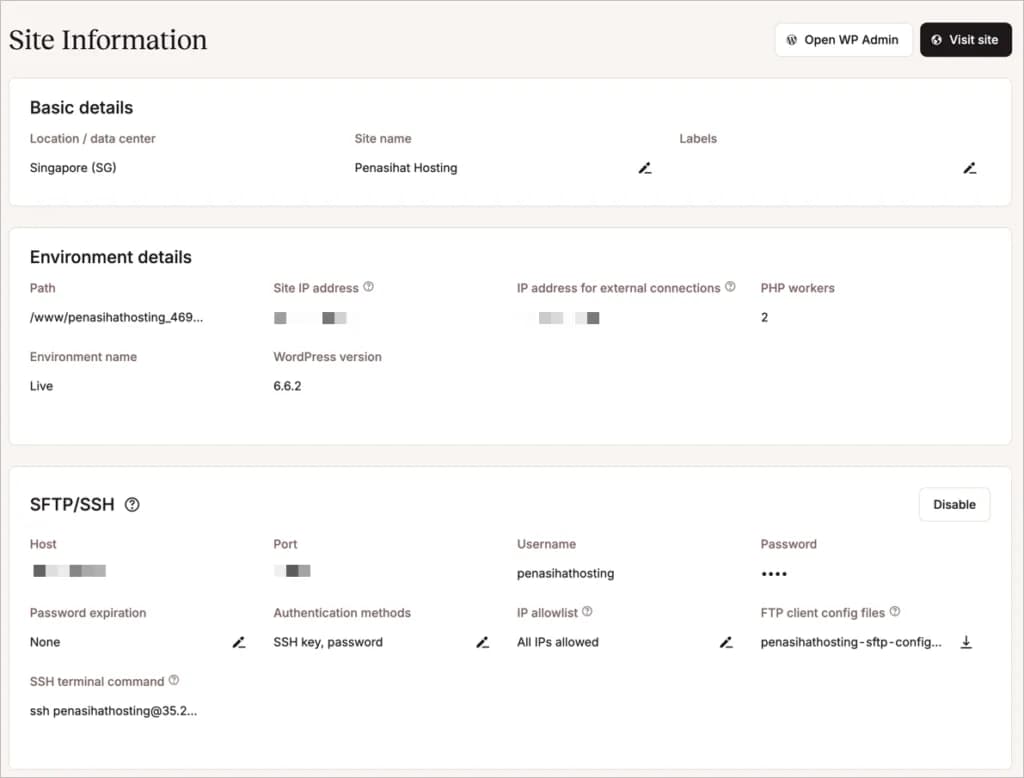
1. Site Information
Imagine a dashboard that gives you all the important information about your website in one glance. That's what Kinsta offers on its “Site Information” page. Here you will find:
- Data center location information, WordPress version, and IP Address
- SSH/SFTP access for developers
- Access to PHPMyAdmin / Database
- WordPress reset and delete buttons (be careful with this last one!)
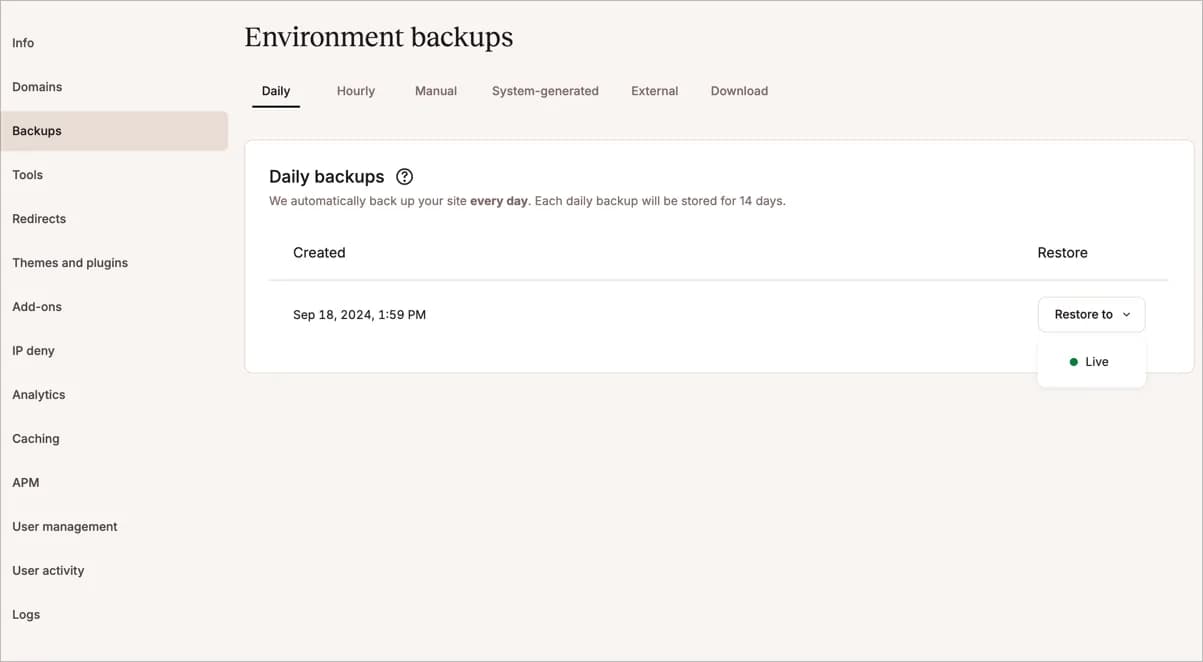
2. Backup and Restore Feature
Good news for those of you who spent money on premium backup plugins, such as UpdraftPlus and BackupBuddy, because Kinsta provides the daily backup feature for free and is available on all plans, including its cheapest plan.
This will save you around $50-$70/year if you used a premium backup plugin previously.
They provide:
- Automatic daily backups (free on all plans!)
- 14-30 days backup storage (depending on package)
- Manual backup and restore option
- Ability to download backup files
3. Staging Environment Feature
Apart from the backup and restore features, in my opinion this is the second most important feature.
What is a staging environment?
In short, if you want to test certain plugins and themes or want to modify your website design, but don't want to do it directly on your website, for fear of damaging the website, errors, wrong coding and other reasons, then you can make a copy of your website via the staging feature.
With a copy/staging website, you can try to make any changes to your website without fear of having a direct effect on your 'live' website.
And when you are ready with all the changes, you can 'push' the changes you make to your 'live' website.
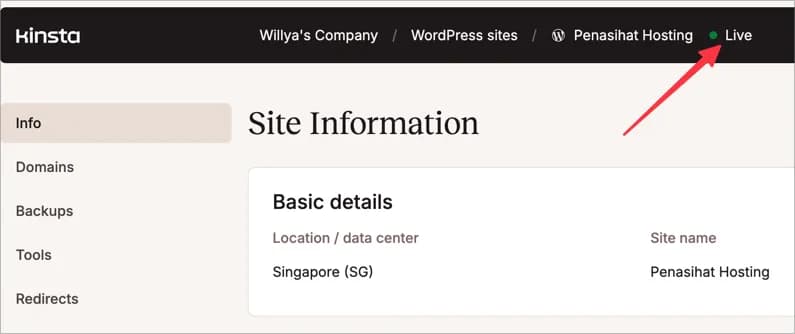
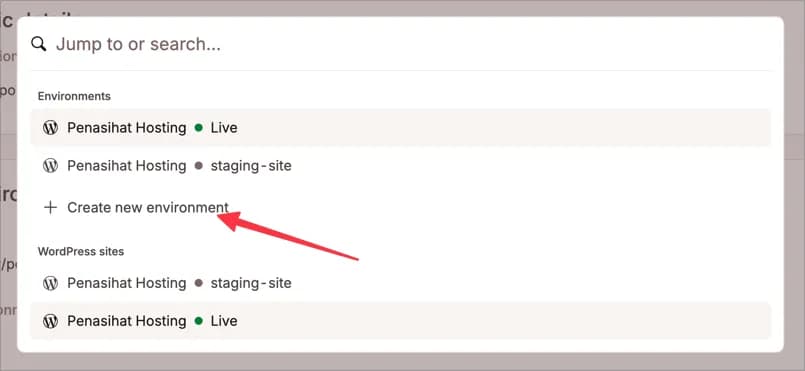
How to access the staging environment from your website? Maybe some of you will be confused, because to access it you need to click a button that doesn't look like the button in the section I've arrowed below:
You can click the “Create new environment” button.
4.Tools
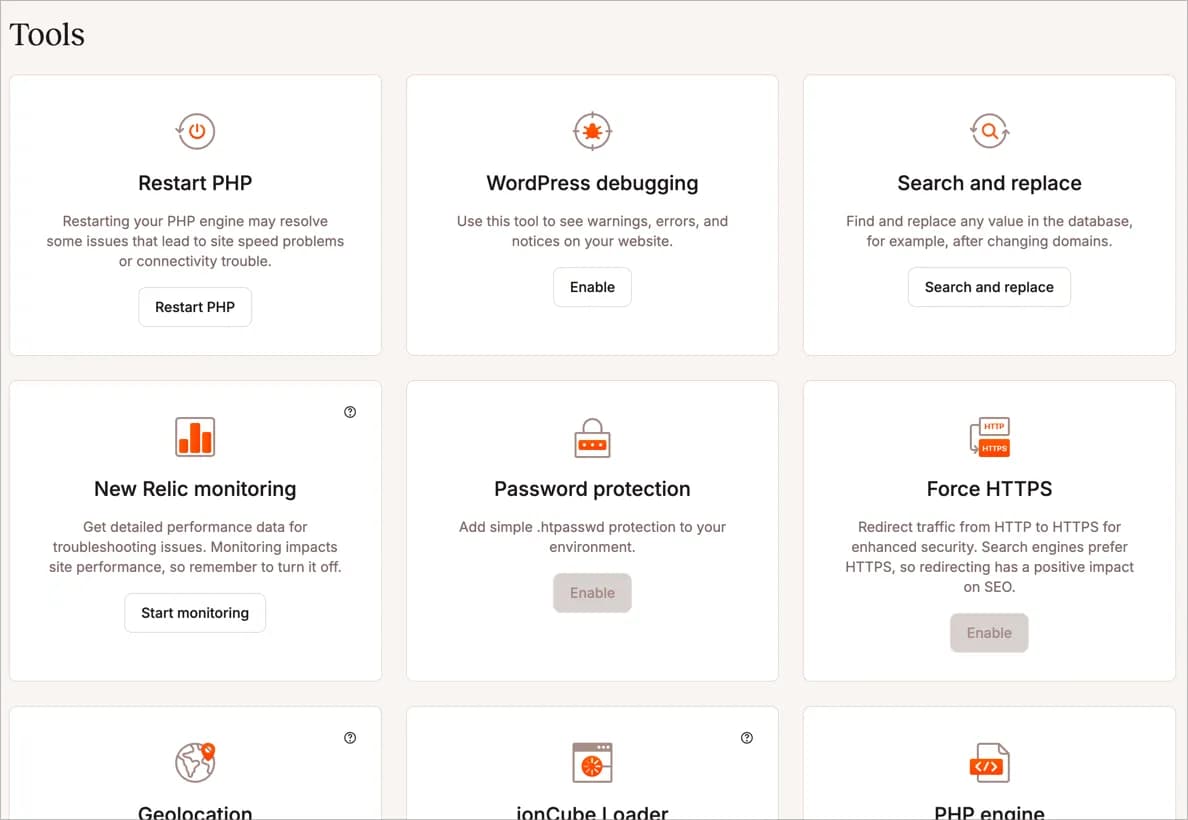
You will often open this 'tool', especially when you first move to Kinsta.
Tools such as Search and replace, Force HTTPS and PHP Engine (the latest version 8.3 is available) usually need to be set up first after migrating website files and databases.
5. Themes and Plugins
This is one of the latest feature updates from Kinsta, where you can activate and deactivate certain plugins and themes directly from MyKinsta.
However, you cannot add new plugins and themes, nor can you delete existing ones.
This feature seems simple, but it will be very useful when you experience problems on your WordPress website caused by plugin conflicts or theme errors, which can make it impossible for you to log in to your WordPress dashboard to deactivate it.

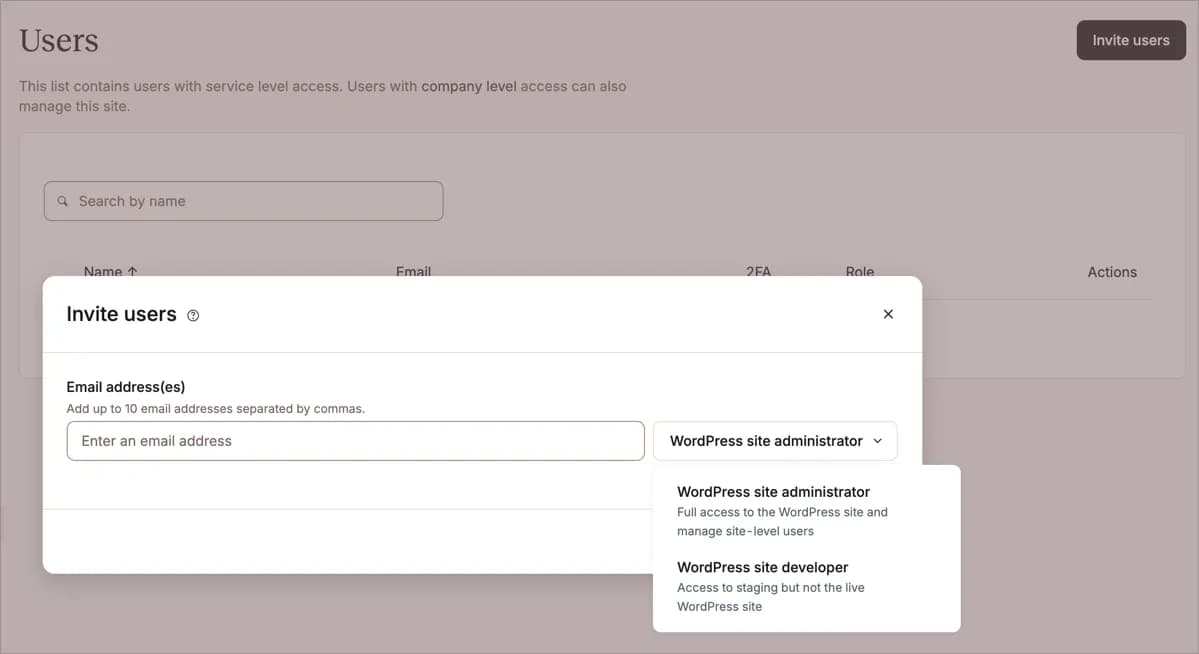
6. User Management
This feature is very useful when you work as a team.
You can add team members to your Kinsta account and determine access rights according to the role of each team member, such as:
- WordPress site administrator: To provide full access to the WordPress website and manage the website as a whole
- WordPress site developer: Access to the staging website but not the live website.
7. Caching
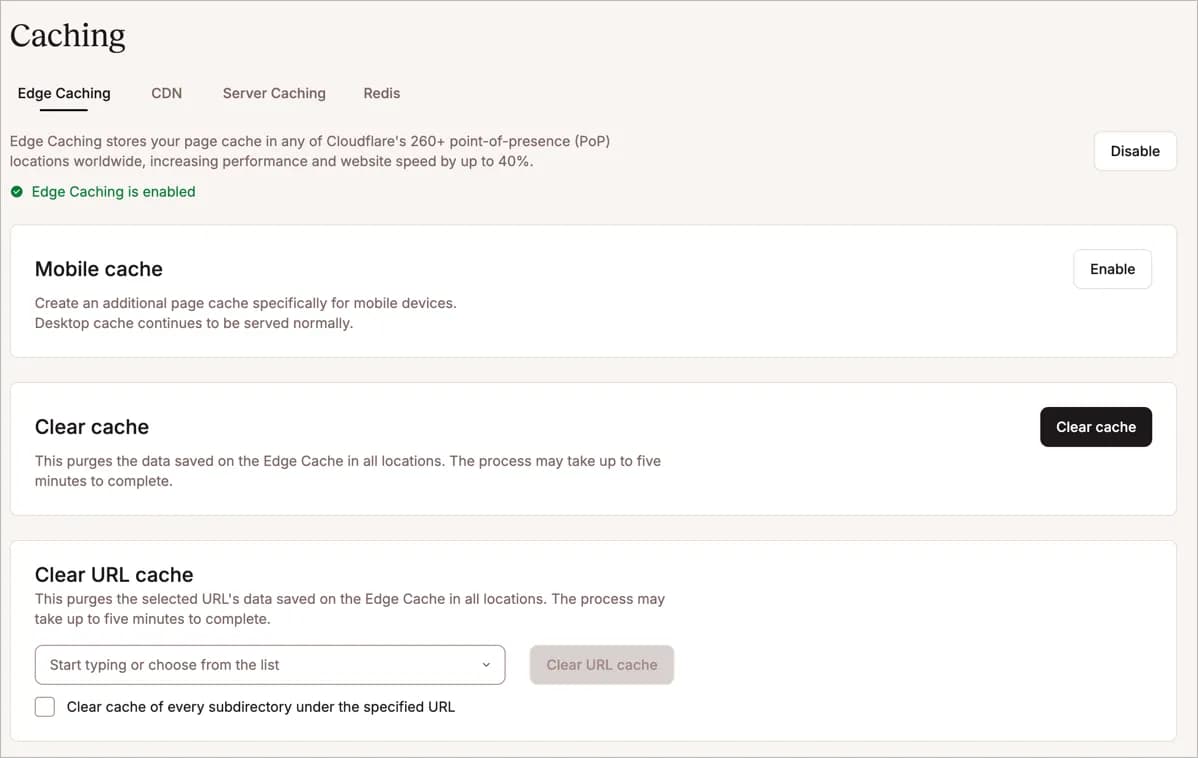
Kinsta has three levels of caching:
- First caching at the server level (server caching),
- Edge caching with 260+ Cloudflare PoPs, which is claimed to increase website performance by up to 40%,
- And thirdly via CDN, where all your static website files such as CSS, JS and images will be stored on the Kinsta CDN network. Not only that, your image files will also be automatically converted to WebP image format to improve website performance.
So, if you have previously used CDNs like Bunny.net, Cloudflare and plugins to convert images to WebP like ShortPixel, I think you can throw them all away and replace them with Kinsta's built-in features after migrating to their hosting.
And there are many more Kinsta features which of course I can't cover them all in this review because it would be too long. Other features worth mentioning are the Redirect, Early Hints, Site Preview, and DevKinsta features.
4. Direct support handled by WordPress experts
This is one of the advantages of choosing Managed WordPress Hosting Kinsta as your partner, all problems with your WordPress website will be handled directly by experienced WordPress Experts.
In fact, from my experience of using Kinsta, there is not a single problem that Kinsta support cannot solve.
So, I believe that whatever problems you have can be resolved well, even if your website is attacked.
You can consult and ask about how to do this or that, they can even help you to block on websites that send fake/spam traffic.
And the good news is, there are two people from the Kinsta support team who come from Indonesia. namely Mas Agus from Jakarta and Mas Thoriq from Surabaya.
Make sure you ask to be forwarded to them if you are having difficulty with the language. However, on weekends it seems like the support is only available in English.

Oh, by the way, Kinsta support is available 24 hours and in my experience the response is fast, less than 5 minutes.
5. Have Reliable Security
Nothing is more important than website security, right?
Kinsta takes active and passive steps to stop any attacks that might occur on your website.
Starting from monitoring your website uptime every two minutes to detecting when a DDoS attack occurs and proactively stopping it.
And even if your website is successfully infiltrated by malicious hackers, Kinsta offers a 'hack fix guarantee'. They will work optimally to restore your website to normal for FREE.
More:
| Category | Security Features |
|---|---|
| Server Protection | - Enterprise level firewall - DDoS protection - Google Cloud Platform Premium Tier Network - Complete isolation technology (containers) |
| Monitoring & Prevention | - Dedicated malware team - Regular uptime checks (480 times a day) - Proactive hack prevention |
| Encryption & Access | - Free SSH access - Free SSL certificate with wildcard support - Two-factor authentication |
| Backup & Restore | - Automatic backup for 2 weeks - Free malware removal service |
| Development Environment | - One click WordPress staging environment |
| Support | - 24/7/365 Support |
| Additional Features | - WordPress and PHP version hiding - Automatic minor security updates - Open_basedir restrictions - XML |
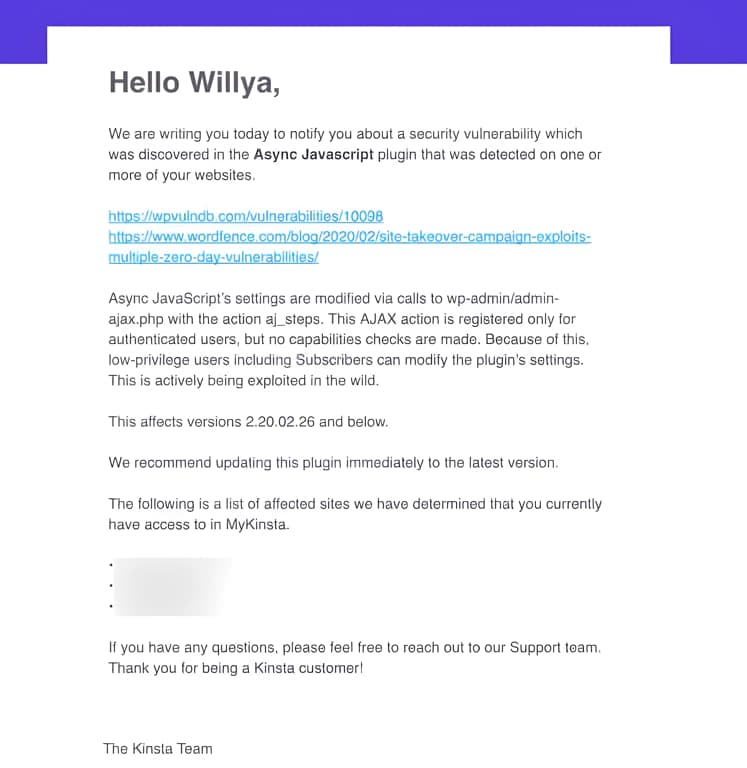
- RPC attack blocking - IP Deny tool in MyKinsta dashboard Another good thing that I like about Kinsta's security system is that they will send you an email if there is a plugin vulnerability that you use on your website. |
You are then given directions on what you should do, such as disabling the vulnerable plugin or updating it to the latest version (which may have already been completed by the developer).
6. Free CDN in collaboration with Cloudflare
Kinsta no longer uses KeyCDN. Currently they use Cloudflare and this combination of Google Cloud and Cloudflare CDN can really increase your website performance by up to 44%.
Kinsta CDN has 260+ POPs spread across the world.
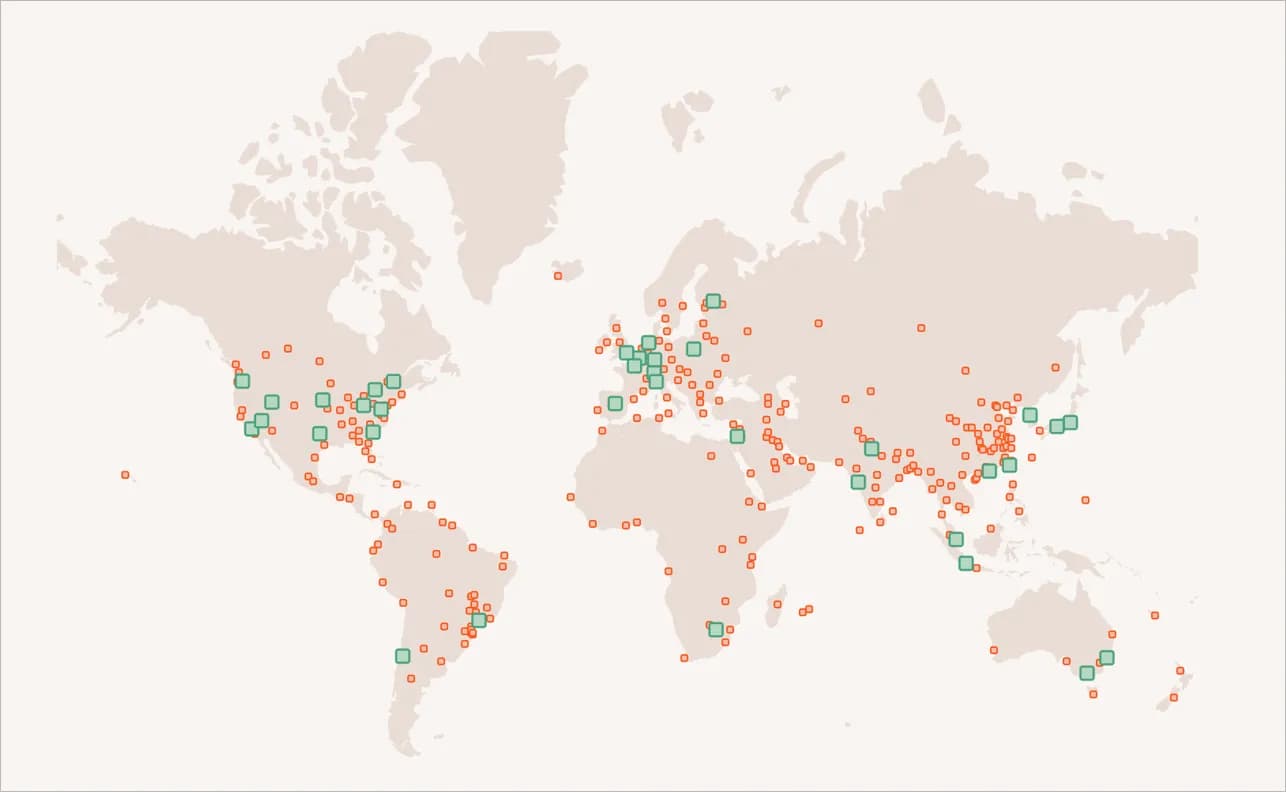
And as I mentioned in the Kinsta caching feature point, this CDN is available free of charge to all Kinsta customers and has additional features such as being able to convert image files to WebP format and providing protection against DDoS attacks.
More:
| Features | Description |
|---|---|
| Integration Type | Premium CDN powered by Cloudflare |
| Cost | Free for all Kinsta customers |
| Network Coverage | 260+ cities in over 100 countries |
| Performance Improvement | Up to 44% reduction in page loading time |
| Key Features | - Enterprise level firewall - DDoS protection - HTTP/3 support - Image optimization - Main domain support |
| Cached File Types | Various static assets (images, CSS, JS, fonts, etc.) |
| Maximum File Size | 5 GB per file |
| Image Optimization | - Lossless options (GIF, PNG) - Lossy options (GIF, PNG, JPEG) - Convert to WebP |
| Cache Control | public, max-age=31536000, s-maxage=31536000 |
| Exclusion Options | - Directory path - URL path - File extension |
| Cache Cleaning - Via | the MyKinsta dashboard - Using the Kinsta MU plugin - WP |
| Compatibility | Not compatible with password protection |
| HTTPS Serving | Requires enabling Force HTTPS on MyKinsta |
| Third Party CDN It is | recommended to disable before enabling Kinsta CDN |
7. Free Hosting Migration to Kinsta
If at this point you are already interested in Kinsta and are planning to move, don't worry about the migration process, because Kinsta will help you move your website from your old hosting to Kinsta for free, whatever hosting package you choose.
Kinsta will migrate your website for free, no matter how many websites you have. *Unlimited.
- The migration process will run without downtime.

8. Has a Very Complete Knowledge Base and an Amazing Blog + Very Useful Guide (Learn WordPress)
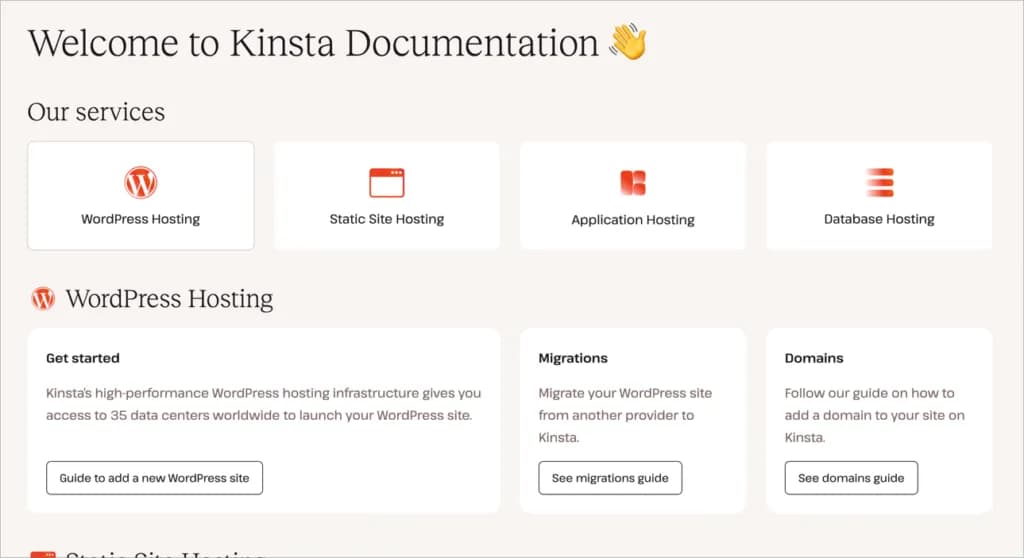
Another thing that I like about Kinsta is that they have a very complete knowledge base page and documentation page, a very good guide (learn WordPress) page and don't forget to mention that their blog is also very active.
Kinsta is very serious about this business. I don't think there is any other provider that has done more than what Kinsta has done.
Disadvantages of Using Kinsta
Besides the many advantages that Kinsta has, they also have disadvantages that you need to know:
1. Not a Cheap Hosting Choice
Kinsta is not the right choice if you are looking for low-cost budget hosting.
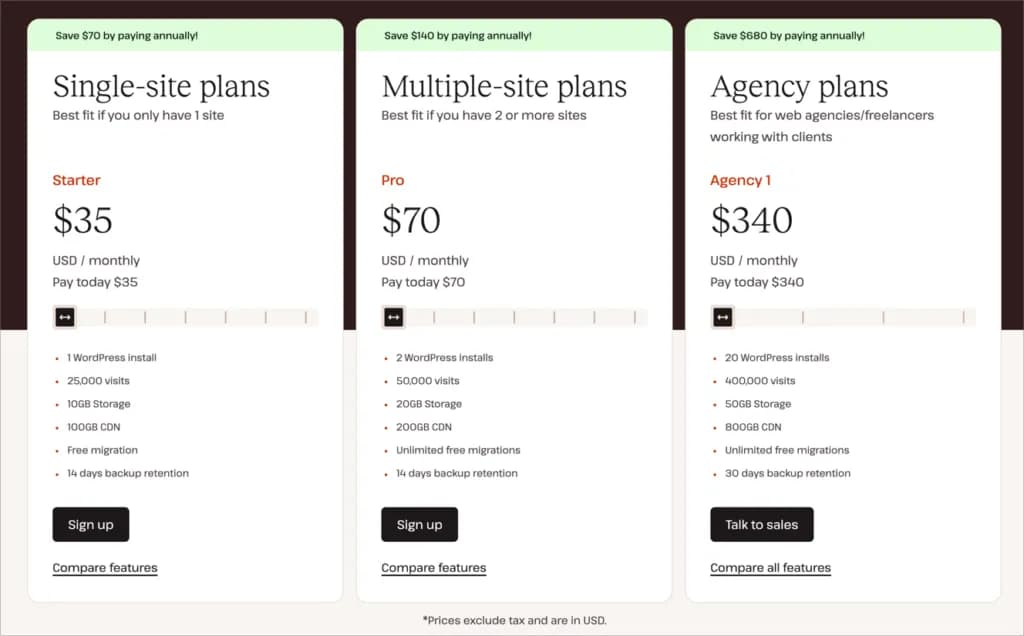
Kinsta's cheapest package price is $35/month or $30/month if you choose to subscribe directly on an annual basis to host 1 WordPress website. What if you have 2 websites? You need to choose the ‘Pro’ package which is priced at $70/month or $115/month for 5 websites.
2. The ‘Starter’ Plan Has Resource Limitations
Kinsta limits the amount of bandwidth, which they call monthly visits. The ‘Starter’ package is only for websites with visits of 25,000 per month or less.
Additionally, this package only has 2 PHP workers which is not ideal for the needs of a WooCommerce website. For WooCommerce websites or those that require more resources, at a minimum you need the 'Business 1' package ($115/month) with 4 PHP workers.
3. Time consuming process
After conducting a series of tests, I found that some processes in Kinsta tend to be slow. These include:
- Time required: More than 5 minutes
- Expectations: This process should take a maximum of 1-2 minutes to complete
- Time required: Approximately 18 minutes (for a 72MB website)
- Expectations: This process should ideally not exceed 5 minutes for the size of the website
Important Point: The speed of this process can have a significant impact on productivity, especially if you manage multiple websites or carry out frequent updates and testing.
4. No Email Hosting and No Selling Domains
Kinsta is a managed WordPress hosting provider only. They don't sell domains, so you will need to purchase your domain at another provider like Namecheap or GoDaddy and then point your domain nameservers to the Kinsta nameservers.
Additionally, Kinsta also does not provide email hosting. So you need to use a third party service for sending emails, such as Google Suite, Zoho Mail, Private Mail (which I use) and others.
Conclusion: Do I Recommend Kinsta?
I confidently recommend Kinsta, especially for busy users or users who want convenience.
Here's a summary of the reasons:
| Kinsta Features | Benefits for Clients |
|---|---|
| Managed Hosting | • Handle technical aspects • Focus on business |
| Intuitive Control Panel | • Easy to use dashboard • Suitable for non-technical |
| Automatic Backup | • Automatic backups • Peace of mind |
| High Level Security | • Proactive security • Threat free |
| Support 24/7 | • Expert WordPress help • Quick solutions |
| Optimal Performance | • Optimized servers • Speed without complicated configuration |
| Staging Environment | • Easy to test changes • Minimal risk of downtime |
| Auto-scaling | • Handles traffic spikes • Stability during high traffic |
Kinsta is not low-cost budget hosting, but the value it offers is worth it for serious online businesses. With high performance and expert support, Kinsta can help grow your business to a higher level.
However, keep in mind a few points:
- Budget: Make sure your budget fits Kinsta's premium pricing.
- Resource Requirements: Evaluate whether the Starter package is sufficient or you need a higher package.
- Additional Services: Set up separate solutions for email hosting and domain purchasing.
- Time Expectations: Consider that some processes may take longer than expected.
Kinsta remains recommended for the majority of users who value convenience, performance, and expert support. Although there are trade-offs, the quality of service generally compensates for these shortcomings.
For online businesses ready to invest in high-quality hosting, Kinsta could be the right choice. However, for those with a limited budget or specific needs (such as integrated email hosting), it may be worth considering other alternatives.
Remember, the ideal hosting depends on your project's specific needs. Carefully evaluate whether Kinsta's advantages fit your priorities and budget.
Visit Kinsta

Willya Randika
Hi, saya Randika, seorang Web Developer yang spesialis di WordPress, Astro, dan Next.js. Sejak 2015, saya telah membantu ratusan bisnis dan profesional membangun website yang tidak hanya cepat dan aman, tapi juga mudah ditemukan di Google dan efektif mengkonversi pengunjung menjadi pelanggan.
More Reviews
Cloudways Review
A complete review of Cloudways, a popular managed cloud hosting platform, discussing its advantages and disadvantages as well as how it compares to other providers. Suitable for beginners to developers.
RunCloud Review
Complete review of RunCloud, a cloud panel for managing Cloud VPS. Learn about RunCloud's features, performance, price, advantages and disadvantages to help you decide.
Kenceng Solusindo Review
Kenceng Solusindo offers the fastest server response in load tests and excellent support, with fair pricing, but lacks a refund guarantee and has limited backup features.
WarnaHost Review
Offers cheap hosting services with pretty good support and JetBackup features. However, it still has shortcomings in uptime stability and server response speed which tends to be slow when tested.
Jagoan Hosting Review
Jagoan Hosting offers a fairly fast average server response speed and an Acronis automatic backup feature with 14 day retention, but server uptime still needs to be improved.
IDCloudHost Review
IdCloudHost's average uptime is quite impressive from 2024 to January 2025, and has the fastest average server response time compared to all the providers we tested.