Cloudways Review
A complete review of Cloudways, a popular managed cloud hosting platform, discussing its advantages and disadvantages as well as how it compares to other providers. Suitable for beginners to developers.
Disclosure: This review is part of a sponsored collaboration with Cloudways. However, all testing, performance data and opinions in this review are the result of my own hands-on testing and reflect my honest and independent views.
Cloudways has been around since 2011. They are headquartered in Malta.
If you have done research before on managed providers cloud hosting, Cloudways is one of the names that is often mentioned.
Over the 14+ years since its founding, they have successfully managed more than 845,000 websites from a total of more than 100,000 customers from all over the world.
An extraordinary achievement, right?
And in August 2022, they were acquired or became part of the large Digital Ocean family, a VPS provider that I'm sure most of you know.
Why can Cloudways' development be said to be rapid?
Furthermore, what approach do they take so that many users switch from traditional hosting providers to Cloudways?
In short, Cloudways provides solutions for several user models, such as:
-
Users who do not have the technical knowledge to manage their own servers
-
Users coming from shared hosting, then want cloud VPS hosting to get much better performance, but don't want the hassle of managing their own servers
-
Users who are looking for alternatives to Managed WordPress Hosting, such as Kinsta and WP Engine, with cheaper prices and no less or even better performance
-
Users who are looking for an alternative to Cloud Panel such as RunCloud, GridPane, ServerPilot, etc., because they don't want the hassle of creating two accounts (a cloud hosting provider account and a cloud panel account)
-
Users looking for an alternative to RunCloud
- Is Cloudways the right choice for beginners? What about developers?
- Has Cloudways been optimized for WordPress websites? What about other CMS, such as Laravel, Drupal, Joomla, Magento, Moodle and others?
- Is the performance fast? How does it compare to RunCloud?
- Is the price reasonable? Worth it to move to Cloudways?
In this Cloudways review, I will try to answer these questions, as well as explore what makes them unique and why their approach can provide more flexibility than other providers.
Advantages of Using Cloudways
Before writing this Cloudways review, I have tried Cloudways and carried out speed tests, also tried their latest dashboard or interface so that this review is up-to-date and can help you in making decisions.
Don't forget, I also retested the quality of the support after previously doing it in 2021. After researching everything, I can conclude the following advantages of Cloudways.
1. Cloudways is a platform for managing unmanaged cloud VPS
First and what you need to know, Cloudways is not actually a cloud hosting provider.
They only provide a platform that you can use to manage cloud VPS hosting from certain providers that they have determined.
So, what they actually offer is server management within a platform. However, this is different from platforms (perhaps more precisely cloud panels), such as RunCloud, ServerPilot, GridPane, SpinupWP and others, where they require you to have two accounts:
- One cloud hosting provider account (say Digital Ocean),
- One account in the cloud panel (say RunCloud)
At Cloudways, because they are a platform, you only need a Cloudways account. This is what differentiates Cloudways from some of the cloud panels that I mentioned earlier.
There are five cloud hosting providers that you can choose from, including:
- Digital Ocean: One of the pioneers in cloud hosting technology and is the most popular and cheapest option with costs starting from $11/month or $14/month for premium.
- Vultr Cloud provider known for high performance thanks to AMD EPYC processors and more than 30 data center locations worldwide. Suitable for CPU-intensive websites, such as websites with a lot of dynamic content or complex database queries.
- Linode (Akamai Cloud): One of the cloud hosting providers that has long experience, now operates under the Akamai infrastructure. A good choice if you are familiar with the Linode ecosystem or need data centers in certain locations that are not available on Digital Ocean.
- Amazon Web Services (AW
S): Who doesn't know AWS? Their cloud infrastructure is very well managed, but in general, their costs are the most expensive. It starts at $38.56/month and the bandwidth (on the cheapest plan) is very limited (2GB) compared to the three providers above.
- Google Cloud Platform (GC
P): Claimed to be better than AWS at slightly lower cost. It starts at $37.33/month and bandwidth (on its cheapest plan) is also very limited (2GB).
Note: Cloudways removed Vultr and Linode from its platform in May 2025, but not long after they were brought back with the addition of new server types (General Purpose and CPU Optimized). As of March 2026, all five providers will be fully available again.
Apart from that, Cloudways not only works for WordPress websites, but you can also use it to host Magento, Drupal, Prestashop, Joomla websites, PHP websites (Laravel, Codeignitor, Slim, Moodle), and others.
That means, you can use Cloudways for any platform, whatever your needs.
2. Innovative Control Panel
Cloudways creates a unique custom control panel, different from other providers.
My first impression is, to be honest, the control panel made by Cloudways looks a bit technical, especially for beginners who have just come from shared hosting and have never seen a control panel other than cPanel hosting, DirectAdmin and Plesk.
I mean, the control panel does look intuitive but maybe it's aimed more at developers.
If you are coming from shared hosting, I think you will need some time to get to know all the existing functions to get used to using them.
You can see some of the control panel displays in the tabs below:
DA
S
H
B
O
A
Cloudways has just created a new interface. It's cleaner because there's lots of white space, and it's also more intuitive than before, although if you're coming from shared hosting and are only familiar with cPanel, you'll still need to get used to it.
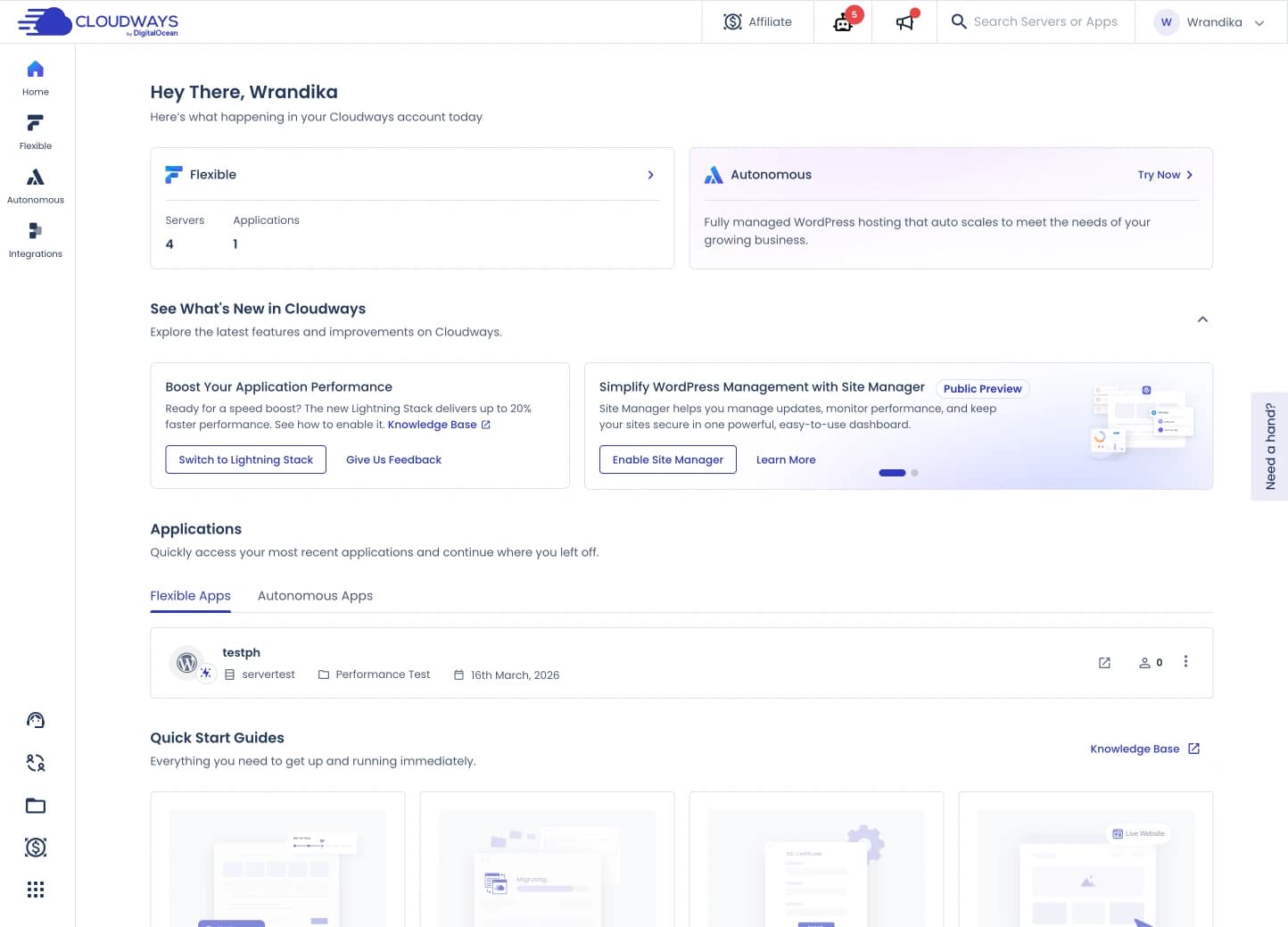
This is the server management page.
You can manage things related to your server, such as managing security, backups, SMTP, downgrade/upgrade server specifications, and so on.
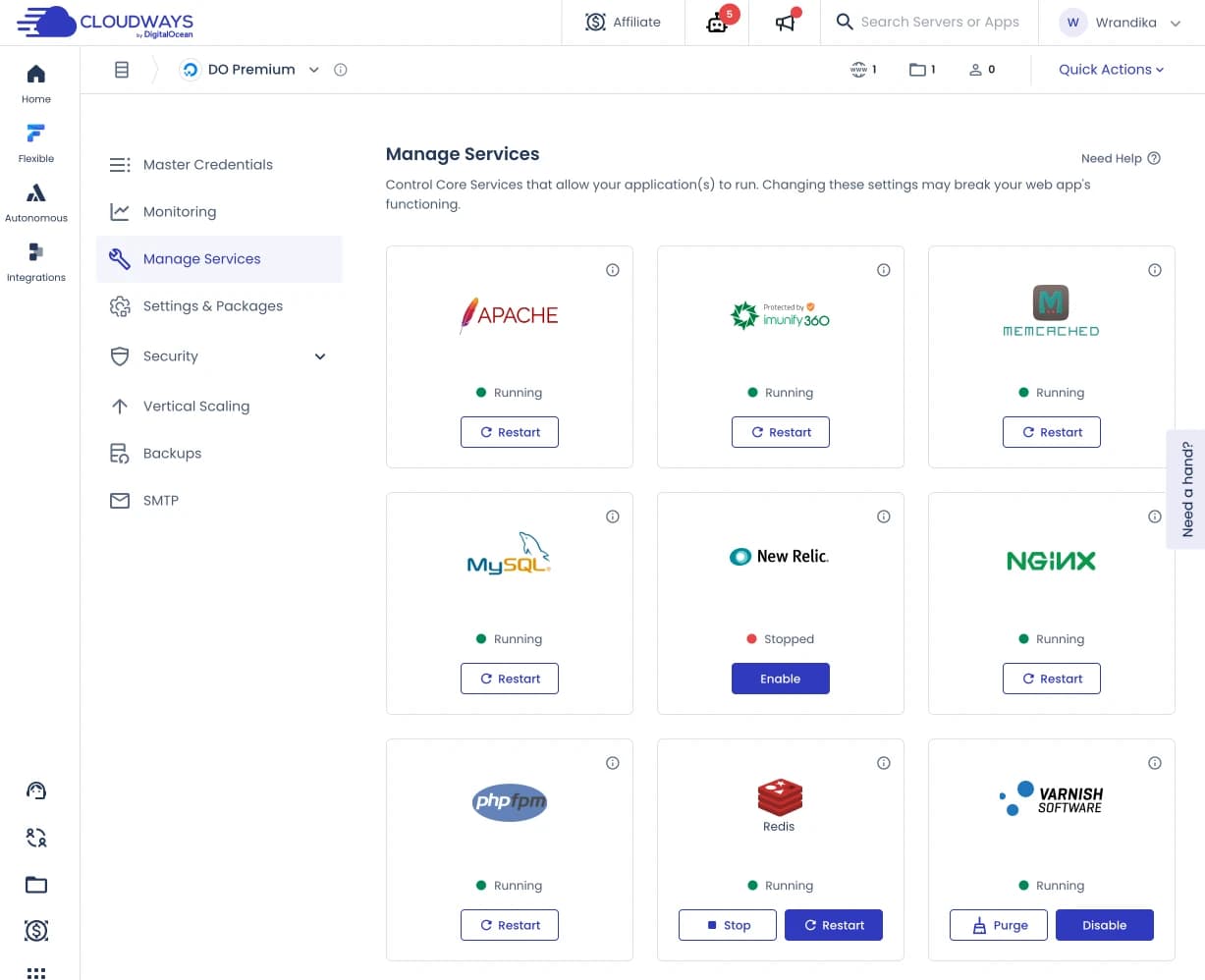
This is the ‘Application Management’ page. On this page, you can carry out daily tasks, such as viewing website statistics in the monitoring section, performing backup and restore, activating Cloudflare, creating website staging, domain management, security, and so on.
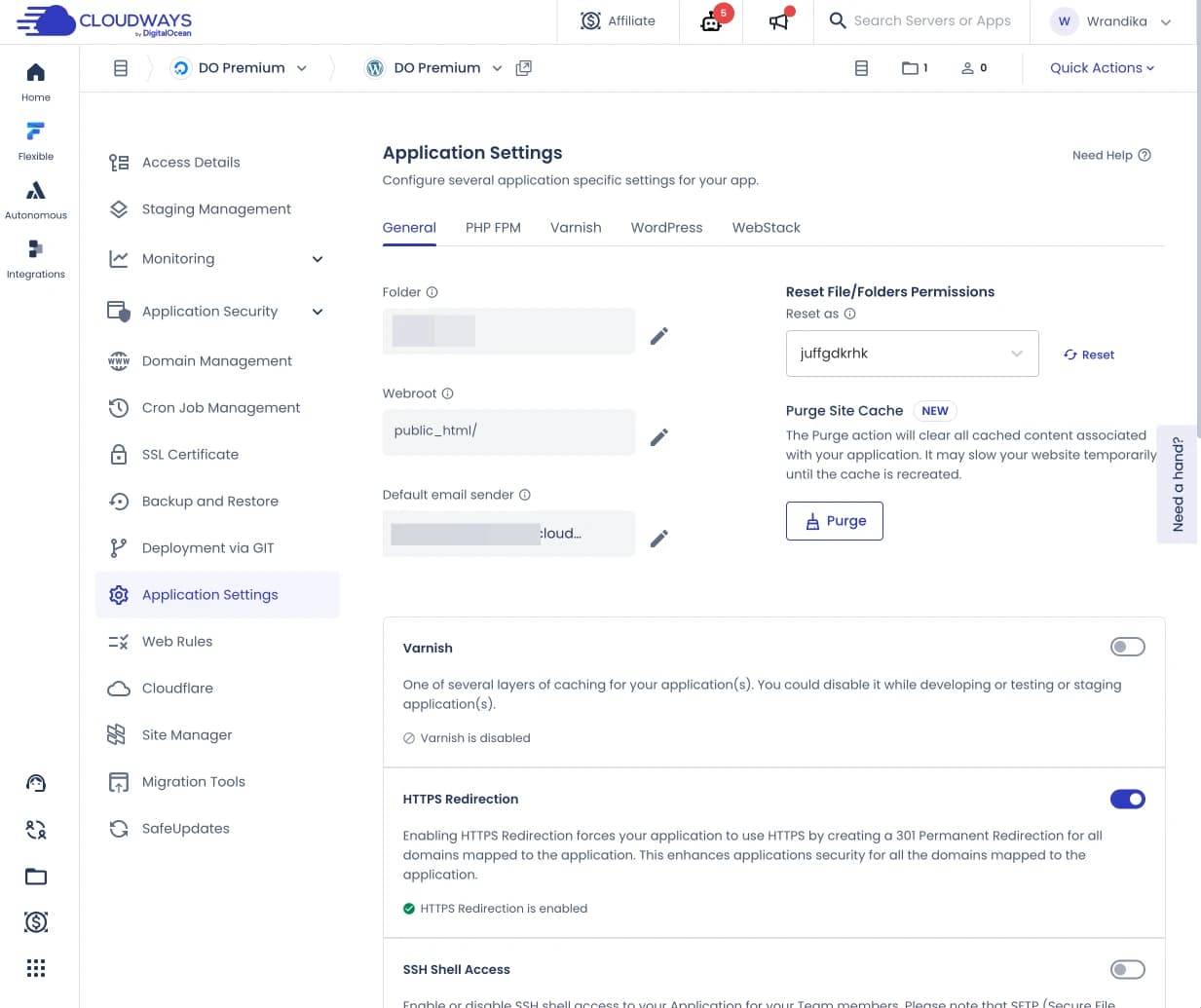
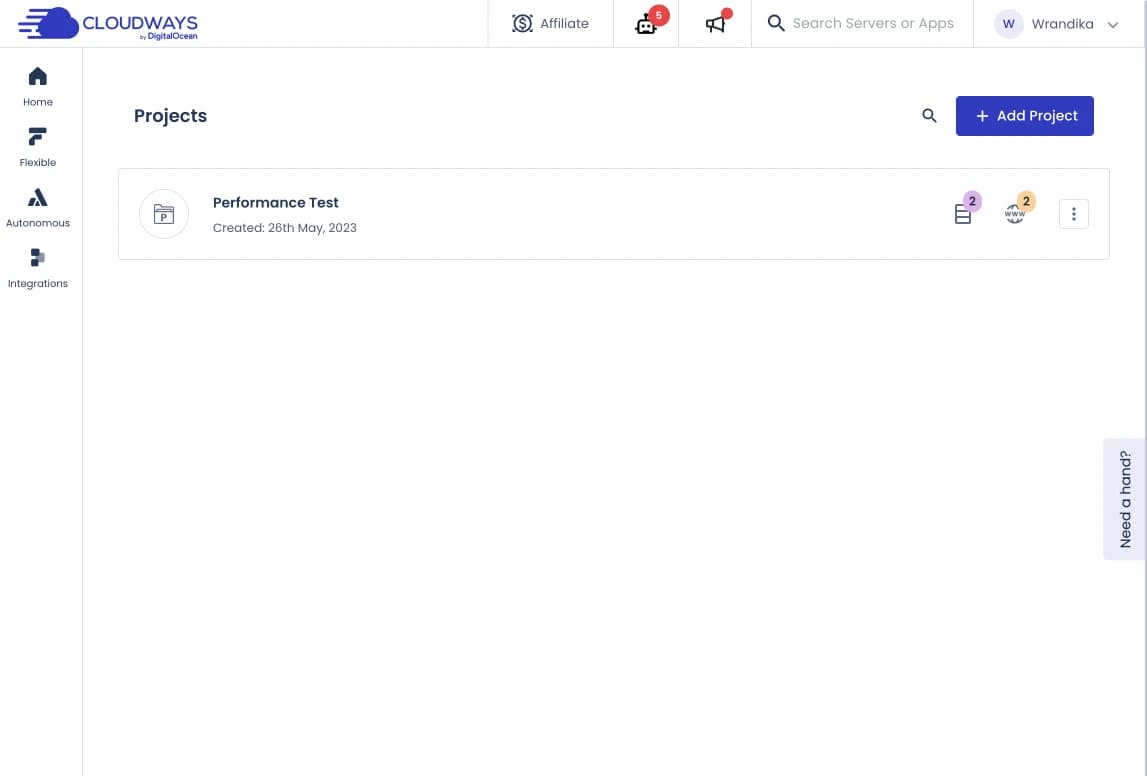
This is the projects page.
The Cloudways dashboard is very friendly for developers (one of them) because of this feature.
If you have a lot of clients or maybe you have a lot of websites, you can tidy it up by giving a project name, for example: I put all my Cloudways test websites in the project: Hosting Advisor.
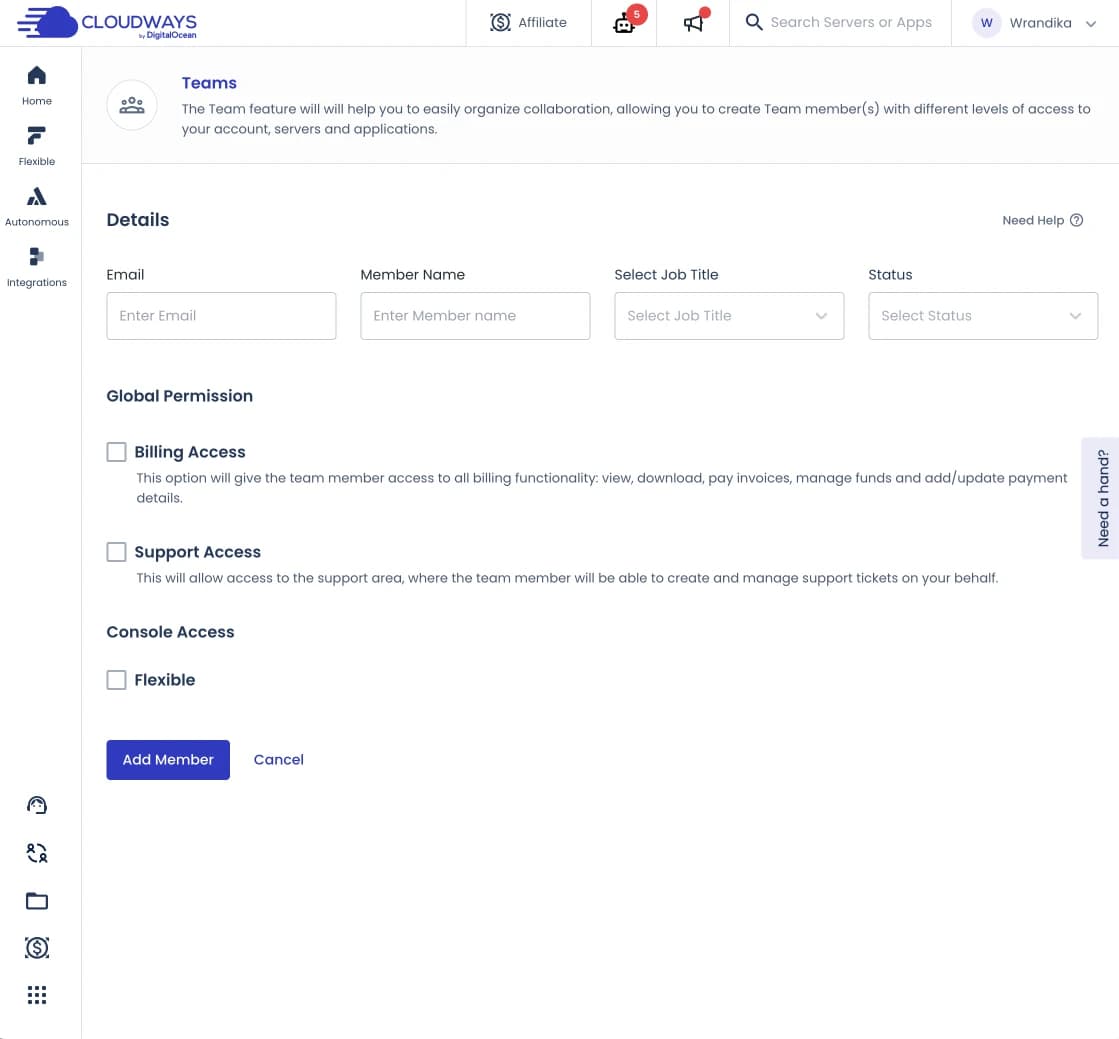
This is the Team page.
On this page, you can add members so you can collaborate as a team.
You can set access permissions for each member of your team.
The good thing is, at Cloudways you get all the features including the "Team" feature even if you only have 1 server and the cheapest server. This is different from most other CloudPanels such as RunCloud where you have to choose the Agency package to get it.
3. Cheaper Prices, Only...
I know, the cost of managed cloud hosting is much more expensive than the cost of shared hosting.
With shared hosting, you generally spend less than IDR 50,000/month, but with managed cloud hosting, the lowest option is around IDR 150,000/month.
Maybe cost is the one thing you consider most. However, for those of you who are serious about running an online business, hosting is the best investment.
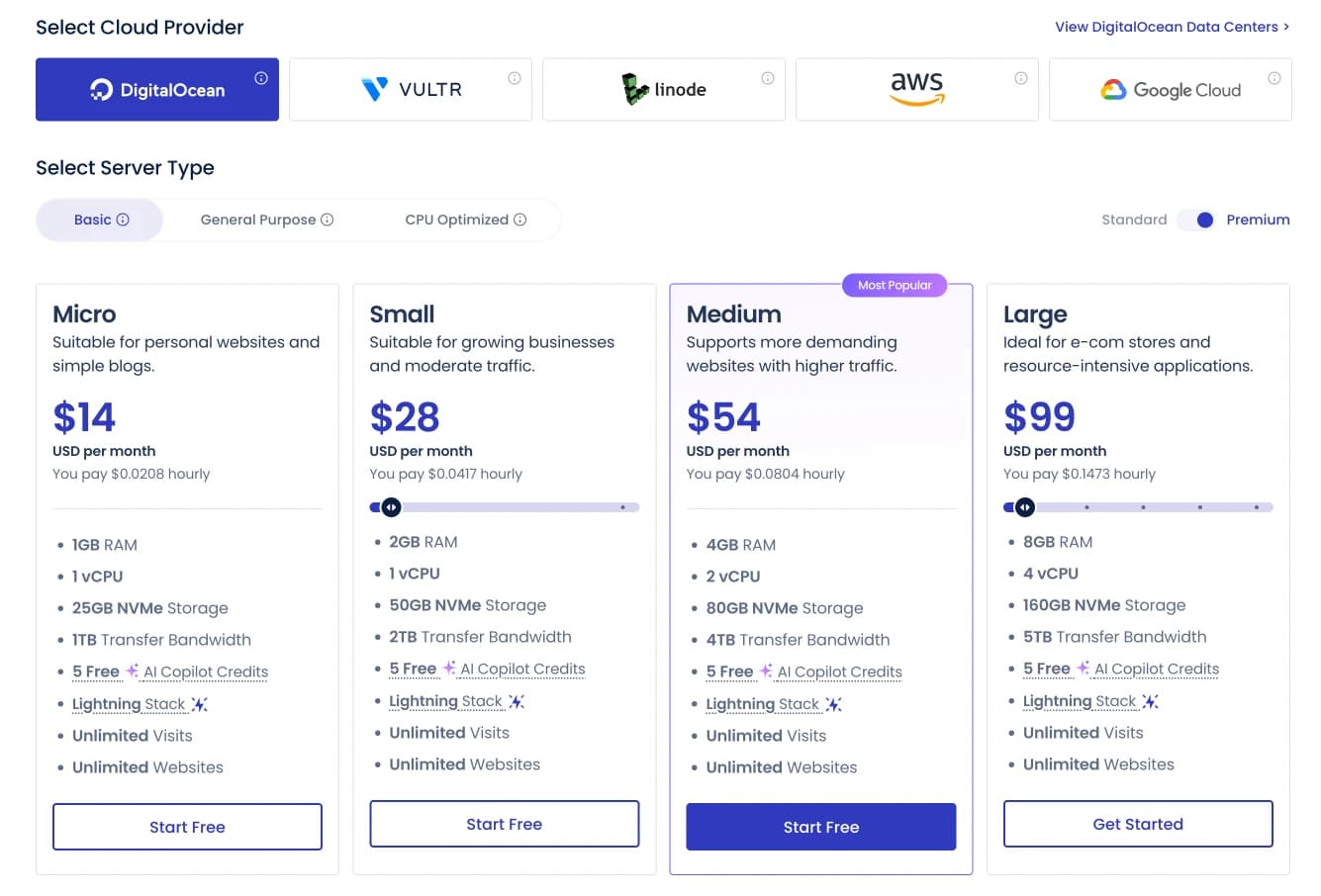
The lowest cost at Cloudways is $11/month with the Digital Ocean Standard cloud hosting provider option. You will get the following number of resources:
- 1GB RAM
- 1 Core Processor
- Storage 25GB
- 1TB bandwidth
With that amount of resources offered, I think you can host up to 3-5 websites with *low to medium traffic. *
It's just... After I compared it with Cloudways competitors such as RunCloud, Cloudways prices
are only cheaper if you subscribe to the cheapest package.
4. Has Rich FeaturesNot many hosting companies are able to maintain a balance between price and functionality. Cloudways is one of them.
Cloudways comes with rich features that are really needed to support daily activities. Everything can be done directly from the Cloudways control panel.
Starting from:
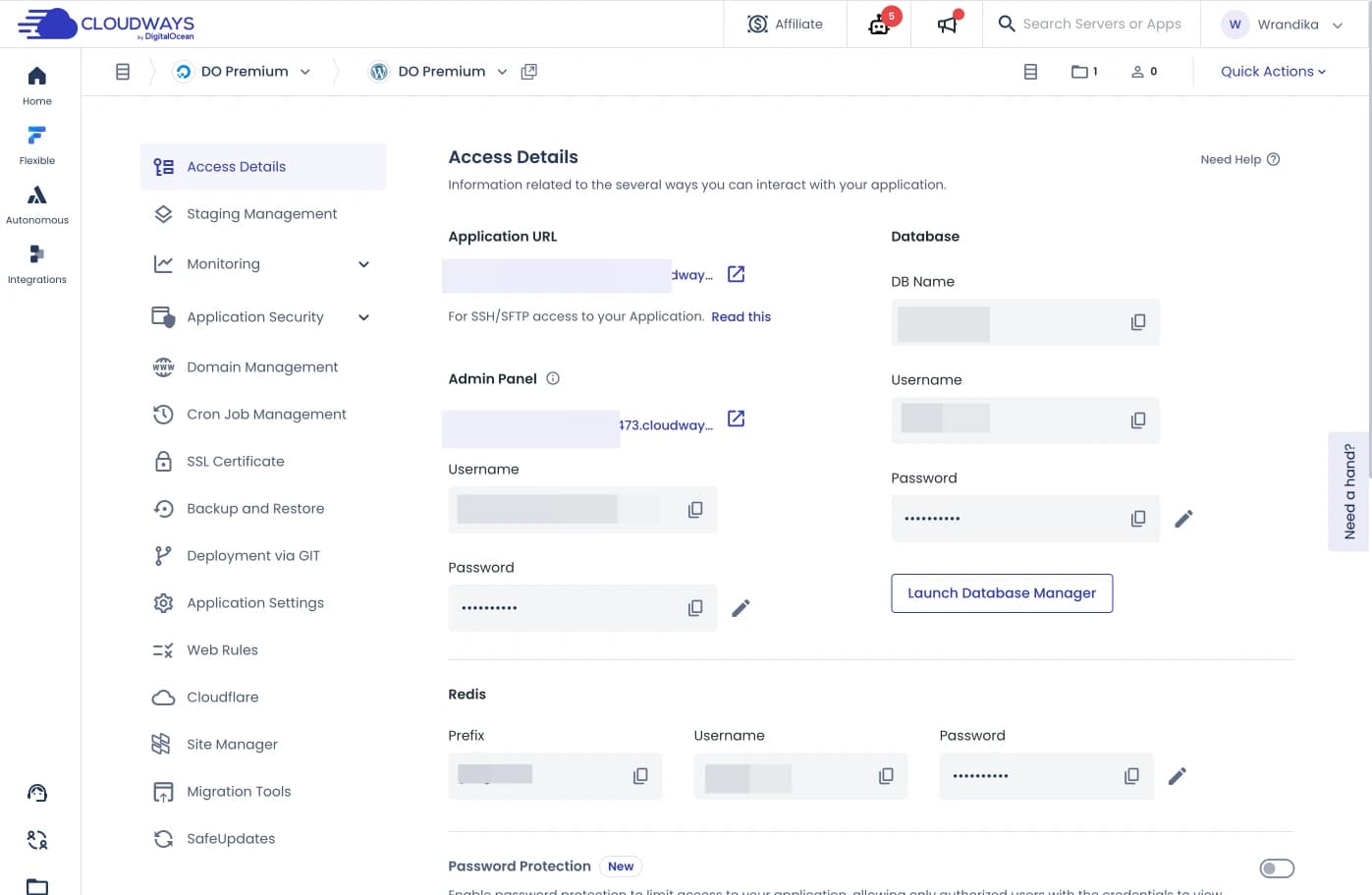
1. View detailed information about your website/application access
Such as your WordPress login details (you don't need to be afraid of forgetting them or having your application login data deleted), FTP, access to MySQL/Database, etc. all in one section.
2. Adding a new application
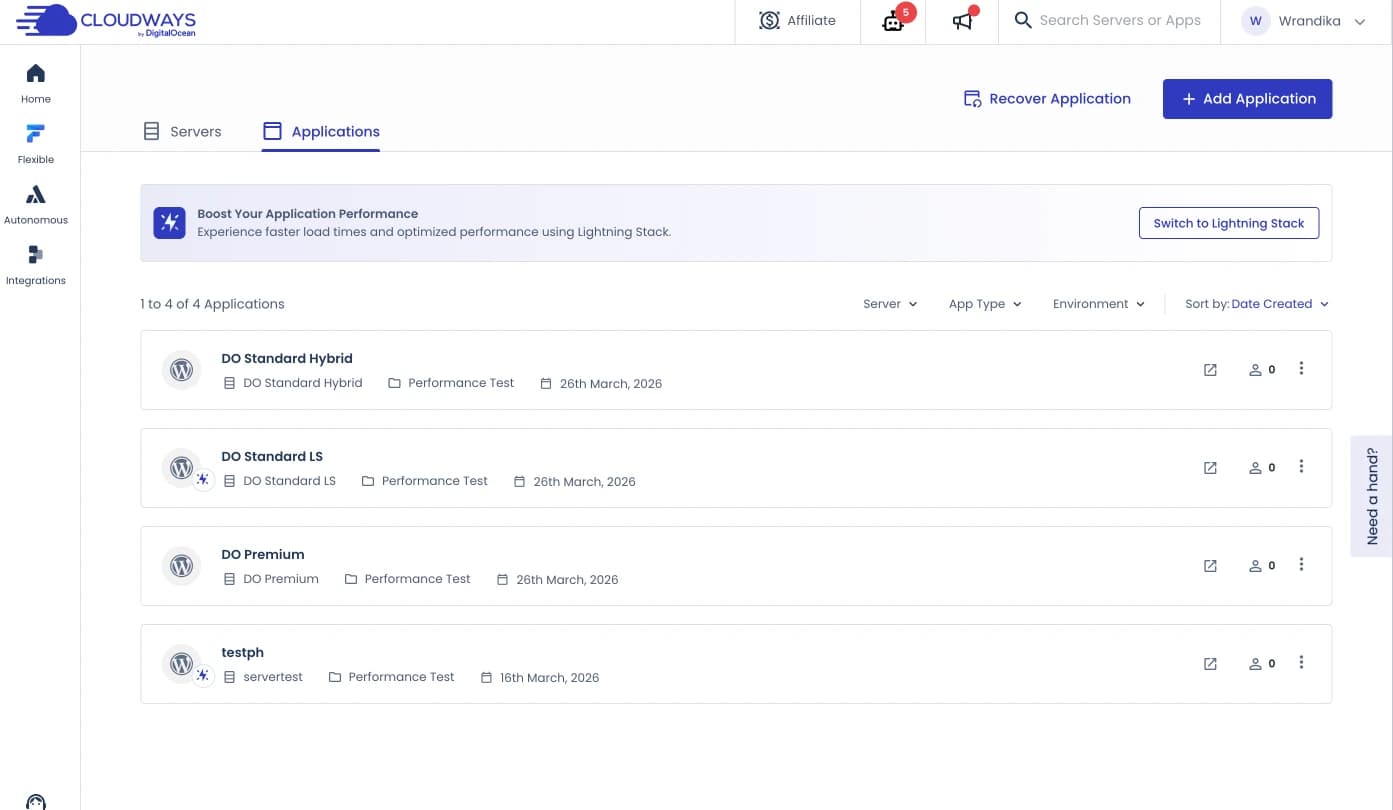
With this feature, you can add new applications or websites or WordPress with different domains to the server. How many websites can you add to a server? The answer depends on the specifications of the server you choose.
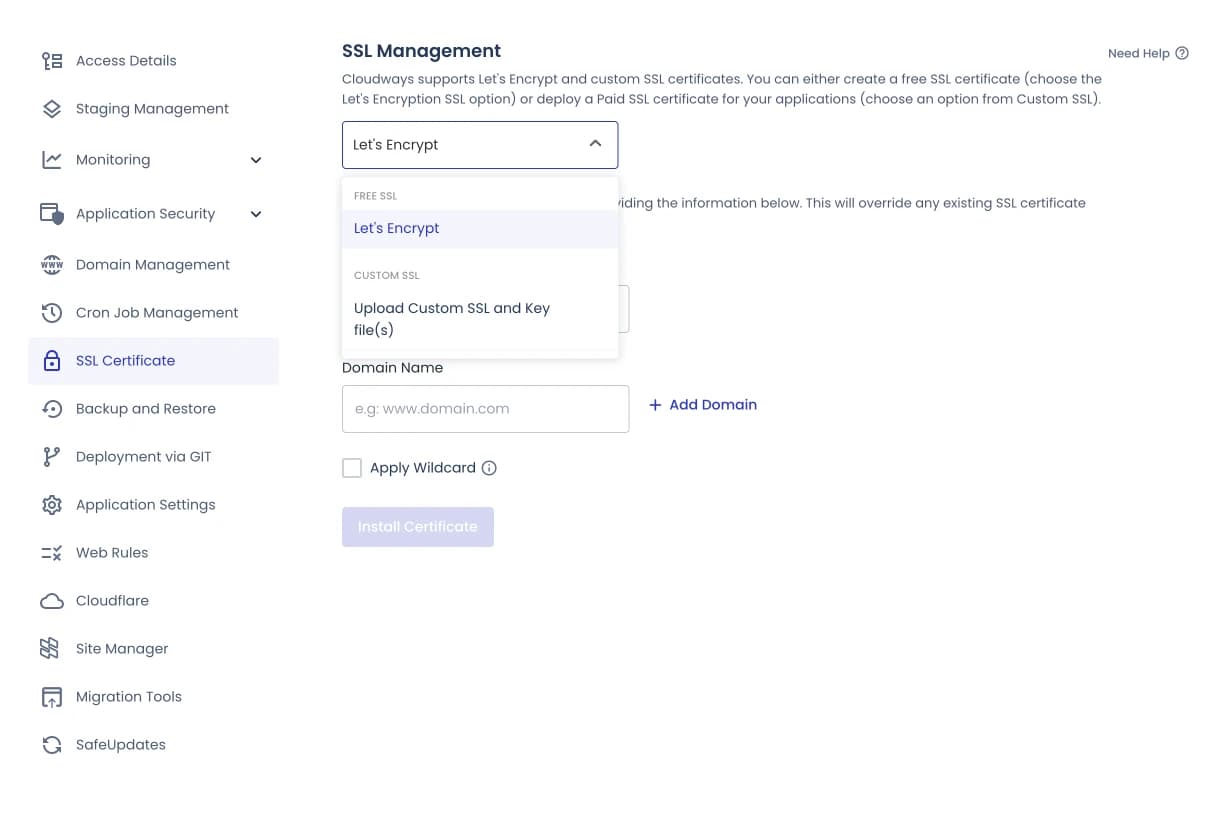
3. Install free SSL or custom SSL
You can also set it so that it can be extended automatically
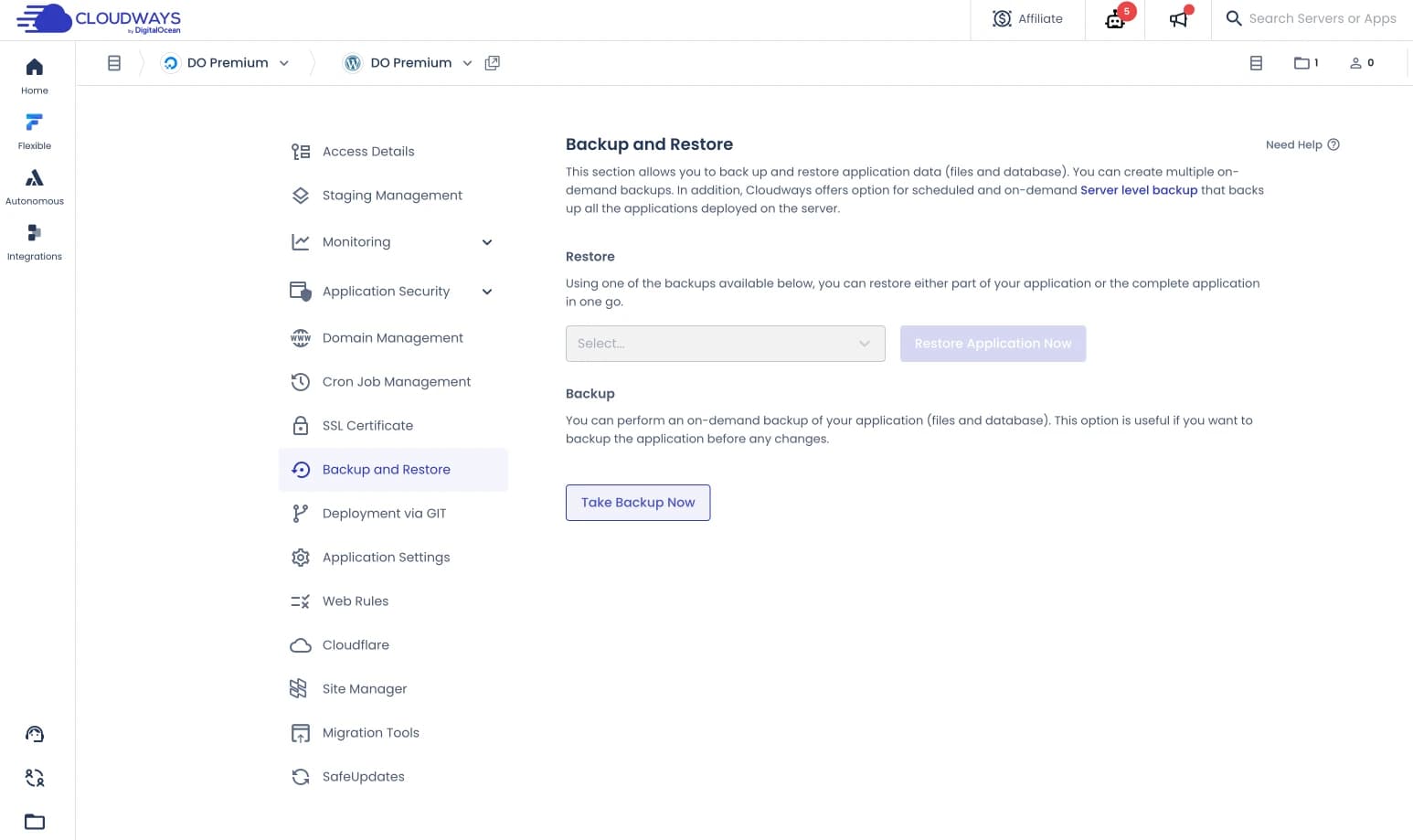
4. Back up and restore with just 1 click.
You don't need to install a plugin just for backup purposes on your website.
Cloudways will backup your website data every day and store the backup data for 10 days.
You can also backup manually.
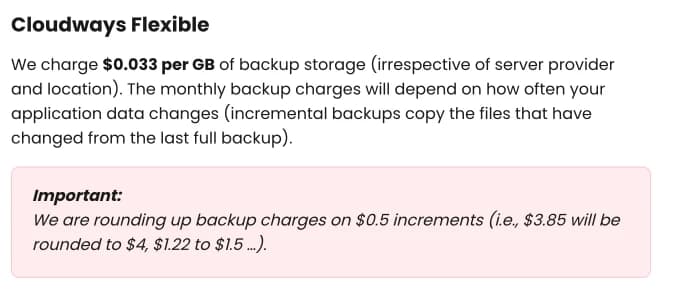
Unfortunately, this backup costs $0.033/GB per server (I'll discuss this in more detail in the drawbacks section later).
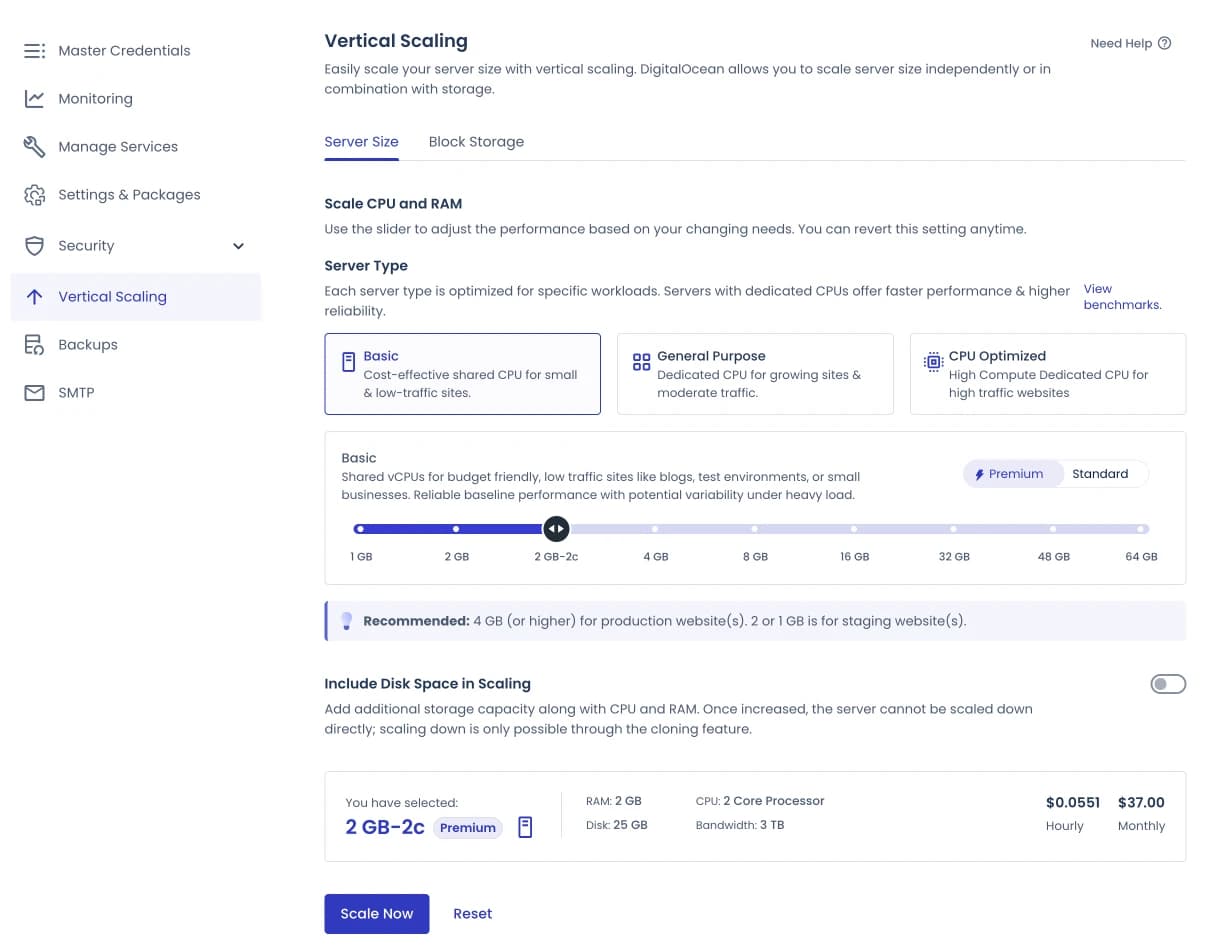
5. Increase or upgrade the server size
When your website grows large and your current server size is no longer sufficient to handle your website's needs, then you need to increase its size by vertical scaling.
At Cloudways, you can do it easily with just 1 click.
Digital Ocean can only upgrade, while AWS and GCP offer the option to upgrade and downgrade.
6. Website staging/clone feature for development needs
You can also create a website clone or staging website with just 1x click on Cloudways.
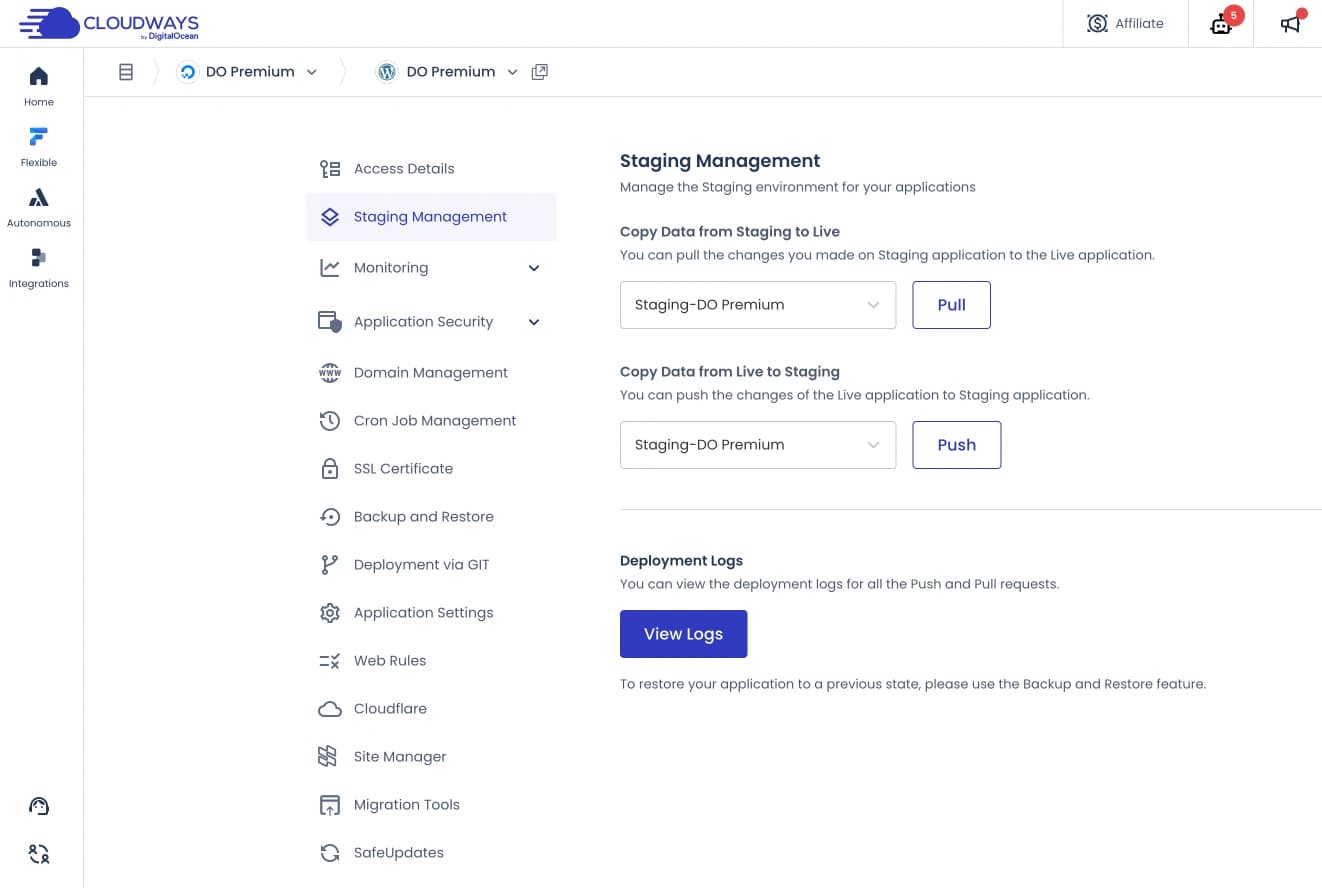
Cloudways even continues to improve this feature, recently they upgraded their staging feature to version 2.
- In “Staging Management” you can do:
- PUSH = Pushes changes you make from your staging website to your ‘live’ website.
- PULL = Pushes changes to the live website to staging
- DEPLOYMENT LOGS = View logs of pushes and pulls that you have done
7. Various important functions are placed in one section
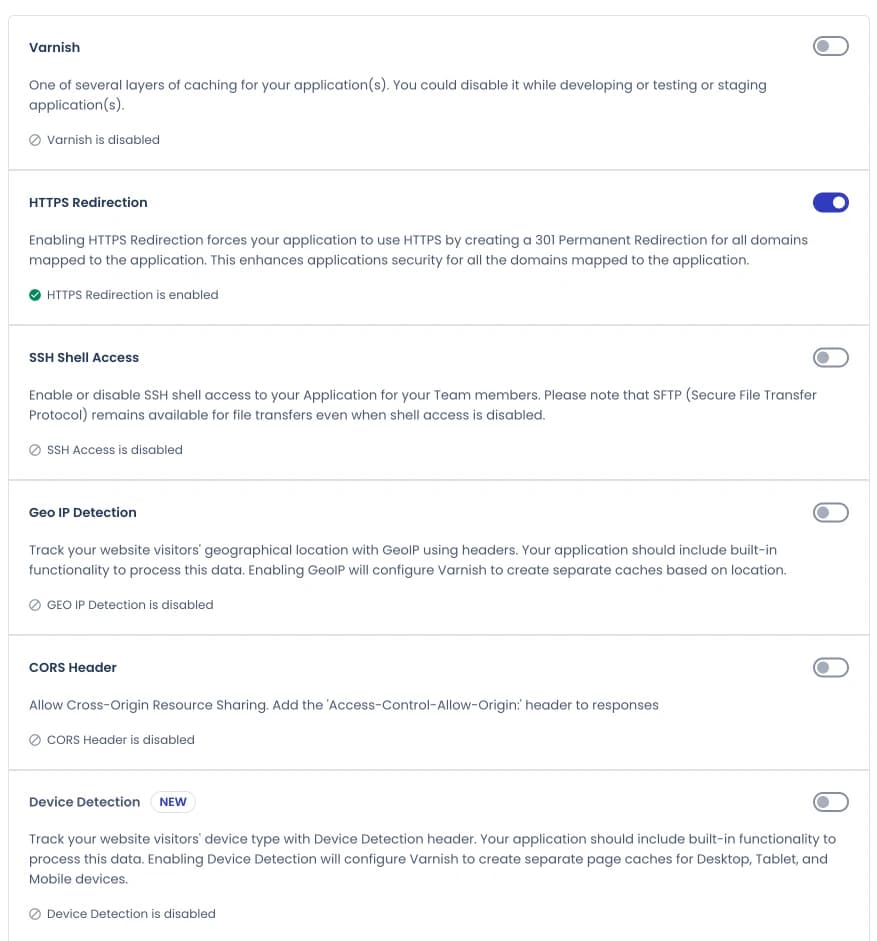
You will definitely like this one. Cloudways has various features or functions that you can activate or deactivate with just 2 clicks.
Functions such as Varnish, HTTP Redirection (can replace the really simple SSL plugin), XMLPRC access and others.
And there are still many features available on Cloudways that I can't possibly mention them all in this review. You can explore everything later when you register.
However, make sure you know the difference between servers and applications. Usually for beginners it is difficult to differentiate between the functions of the two.
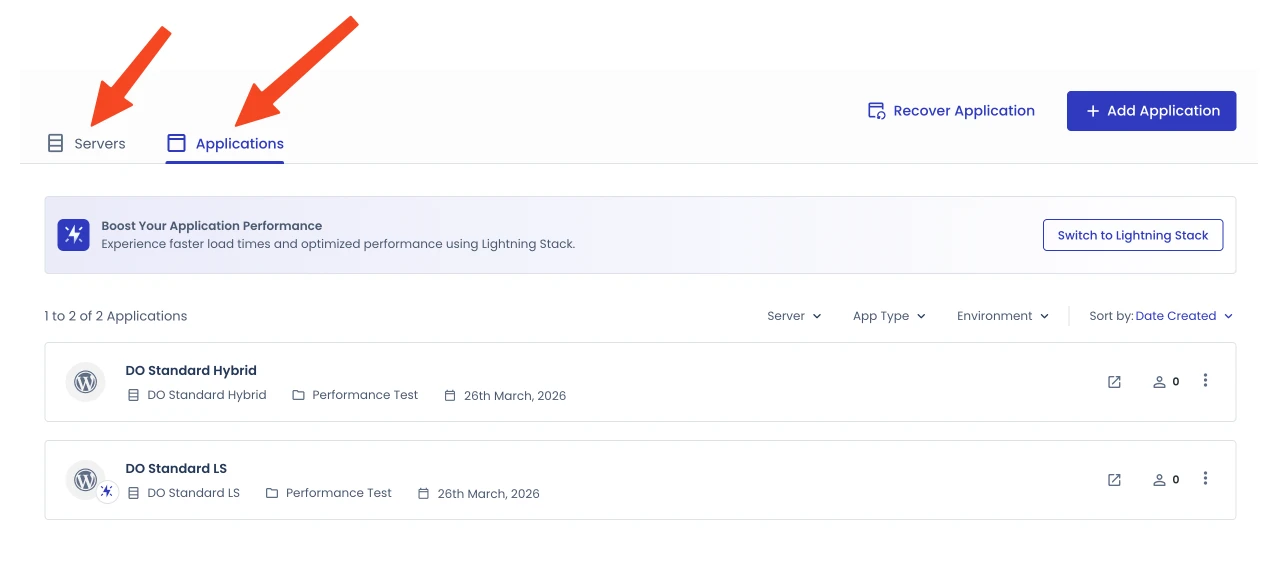
Both of them have different entities where in applications you can perform tasks that are directly related to your application/website (for example WordPress), such as backup, restore, install CDN, SSL, FTP, etc., while in servers it is about server settings in general.
5. Cloudways Copilot: The AI Assistant that Monitors Your Servers 24/7
This is the most revolutionary feature addition from Cloudways since the platform was founded. Officially launching on August 12, 2025, Cloudways Copilot is an AI-based assistant that actively monitors your servers around the clock — and not only monitors, but can also fix problems automatically.
How does it work?
Copilot integrates Cloudways' monitoring system with OpenAI's large language model (LLM)-based AI, combined with Digital Ocean's Gradient AI — Digital Ocean's proprietary AI platform that uses SRE (Site Reliability Engineering) agents to detect and diagnose infrastructure problems.
When a problem is detected on your server — whether it's a webstack problem, disk space is almost full, disk inodes are low, backup issues, or indications of a bot/DDoS attack — Copilot doesn't just send a simple notification. It sends a complete analysis report to your dashboard and emails containing:
What's the problem
What is the specific cause
Concrete steps to solve
And the superior feature is Smart
Fix: the ability to fix common problems with just 1 click, without needing to contact the support team at all.
How effective?
Before Copilot existed, the average time needed to resolve server problems with Cloudways support was 30–40 minutes. With SmartFix, the average drops to 5–6 minutes. An agency called Mint Media reported that Copilot managed to save 15 hours of work in one month on managing their 180+ client websites.
What can Copilot detect and handle at this time?
Webstack issues (NGINX, PHP-FPM issues or crashes)
Disk space is almost full
Disk inodes running low
Problems with the
Host health issues
backup system
In the future, Cloudways plans to expand Copilot's capabilities to detect problems at the WordPress application level, unoptimized MySQL queries, and bulk maintenance actions.
I think this is a huge plus — especially for less technical users. In major competitors such as RunCloud, GridPane, or SpinupWP, this class of feature does not yet exist.
how much does Cloudways Copilot cost? As of March 2026:

6. Lightning Stack: The Largest Infrastructure Overhaul in Cloudways History
In late 2025, Cloudways launched Lightning Stack — the largest infrastructure upgrade they have undertaken since the platform was founded.
What changed?
For years, Cloudways has used what they call a Hybrid Stack: a combination of Apache + NGINX, where NGINX functions as a reverse proxy that receives requests, then forwards them to Apache, then Apache processes them and forwards them to PHP-FPM. There's an "extra jump" here — each request has to pass through two layers before being processed.
Lightning Stack removes Apache completely. The architecture is now pure NGINX + PHP
- F
PM:
Legacy Hybrid Stack: NGINX → Apache → PHP-FPM → Database
New Lightning Stack: NGINX → PHP-FPM → Database
The result is much more efficient because:
NGINX handles all requests — static and dynamic — asynchronously, rather than queuing them one by one like the Apache
One less process = lower latency, lower CPU consumption
More stable when there are traffic spikes due to NGINX's event-driven architecture
Cloudways worked with the independent Koddr.io team to run benchmarks simulating real traffic, not just static pageviews, including WooCommerce checkout, LMS course progression, and WordPress admin workflow scenarios:
| Scenario | Improvement vs Hybrid Stack |
|---|---|
| Response time (uncached/dynamic) | Up to 53% faster |
| WooCommerce Checkout throughput | 58% more successful transactions |
| LearnDash (LMS) uncached | 85% higher throughput |
| WordPress Dashboard (login) | Up to 31% more responsive |
| Publish workflow | Up to 20% faster |
For cached static content, the difference isn't that significant — both are already fast. The biggest difference is actually felt in dynamic workloads: checkout, login, content updates, database queries — this is what directly affects the real user experience on business websites.How to activate Lightning Stack: Lightning Stack is available free to all Cloudways users. How to go to the dashboard → select application → Settings → Stack → select Lightning Stack. You can also bulk switch many applications at once.
 One important thing you need to know:
Lightning Stack is purely NGINX-based — meaning it doesn't support .htaccess files like those typically used in Apache. As a solution, Cloudways presents the Web Rules feature: a UI-based interface that allows you to set redirects, URL rewrites, and custom headers without having to touch the server configuration manually.
Based on Cloudways analysis of more than 100,000 websites, Web Rules is able to handle 80–90% of common .htaccess use cases. If your website relies on very complex .htaccess rules or uses specific Apache modules, you can stick with Hybrid Stack — there's no pressure to switch.
As a comparison, I also tested and compared the performance between the stack that uses lightning vs the hybrid one, which I will explain in the next advantage point.
7. Has very impressive performance
To find out how well Cloudways performs, I carried out a test *Load Testing. *I will compare the performance of Standard and Premium Digital Ocean and also compare the two stacks (lightning stack and hybrid) to see the difference in performance between the two stacks.
Digital Ocean Standard: $11/month
Digital Ocean Premium: $14/month
Configuration: Clean install (no cloud ways optimization) + not using plugins caching and varnish is also disabled. So, purely to test server performance after installing it on the Cloudways.
platform
I installed WordPress on the test website above with default settings.
And to test the performance, I did a Load Test using the tool BlazeMeter.
Oh, please note that in this test I did not include Amazon Web Services (AWS) and Google Cloud Platform (GCP) in the test because I believe that you don't need expensive hosting yet, unless you know the reason why you need to use AWS or GCP.
I carried out Load Testing by sending 20 virtual users to explore the test website for 5 minutes.
The result?
DI
G
I
T
A
L O
C
E
A
N S
T
A
N
D
A
R
D L
I
G
H
T
N
I
N
G Stack:
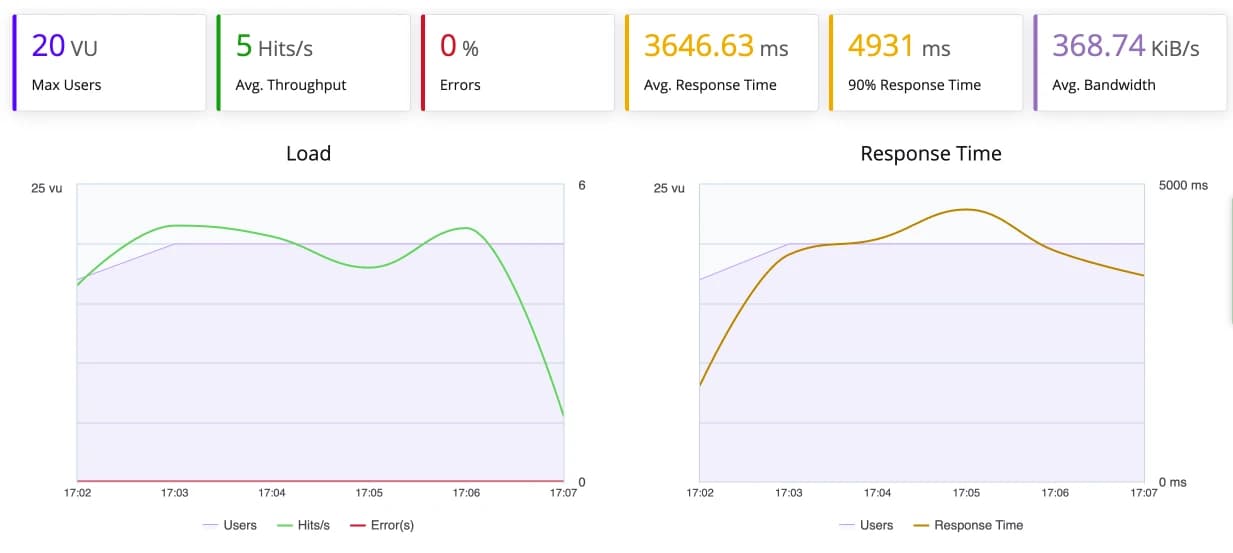
The average response times are 3646 ms or 3.6 seconds. There are no errors.
D
I
G
I
T
A
L O
C
E
A
N S
T
A
N
D
A
R
D H
Y
B
R
ID Stack:
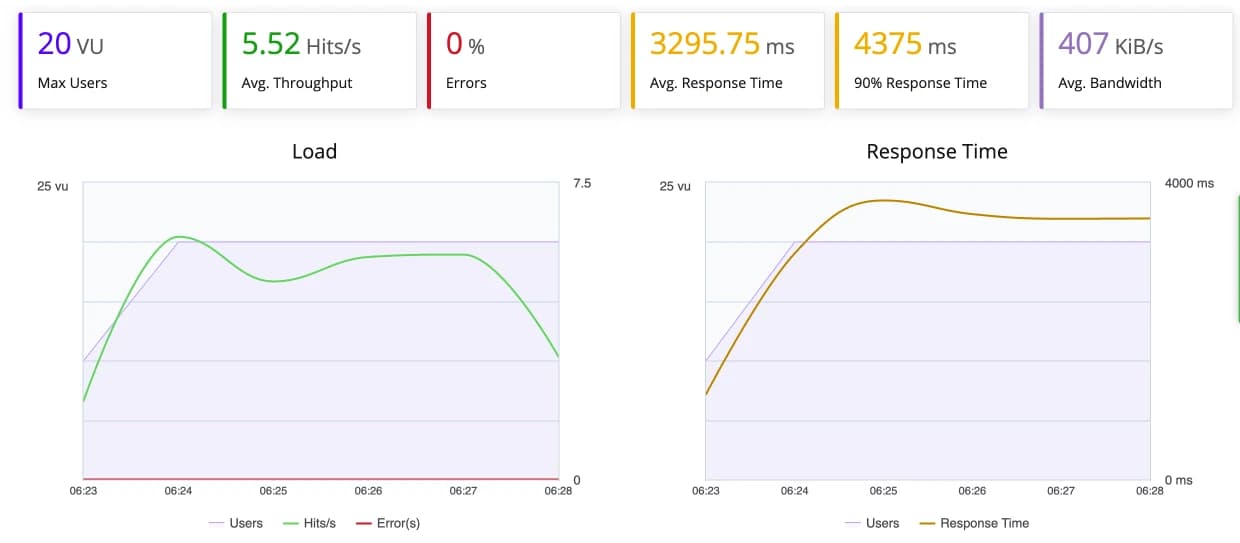
The average response times is 3295 ms or 3.2 seconds.
D
I
G
I
T
A
L O
C
E
A
N P
R
E
M
I
U
M L
I
G
H
T
N
I
N
G Stack:
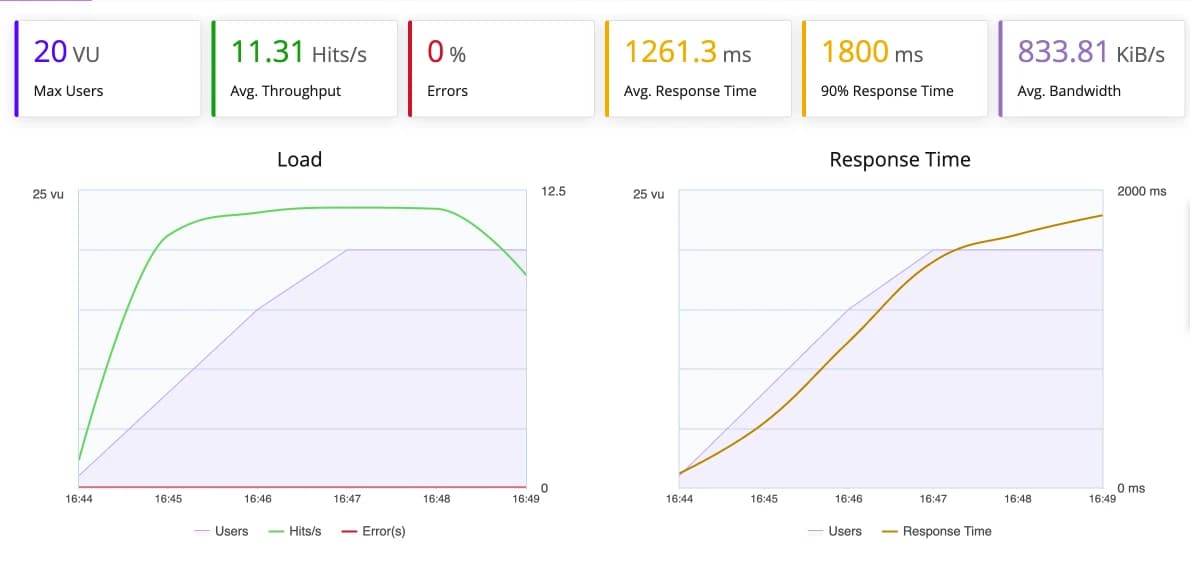
The average response times is 1261 ms or 1.2 seconds.
D
I
G
I
T
A
L O
C
E
A
N P
R
E
M
I
U
M H
Y
B
R
ID Stack:
The average response times are 1828 ms or 1.8 seconds.
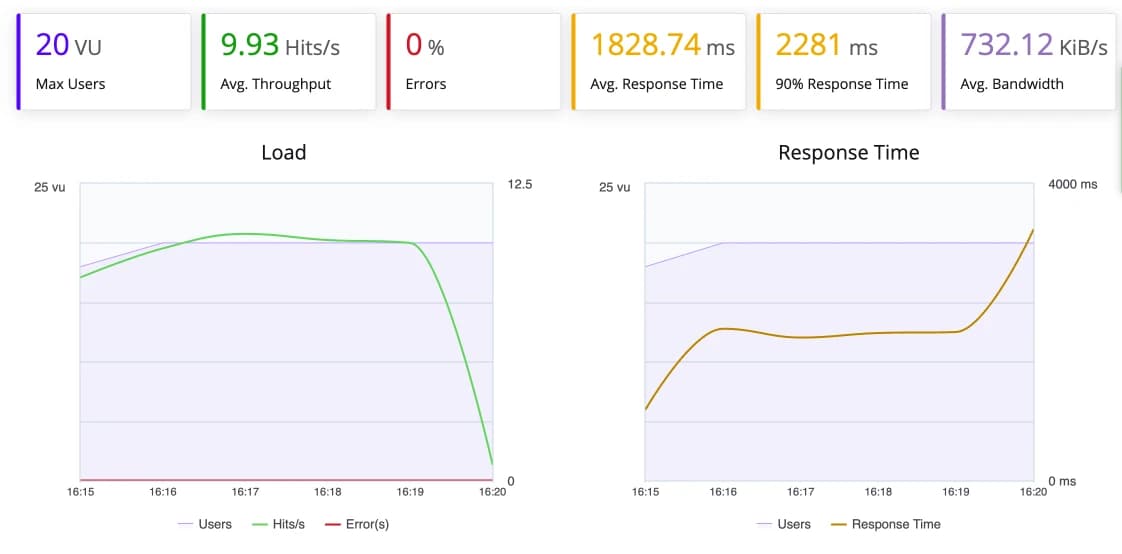
To make it easier to understand, I summarize the results in the table below:
| DO Standard Lightning | DO Standard Hybrid | DO Premium Lightning | DO Premium Hybrid | |
|---|---|---|---|---|
| Avg. Response Time | 3,646 ms (3.6 sec) | 3,295 ms (3.2 sec) | 1,261 ms (1.2 sec) | 1,828 ms (1.8 sec) |
| 90% Response Time | 4,931 ms | 4,375 ms | 1,800 ms | 2,281 ms |
| Avg. Throughput | 5.00 hits/s | 5.52 hits/s | 11.31 hits/s | 9.93 hits/s |
| Avg. Bandwidth | 368.74 KiB/s | 407 KiB/s | 833.81 KiB/s | 732.12 KiB/s |
| Error Rate | 0% | 0% | 0% | 0% |
The results of this test produced interesting and honest findings — not always in line with expectations.
On Digital Ocean Standard, the results were the opposite of what was expected: Hybrid Stack was slightly superior to Lightning Stack. Hybrid Stack response time averages 3,295 ms vs. Lightning Stack 3,646 ms — about 10% faster. The Hybrid Stack's throughput and bandwidth are also slightly higher (5.52 hits/s and 407 KiB/s vs. 5.00 hits/s and 368.74 KiB/s).
Possible cause: 1GB RAM servers tend to be more efficient with older Hybrid Stack architectures due to resource limitations. A Lightning Stack optimized for high performance may not necessarily provide the best results on an entry-level server with limited resources.
In Digital Ocean Premium, Lightning Stack shows very significant advantages. Average response time was 1,261 ms vs. 1,828 ms from the Hybrid Stack — 31% faster. Throughput is also much higher: 11.31 hits/s vs 9.93 hits/s, and bandwidth 833.81 KiB/s vs 732.12 KiB/s.
The practical conclusion: Lightning Stack provides real benefits on Premium servers and above. If you're using an entry-level server ($11/month DO Standard), the difference isn't significant — even the Hybrid Stack is a bit more responsive. But once you move up to DO Premium ($14/month), Lightning Stack immediately feels noticeably different.
The positive note from these four tests: not a single error occurred — demonstrating Cloudways' consistent stability and reliability across all configurations.
What about the uptime? Well, I think it's just a matter of time to test how good the average uptime of these three providers (Digital Ocean, Vultr and Akamai) is, because I'm sure their servers are reliable. You can prove it yourself after trying it.
From my experience, Digital Ocean is superior in uptime stability, while Vultr is superior in speed.
Ohia, I tested the uptime of the three providers in 2021 using Pingdom for 2 months. The result? The average is 99.98% - 100%.
And in addition to the performance point, I think it's worth mentioning the Object Cache Pro feature. This is one of Cloudways' best value propositions that is rarely highlighted. Object Cache Pro is a premium Redis-based object caching plugin that independently sells for $95/month.
At Cloudways, this plugin is included free for all servers with a capacity of 4GB RAM and above. Since the launch of Lightning Stack, Object Cache Pro is even enabled by default on every new WordPress installation.
How it works: Object Cache Pro stores database query results in memory (Redis), so WordPress doesn't need to run the same SQL query over and over again. This is very impactful for dynamic websites such as WooCommerce, LMS, or membership sites that perform a lot of database read-write operations.
For servers under 4GB, Object Cache Pro can still be activated, but unfortunately as a paid add-on.
8. Can Add Members to the Team
If you work as a team, you will like this feature.
Cloudways makes it easy for you to add members to your team. They can access your Cloudways account and you can give access permission to each member.
For example:
- Billing Access: Can only access functions related to billing
- Support Access: Will provide access where team members can create or manage support tickets
- Console Access: You can give full access to team members or give limited access to only certain servers or applications.
The good thing is, you can enjoy this feature whatever package you take. This feature is also a plus point, because many other providers do not have this feature or actually require you to take a more expensive package to get the team member feature.
9. Free 3 Day Hosting Trial and Free Hosting Migration
If you want to try Cloudways first, you can register without having to pay by taking advantage of the 3 day trial.
If you are satisfied, you can upgrade your account from trial to full afterward.
And the good news, Cloudways also offers migration from your old hosting to Cloudways for free for one website.
1
- The Payment System is *Pay As You Go Service
Cloudways' billing system remains the same: pay-as-you-go, no contracts, no limits on the number of websites. You only pay for the resources you use.
The good news: the lowest plan price has not changed. Digital Ocean Standard is still available starting at $11/month with specs:
1GB RAM Processor 1 Core Storage 25GB SSD 1TB bandwidth
However, what has changed quite significantly is the choice of server types which are now much more diverse. No longer just Standard and Premium — Cloudways now offers three tiers for the main providers:
| Server Type | Characteristics | Suitable For |
|---|---|---|
| Standard/Basic | Shared CPU, regular SSD | Blog, personal website, low-medium traffic |
| Premium / General Purpose | More stable CPU, NVMe SSD, balanced CPU | |
| CPU Optimized | Dedicated CPU, high computing performance | Large WooCommerce, LMS, complex dynamic applications |
My recommendation: For the majority of users, Digital Ocean Premium ($14/month) is the sweet spot — about the same price as Standard, but performance is much more consistent thanks to the NVMe SSD and better CPU. From my tests, the performance is also much better than the standard Digital Ocean.
Fortunately, Cloudways accepts payment methods via PayPal.
Apart from that, they also accept payments via prepaid cards, such as Payoneer and Wise (the card I use for online payments). If you don't have both, you can use a prepaid card issued by Bank Jago Syariah.
The way to register with Bank Jago Syariah is very easy. No need to go to the bank. Everything can be done online. I am also one of the users and am helped by the prepaid card issued by Bank Jago Syariah.
Disadvantages of Using Cloudways
There are at least a few drawbacks that you need to pay attention to before deciding whether Cloudways is the right choice for you.
1. Improved Speed of the New *User Interface
- Not Optimal
Even though it has introduced a new interface , Cloudways has not been able to match the speed of its main competitor, Runcloud. I still feel unsatisfied because the speed increase on the new interface is not that significant when compared to their classic interface .
Updated: As of 2026, Cloudways New Interface has General Availability status — meaning it has been fully released and is no longer Beta. Cloudways has even started to gradually retire the Classic UI and recommends all users to switch to the New Interface, because the latest features such as Copilot and Lightning Stack are only available there.
Regarding the speed of the interface - which was previously a complaint - there has been improvement compared to the Beta version, although when compared to RunCloud which is known to be very light, Cloudways is still a little heavier because the complexity of the features is much greater.
2. Cloudways Has Good Support, Unfortunately It Has Limitations
Cloudways provides support via ticket and live chat 24/7/3
Where you can use live chat to ask for help that doesn't require a detailed inspection. I think problems like: problems with SSL, problems with backups, installing CDN, add ons, and the like.
Meanwhile, if you need help that requires in-depth inspection, then you can use a ticket.
Based on my testing, the support response via live chat is very fast. Unfortunately, this (free) support from Cloudways has limitations, such as:
- The duration of live chat is limited to 20 minutes, while the ticket response time is 3 hours.
- Support via live chat may not be handled directly by an agent, but will start from a robot/bot first.
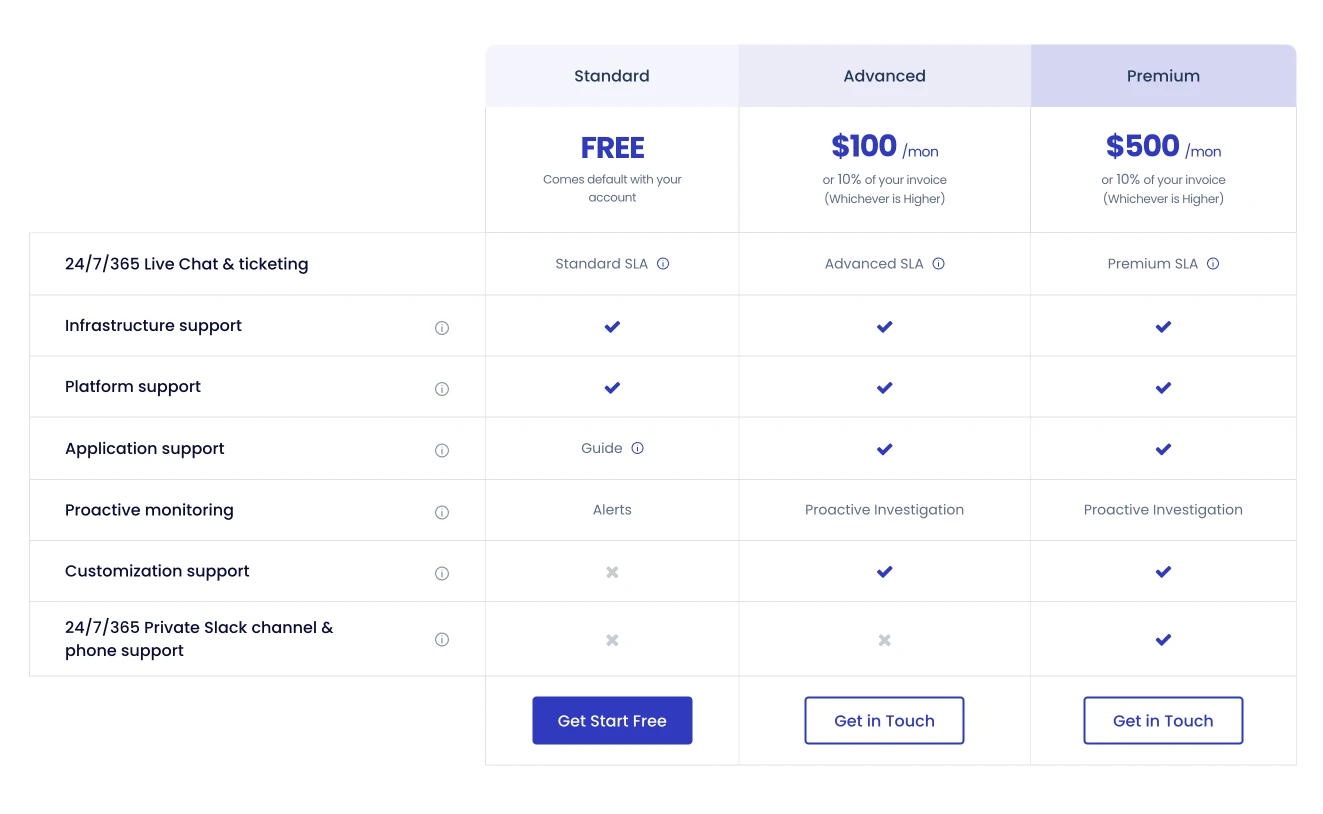
- Free support (standard support) is only for things related to the platform, such as installing SSL, adding servers/applications, backups, cloning servers and so on. So, I can't recommend it for everyone.
- If you need support related to your application, for example an error on the WordPress website, then they will not immediately help, but will only guide you on how to solve your problem, but you are the one messing around with it.
The problem is that deeper support prices from Cloudways will be very expensive, especially for the Indonesian market, here are the details:
3. Cloudways Automatic Backup
Feature is Not Free. You Have to Pay $0.033/GB per Backup
Cloudways uses off-site backup where your website files will be backed up on an external storage network, which is different from your website storage network.
However, this off-site backup costs $0.033/GB.
And another thing you need to know is that they round up the nominal backup charge to a multiple of $0.
- For example, your backup cost this month is $1.22, then it will be rounded up to $1.5, etc…
4. Not Getting Root Access
Clouways is a platform, all servers are managed centrally so they are connected to each other.
So, it is impossible for all users to have access to the root server, because there is no guarantee that there may be users who damage certain tools which are the core of the Cloudways platform.
If you want Root Access, you can try other alternatives like Runcloud.
5. Cloudways Does Not Sell Domains
Cloudways does not sell domains.
So, you need to buy domain elsewhere, such as Namecheap (affiliate), GoDaddy or you can also go through a local provider.
6. No Email Hosting
If you previously used email hosting from webmail on cPanel (shared hosting), you will not find anything similar on Cloudways.
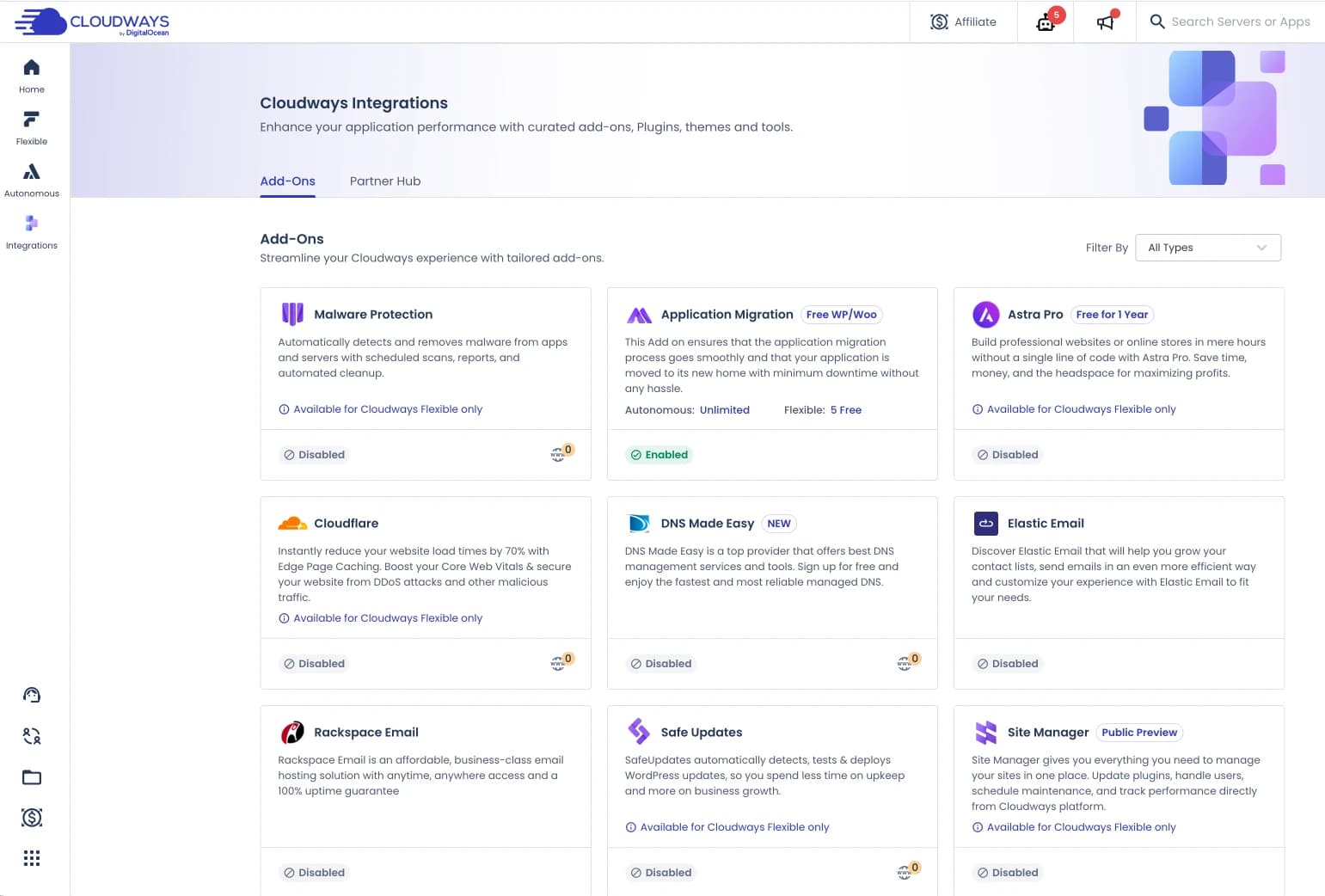
Instead, Cloudways provides email services from third parties. It's an add-on, so it's paid and optional.
However, the choice of email add-ons available is now more diverse:
Elastic Email — For transactional emails (automatic emails from websites such as order notifications, password resets, etc.). Starting from $1/month.
Rackspace Email — For business email (mailbox with own domain). Available as an add-on on Cloudways at a more affordable price than the standalone email solution.
Gmail SMTP — Cloudways now also provides Gmail SMTP integration as an option, leveraging Google's infrastructure for better email deliverability.
If you previously used email from cPanel on shared hosting, you will need to budget for additional costs for email when moving to Cloudways.
7. Lightning Stack Does Not Support .htaccess
This isn't a big drawback, but it's something you need to know about.
If you plan to use Lightning Stack (which I highly recommend for better performance), it is pure NGINX based so it does not support .htaccess files.
Cloudways has provided a solution in the form of Web Rules — a UI feature for managing redirects, rewrites and custom headers. Web Rules are sufficient for 80–90% of common .htaccess needs.
But if your website uses very complex .htaccess rules, plugins that depend on specific Apache modules, or complicated legacy configurations, you may want to stick with Hybrid Stack. There is no pressure to switch to Lightning Stack.
Conclusion: Do I Recommend Cloudways?
I recommend Cloudways, but not for all user models.
Try Cloudways Free 3 Day Trial
To make your decision easier for you, I have tried to detail some user models that might be suitable for using Cloudways:
- If you are a beginner, previously from shared hosting, understand how to use cPanel, then Cloudways is for you.
- If you are a Google Expert (accustomed to finding your own problems or at least able to follow the guidance provided by Cloudways support staff regarding technical problems on your website), Cloudways is for you.
- If you only want to host one or a few websites with low to medium traffic, want the cheapest price for managed cloud VPS hosting, then the Cloudways + Digital Ocean package at $11 (or $14 with Premium) is the right choice for you
- If you previously used SiteGround, Cloudways is the best alternative.
- If you previously used premium managed WordPress hosting such as Kinsta and WP Engine or several local managed cloud hosting options, and want a price that is not much different, but with better performance and more storage + bandwidth, then Cloudways is for you.
- Alternative best hosting for those of you who don't want to use cloud panels such as RunCloud, SpinupWP, ServerPilot, etc., because it's complicated to manage two accounts.
-
If you are a total-newbie, just came from shared hosting, don't understand cPanel or websites, then Cloudways is not suitable for you.
-
Cloudways does not provide root access, so for system experts who like to tinker with configurations on servers, Cloudways will not be suitable for you.
-
If you are an agency that manages many websites, then Cloudways is not the right choice, because the price is expensive for managing many websites. I recommend RunCloud for agencies. Or you may try it first and decide after.

Willya Randika
Hi, saya Randika, seorang Web Developer yang spesialis di WordPress, Astro, dan Next.js. Sejak 2015, saya telah membantu ratusan bisnis dan profesional membangun website yang tidak hanya cepat dan aman, tapi juga mudah ditemukan di Google dan efektif mengkonversi pengunjung menjadi pelanggan.
More Reviews

RunCloud Review
Complete review of RunCloud, a cloud panel for managing Cloud VPS. Learn about RunCloud's features, performance, price, advantages and disadvantages to help you decide.
Kinsta Reviews
A complete review of Kinsta, a premium managed WordPress hosting provider, discussing its advantages and disadvantages, superior features, and performance. Suitable for users who want the best performance and expert support.
Kenceng Solusindo Review
Kenceng Solusindo offers the fastest server response in load tests and excellent support, with fair pricing, but lacks a refund guarantee and has limited backup features.
WarnaHost Review
Offers cheap hosting services with pretty good support and JetBackup features. However, it still has shortcomings in uptime stability and server response speed which tends to be slow when tested.
Jagoan Hosting Review
Jagoan Hosting offers a fairly fast average server response speed and an Acronis automatic backup feature with 14 day retention, but server uptime still needs to be improved.
IDCloudHost Review
IdCloudHost's average uptime is quite impressive from 2024 to January 2025, and has the fastest average server response time compared to all the providers we tested.