Choosing a Domain and Hosting
A website starts with a domain name - not a design. You need a name before you start building your website.

Choosing a Domain Name
The website started from a domain name. Not design.
Domain is the name of your website. An address that people will use when trying to visit your website via a browser.
For example, the domain name of this website is penasihathosting.com.
Having a good domain name is a very important first step.
What is the reason?
Firstly because a domain name can help you build a brand that will stick in the minds of your customers or visitors.
Second, a domain name can help determine your target market. For example, my website domain: penasihathosting.com.
So, the 2nd step in how to create a website after selecting the platform (WordPress) is to determine the domain name.
If you are still confused about choosing a domain name, here are some tips that I hope will make it easier for you to find the right domain name:
- If you plan to create a website for yourself, then you can use your name as the domain: YourName.com.
- If you create a website for a company, you can also use the company name: YourCompanyName.com.
- If it is for an organization, you can also use the name of the organization, for example GenerasiBebasRiba.com
And use popular domain extensions to make your website look more professional, such as:
- .com
- .net
- .org (usually used for organizations)
- .sch.id (suitable for school websites)
- .ponpes.id (suitable for Islamic boarding schools)
- .co.id (for companies that already have a business license)
- .id (suitable for personal use, but now its use is common and not only suitable for personal websites)
Other tips:
- Avoid trademarks or trademarks, for example the domain name: reviewhpSAMSUNG.com
- Avoid using hyphens or numbers *And *keep it simple
Oh yes, domain prices are not too expensive, starting from IDR 145,000 per year.
Note: I will tell you how to get a free domain for 1 year at the next stage.
Choosing Web Hosting
Web hosting is a server for storing website data online. Its function is to connect your website to the internet.
Maybe you are wondering: What is the difference between web hosting and a domain?
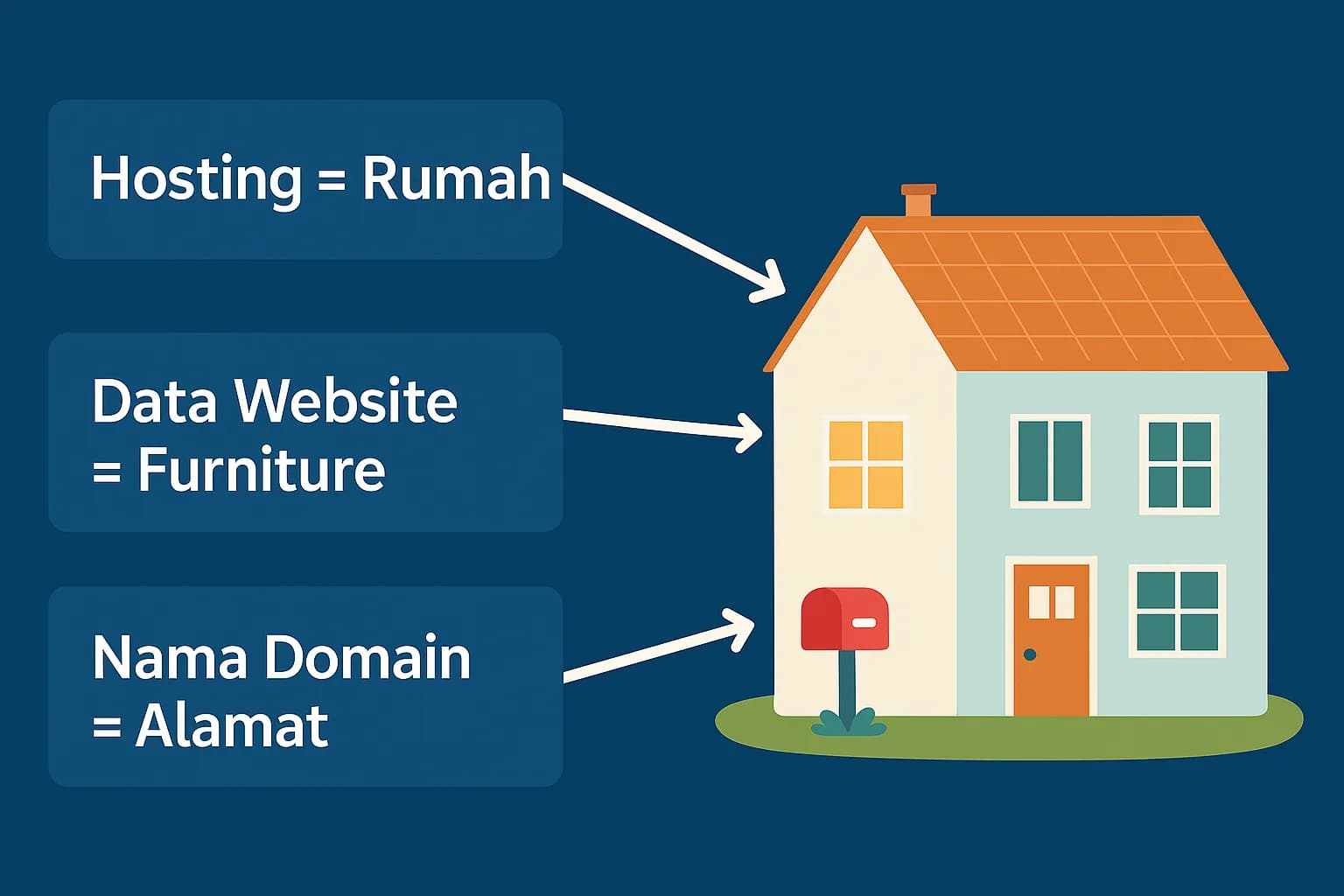
A domain is just an address, like a home address. While hosting is the house.
Without an address (domain) and home (hosting), people will not be able to enter your website.
That's why you need both so that your website can be accessed by everyone on the internet, from all over the world.
You have learned how to choose a domain. So, how do I choose hosting?
There are more than 100 hosting providers in Indonesia. Choosing one among hundreds is not an easy job.
Choosing hosting is the first milestone you need to go through, because:
- If you choose the wrong hosting, your website could run into problems in the future, such as data being lost, the website often having errors/not being accessible, and the like
- If you choose the wrong hosting, your website could be easily exposed to malware, easily penetrated by hackers, and the like
In essence, choosing the wrong hosting will not help you generate sales, in fact the costs will increase because you have to change hosting providers.
This hosting problem is quite complex.
Choosing one of the many options can be difficult. It's easy to find, because there are many choices available, but it's hard to find the best one.
Fortunately, we at Harun Studio have conducted research for more than 30 months on the 22 most popular hosting providers in Indonesia. (read research results)
The goal? One of them is so that people who are just learning how to create websites like you don't make a mistake in choosing hosting.
And the recommendation of best hosting for beginners based on our research results is DomaiNesia at least because of the following 5 strong factors:
- Their hosting or server is stable
- The speed is quite reliable
- The support is good and reliable
- Quite a lot of features
- Plus quite competitive price offers
Get Hosting and Domain at DomaiNesia
- Enter promo code: CREATEWEBSITE when checkout to get 5% discount.
Hosting guarantee: DomaiNesia offers a 30 day hosting guarantee. If you are disappointed with their service, you can request a refund and you will get your money back (minus the domain fee).
Disclosure: Your support helps keep this website running. We use affiliate links, where we will receive a commission of 20 - 50% from your hosting purchase without any additional costs being charged to you. Read more.
How to buy cheap hosting and domains at Domai
Nesia:
1. Visit [www.
DomaiNesia.com](/go/kedomainesia) (referral/affiliate link)
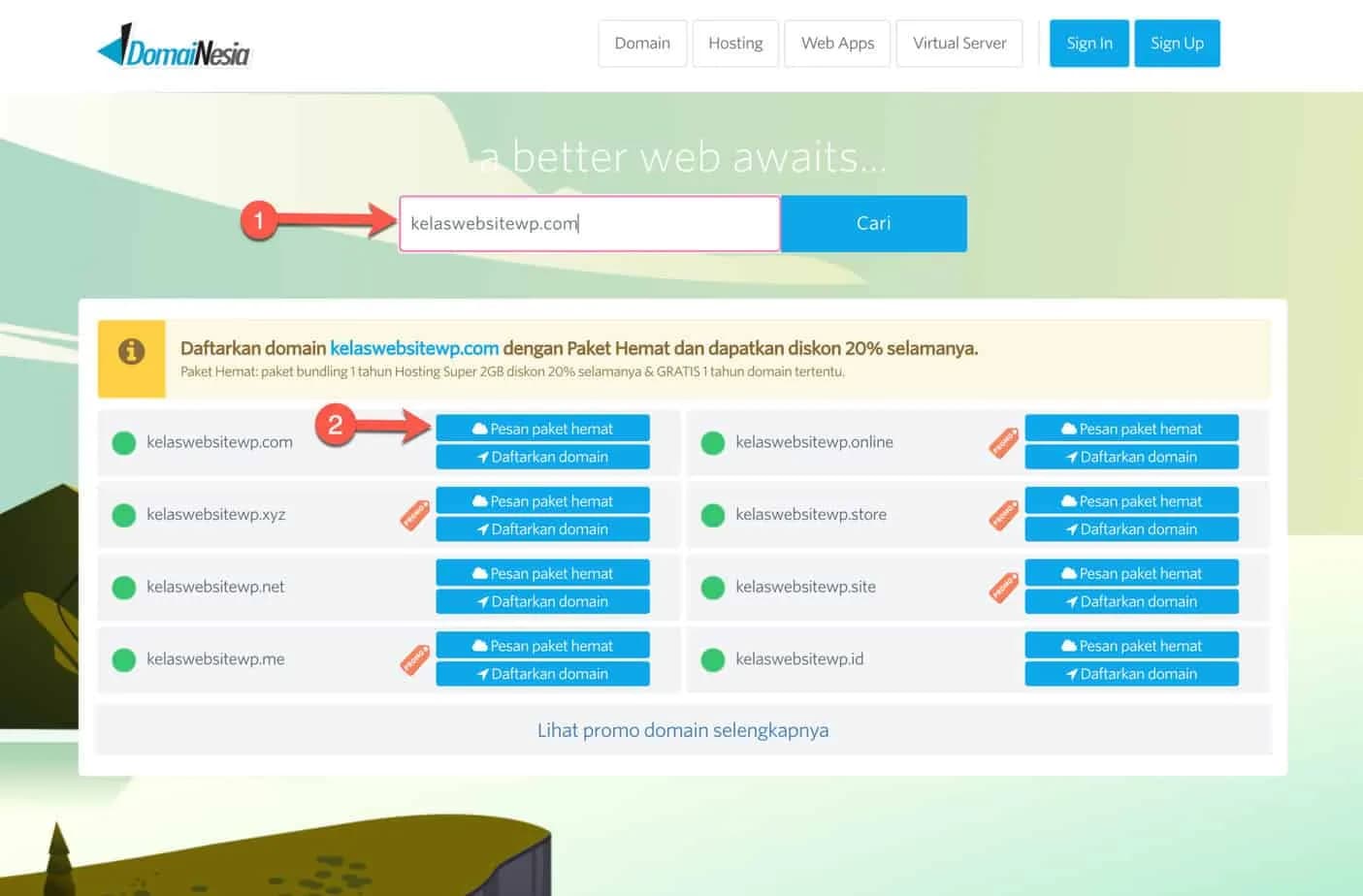
(1) Enter the domain name you want in the domain name form "A better web awaits.." (2) If the domain you choose is available, click the "Order economical package" button.
If it is not available, please look for another domain name or choose a different extension (.com, .id, .net, .org, etc.).
2. Fill in the hosting package purchase details
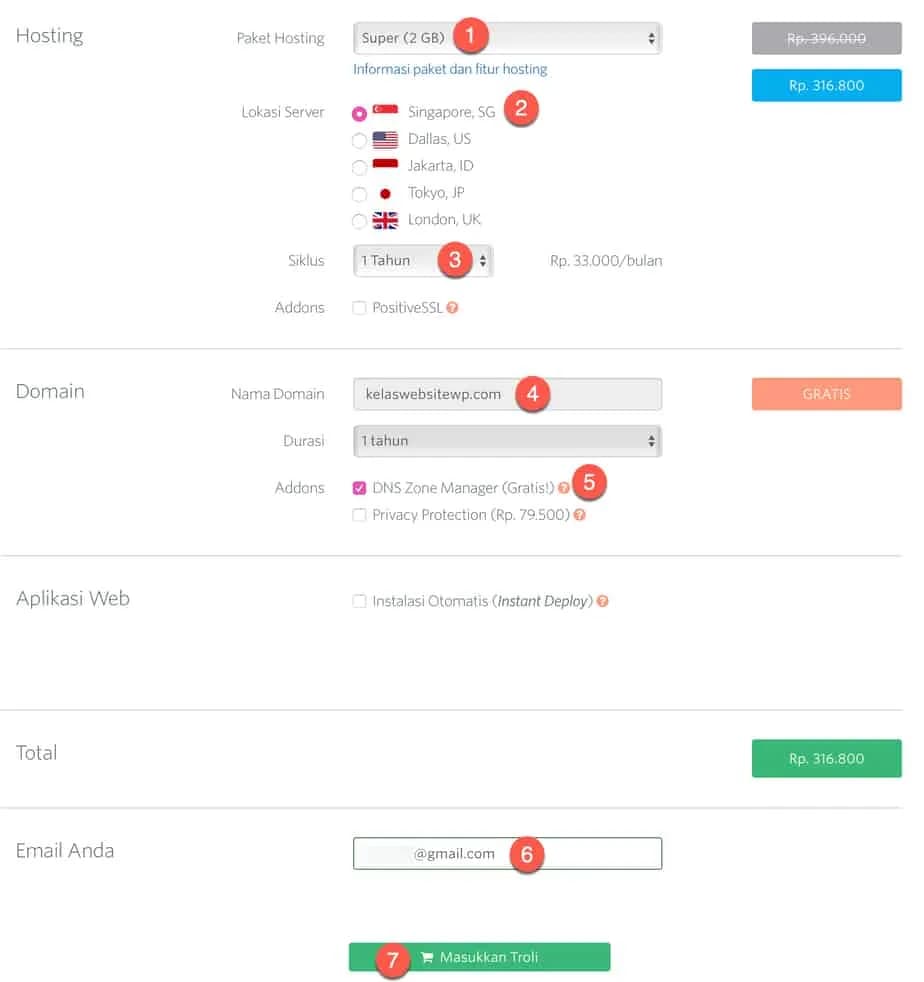
(1) Choose your hosting package. My suggestion is the Super package (2GB) and you will get a free domain for one year. (2) You can choose the server location, Singapore or Jakarta. Both are good, but I prefer Singapore. (3) Select the hosting payment cycle. If you choose 1 year, then you will get 1 free domain. (4) Make sure that your domain name is correct. Pay attention to each character, because if it is wrong, the domain name cannot be changed if it is already active (5) Check Addons: DNS Zone Manager (Free) (6) Enter your email address to create a DomaiNesia account (7) Click the green button "Add to Cart"
3. Enter the promo code to get a bigger discount
Promo code: CREATEWEBSITE (35% discount and valid for renewal.)
The total price you have to pay if you previously chose the “Super” package should be IDR 368,940 after applying our promo code.
If it is correct, click the "REGISTER" button.

4. Fill in your personal data
Fill in your first and last name, institution, email, and password.
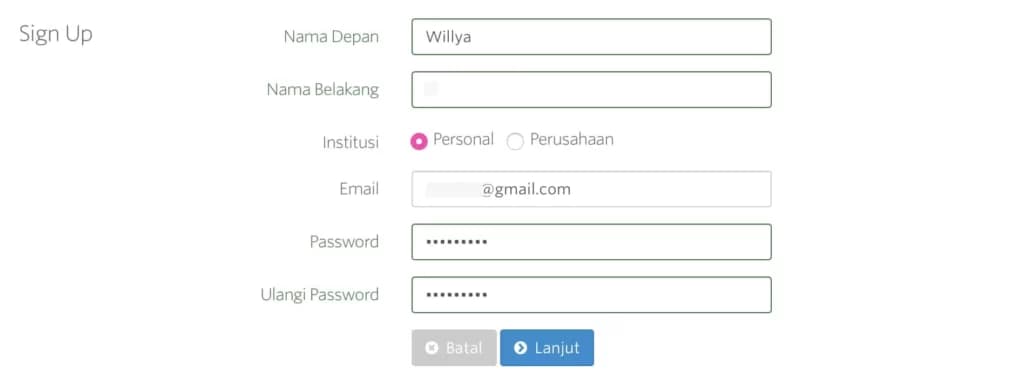
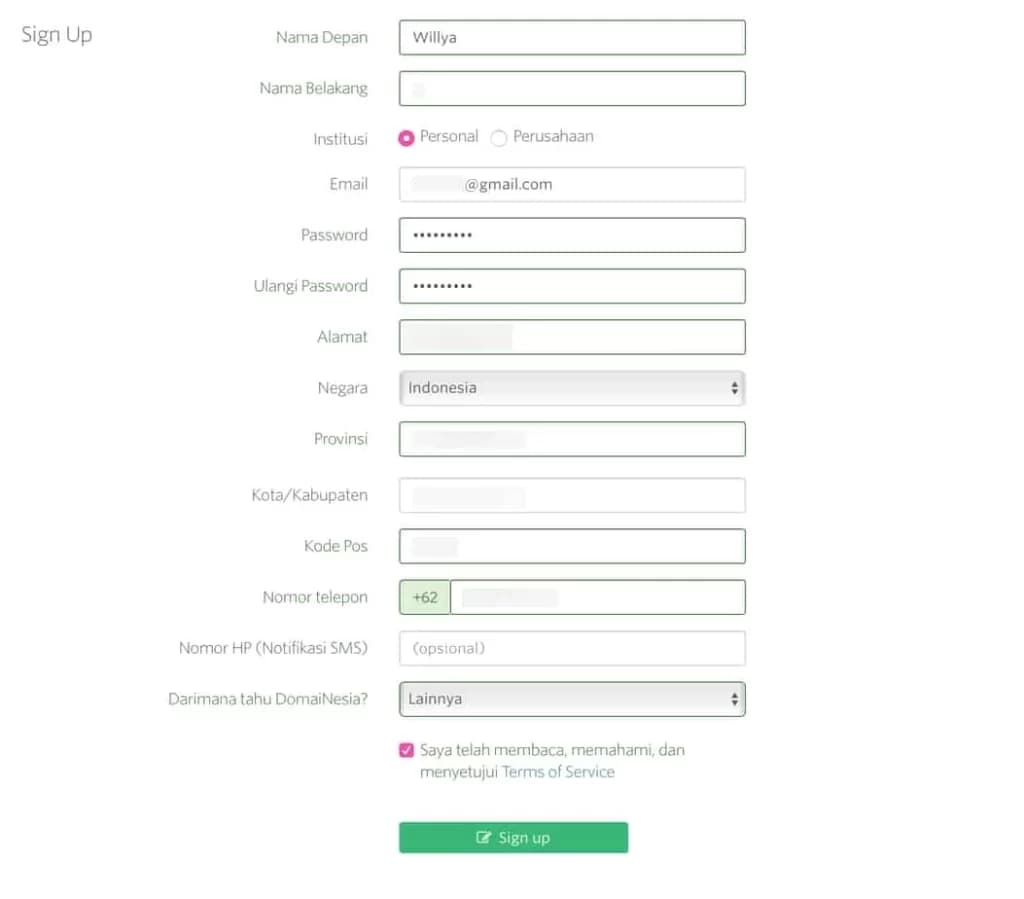
Continue by filling in the address and telephone number.
And before clicking the green “Sign Up” button, make sure once again that all the information you entered is correct.
Don't just fill in your personal data carelessly.
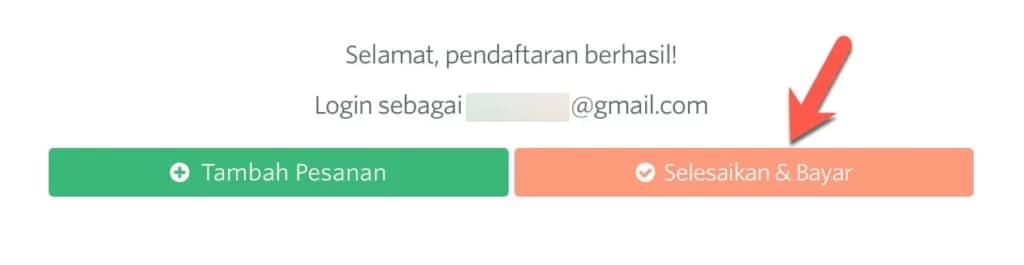
If correct, a notification will appear that registration has been successful.
Click the “Solve & Pay” button.