---
title: Cloudzy VPS Review
description: "Hands-on review of seven Cloudzy VPS servers across Singapore and Dallas: Regular vs High Frequency CPU, scaling up to 12 vCPU, network throughput, actual panel pricing, local VPS comparisons, and pros and cons."
canonical: https://penasihathosting.com/en/cloudzy-vps-review
type: review
locale: en
updated: 2026-11-24
author: Willya Randika
---
# Cloudzy VPS Review
## Overview
- **Summary:** Hands-on review of seven Cloudzy VPS servers across Singapore and Dallas: Regular vs High Frequency CPU, scaling up to 12 vCPU, network throughput, actual panel pricing, local VPS comparisons, and pros and cons.
- **Last tested:** 2026-11-23
- **Author:** Willya Randika ([profile](/penulis/willya-randika))
- **Subject:** [Cloudzy](//en/hosting/cloudzy)
## Article
**Disclosure:** This review is a sponsored partnership with Cloudzy. That said, all seven servers I tested, every setup step, and every benchmark number here come from my own hands-on testing. My editorial judgment remains objective and independent.
---
In Indonesia, Cloudzy is not as well known as DigitalOcean, Vultr, or Hostinger.
They are not a newcomer, though. Cloudzy has been operating since 2008, serves more than 122,000 developers worldwide, starts at $2.48/month, and shows a 4.5/5 Trustpilot rating on its site.
They run 13 active regions across four continents, including Singapore for Southeast Asia and Dallas in the US. What caught my eye is that they sell two CPU tiers, Regular CPU and High Frequency 4.2 GHz+, at the exact same price.
For this review, I did not stop at one server. I tested seven Cloudzy VPS units in November 2026: Regular 2, 4, 8, and 12 vCPU in Singapore, plus three units in Dallas (High Frequency 1 vCPU and 2 vCPU alongside Regular 2 vCPU) for an apples-to-apples CPU matchup in the exact same datacenter.
If you are thinking about moving up from shared hosting, need a Singapore node with hourly billing, or want to weigh Cloudzy against local 4 GB VPS hosts in Indonesia, I wrote this review so you have real numbers before spending money.
## What is Cloudzy VPS?
Cloudzy VPS is a self-managed KVM VPS built with flexible billing (hourly, monthly, or annual) for developers, builders, and technical users who prefer running their own server.
Because it is self-managed, you do not get a bundled control panel, automatic WordPress installation, or a support team managing your apps. You get full root SSH access, pick your own OS and software stack, and take ownership of security, OS updates, and backups. This is not managed WordPress like Kinsta, and it is not a managed cloud platform like Cloudways.
The big draw here is hourly billing. You can spin up a box for a migration test or staging run for two days, delete it, and pay only for the hours it ran.
If you already run unmanaged VPS instances elsewhere, switching to Cloudzy should feel straightforward.
If you are stepping up from shared hosting for the first time, expect a short adjustment period. That said, with today's AI tools, you no longer need to memorize Linux commands from scratch, so going unmanaged is far less daunting than it used to be.
## What does Cloudzy VPS offer?
Cloudzy offers KVM virtual servers across 13 active regions with two CPU classes (Regular and High Frequency) at identical list prices, scaling from 512 MB up to 64 GB RAM.
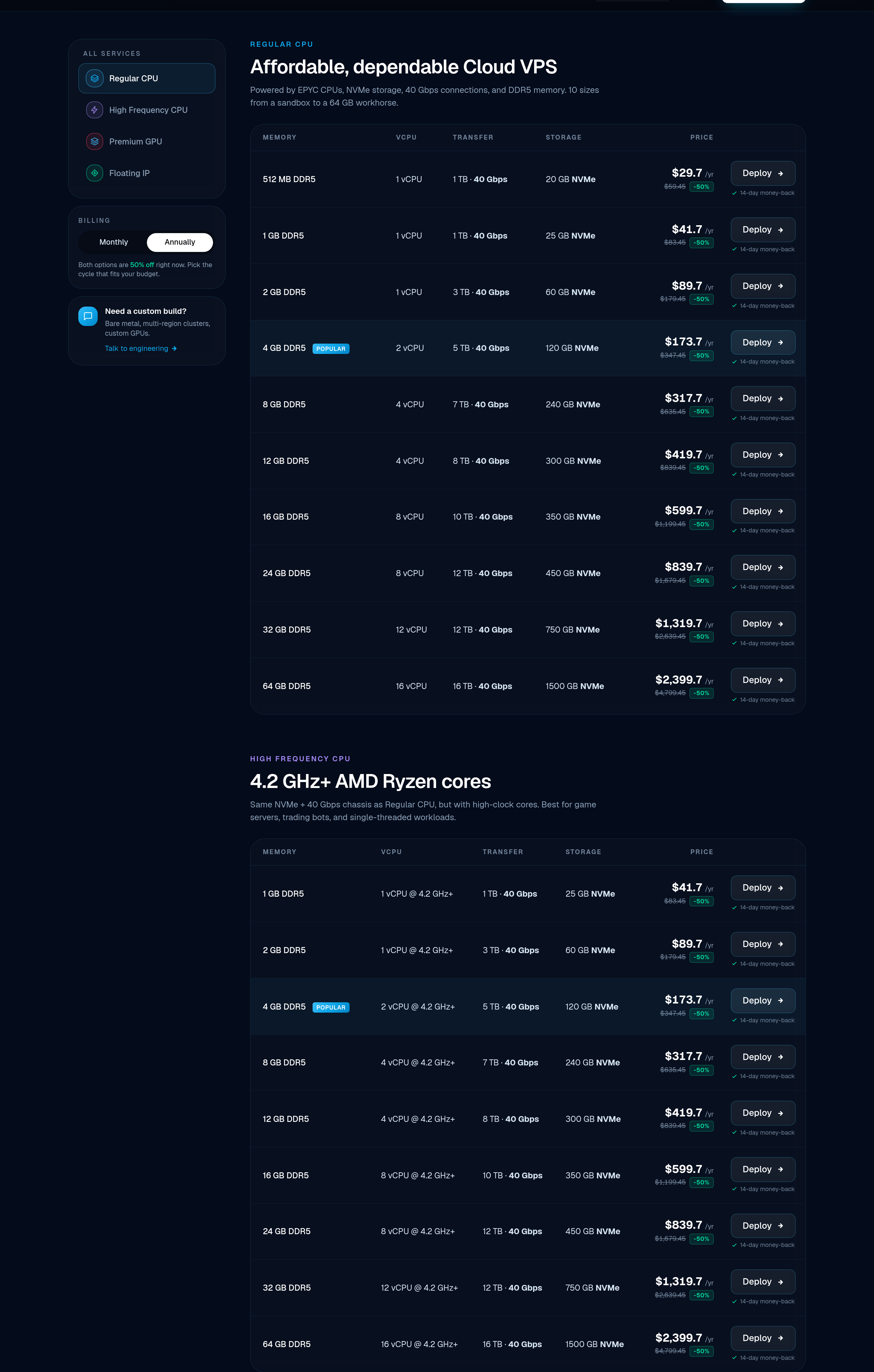
Here is the main lineup from Cloudzy's official pricing page (checked November 23, 2026). The 50% promo rate is the headline promotional price on the site, while the regular column is the standard list rate.
| Plan | vCPU | RAM | Storage (advertised) | Transfer | Promo 50% /mo | Regular /mo | Notes |
| --- | --- | --- | --- | --- | --- | --- | --- |
| 512 MB (Regular) | 1 | 512 MB | 20 GB NVMe | 1 TB | $2.48 | $4.95 | Regular CPU only |
| 1 GB (Reg / HF) | 1 | 1 GB | 25 GB NVMe | 1 TB | $3.48 | $6.95 | Not tested |
| 2 GB (Reg / HF) | 1 | 2 GB | 60 GB NVMe | 3 TB | $7.48 | $14.95 | Tested (HF Dallas) |
| 4 GB (Reg / HF) | 2 | 4 GB | 120 GB NVMe | 5 TB | $14.48 | $28.95 | Tested (Reg SG, Reg & HF Dallas) |
| 8 GB (Reg / HF) | 4 | 8 GB | 240 GB NVMe | 7 TB | $26.48 | $52.95 | Tested (Regular SG) |
| 16 GB (Reg / HF) | 8 | 16 GB | 350 GB NVMe | 10 TB | $49.98 | $99.95 | Tested (Regular SG) |
| 32 GB (Reg / HF) | 12 | 32 GB | 750 GB NVMe | 12 TB | $109.98 | $219.95 | Tested (Regular SG) |
Outside Regular and High Frequency VPS plans (up to 64 GB RAM), Cloudzy also sells GPU VPS servers (RTX 4090, RTX 5090, RTX PRO 6000 Blackwell, and Nvidia A100) and custom bare metal.
Key features listed across Cloudzy's site, docs, and deploy panel (checked November 23-24, 2026):
- 14 locations on their global map (13 active regions including Singapore for Southeast Asia, plus Tokyo marked coming soon): Utah, Dallas, Los Angeles, Las Vegas, New York, Miami, Amsterdam, London, Frankfurt, Bern, Dubai, Singapore, Sydney, and Tokyo
- Pure NVMe storage on every plan (per Cloudzy's official claim, included by default with no paid storage tier upgrade)
- Full KVM virtualization with root SSH access, SSH public key injection, and first-boot startup scripts
- Free IPv4 and free IPv6 addresses, plus free resource monitoring (CPU, memory, disk, and transfer) directly in the Advanced features menu
- Marketplace with 1,000+ one-click apps, wide OS coverage (Ubuntu 20.04/22.04/24.04 LTS, Debian 11/12/13, AlmaLinux, Rocky, Fedora, Arch, FreeBSD, Windows Server), and custom ISO uploads
- 40 Gbps per-host uplinks (shared across VMs with network QoS) and no egress charges inside your transfer quota
- REST API v1, `zy` CLI, scoped API tokens, and a built-in MCP server for automation
- Live resize for RAM, vCPU, and storage without rebuilding (advertised under 60 seconds), plus customizable Storage/Transfer sliders during deploy
- Nested virtualization on Regular CPU plans with 8 GB RAM or more ($8.00/month), and reserved extra IPv4 addresses ($2.50/IP/month, up to 10 IPs)
- 24/7/365 human engineer support (no AI chatbots), with an advertised 18-minute median first response
- 14-day money-back guarantee (including annual plans) and a 99.95% uptime SLA tracked publicly at status.cloudzy.com
- Wallet top-ups via credit/debit cards (Visa, Mastercard, AmEx), PayPal, and Alipay/WeChat Pay
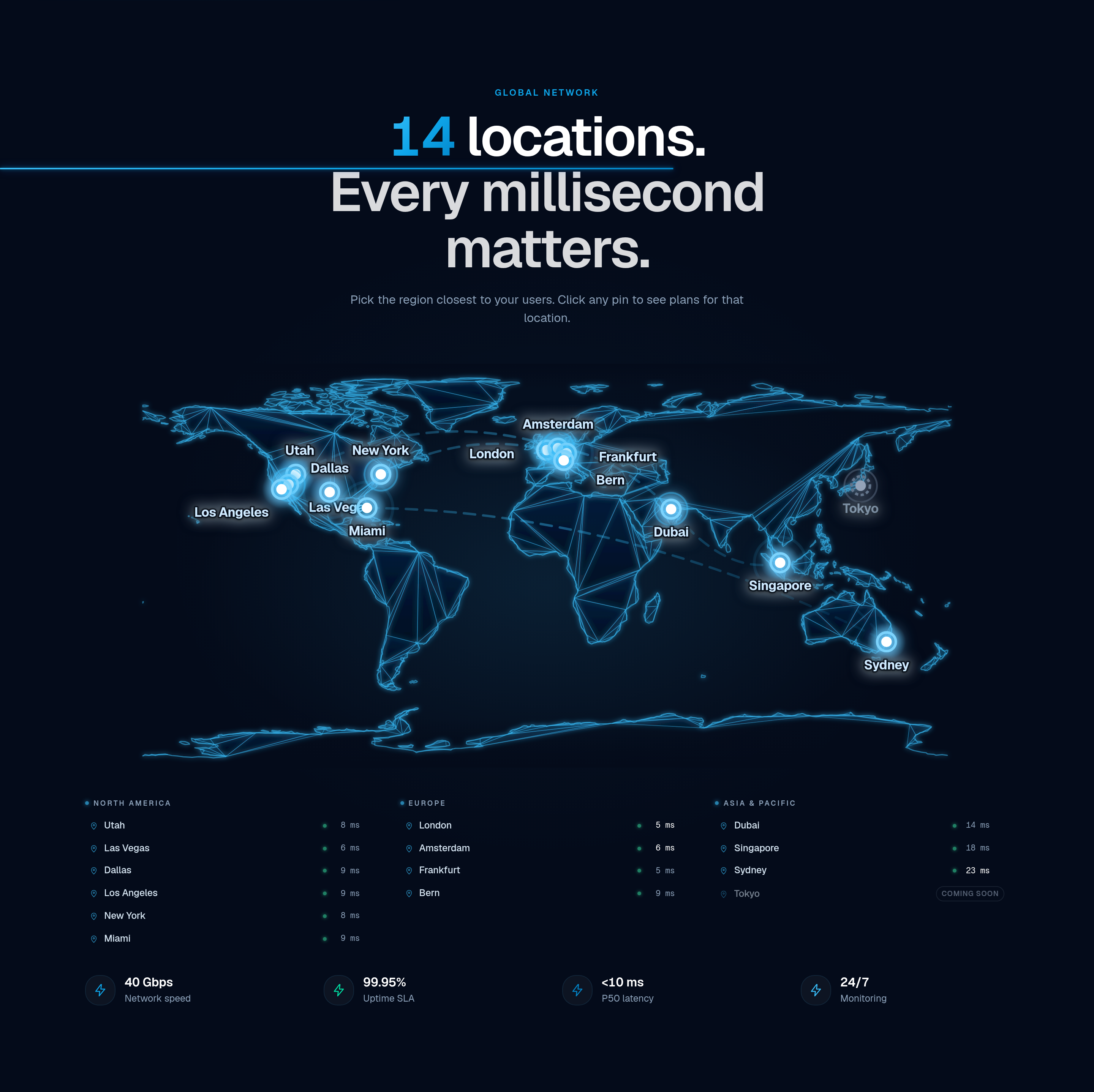
Here is what I actually saw during ordering and inside the deploy panel:
- The Singapore server (Regular 4 GB) provisioned in roughly 1-1.5 minutes and allowed SSH-key-only setup, with a fallback root password tucked behind a Show button
- Inside the deploy panel's Advanced features section, IPv4, IPv6, and Monitoring are explicitly marked Free alongside Startup scripts and SSH keys
- Availability of optional add-ons varies by region (at the time of checking, Automatic backups and VPC network appeared Unavailable, and DDoS protection appeared Sold out)
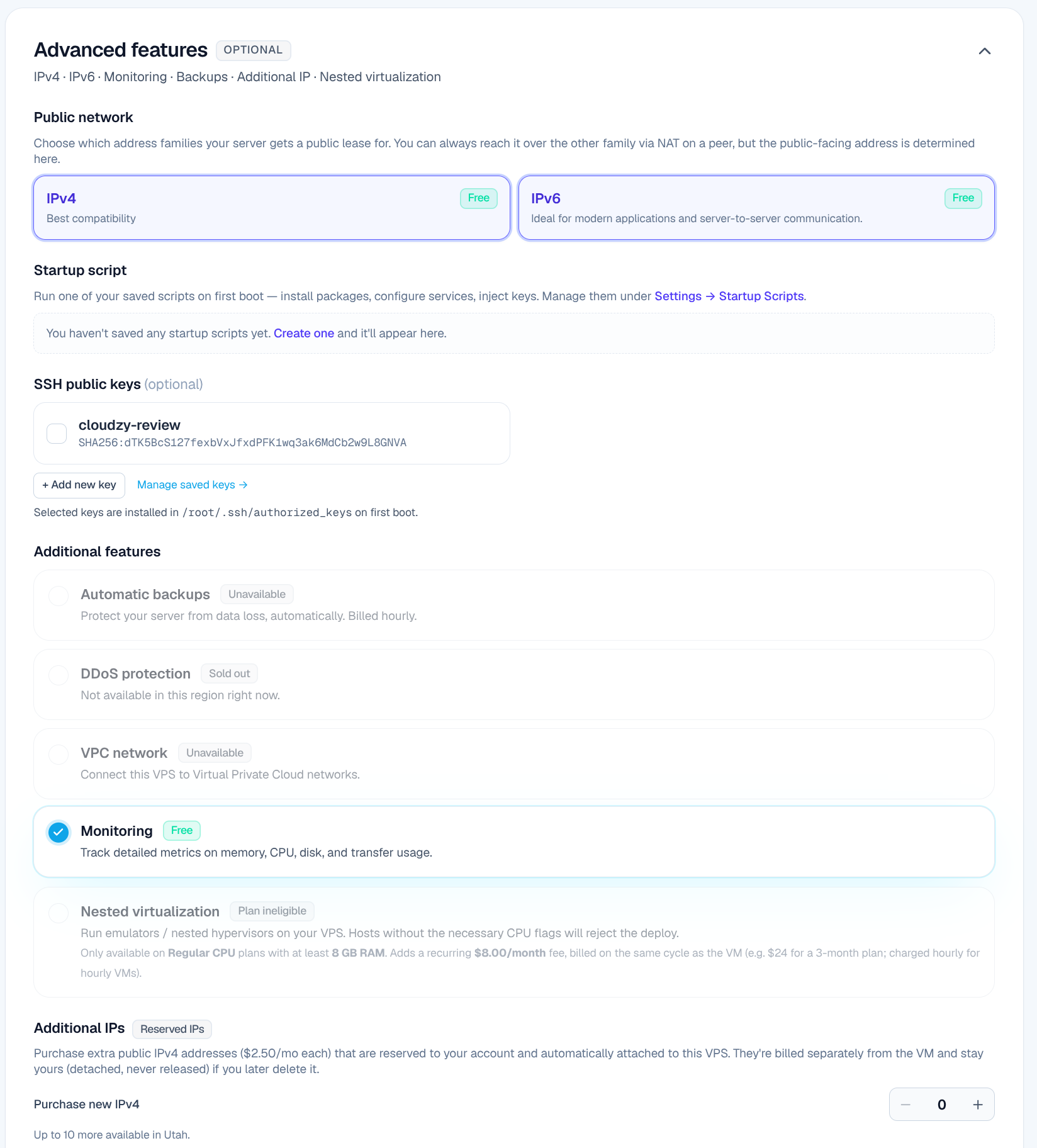
What is not included: a control panel (like cPanel or hPanel), automatic WordPress setup outside the Marketplace, free daily backups, server hardening, and application-level support. If you want a hands-off host where you never touch a server, look elsewhere.
## Review setup
To get a complete picture, I ran two testing layers. First, full WordPress and network benchmarks on two primary machines (Regular 2 vCPU / 4 GB Singapore and High Frequency 1 vCPU / 2 GB Dallas). Second, five additional instances tested with the exact same infrastructure script: Regular 4, 8, and 12 vCPU in Singapore, plus a same-region head-to-head between Regular 2 vCPU / 4 GB and High Frequency 2 vCPU / 4 GB in Dallas.
Comparison note: High Frequency was tested in Dallas because Singapore High Frequency was out of stock when I ordered. Jakarta latency is therefore measured strictly from Singapore, while the Regular vs High Frequency duel runs inside Dallas at identical specs and pricing.
| Component | Server A (Regular Singapore) | Server B (High Frequency Dallas) |
| --- | --- | --- |
| Test date | November 17, 2026 (k6 retest Nov 18) | November 23, 2026 |
| Plan | Regular CPU, 2 vCPU / 4 GB | High Frequency, 1 vCPU / 2 GB |
| Processor | AMD EPYC Rome (Zen 2, base 2.0 GHz, L3 16 MB) | AMD EPYC-Rome QEMU model (Zen 2, measured base 4.20 GHz, L3 16 MB) |
| Virtualization | KVM | KVM |
| Memory | 4 GB (3.8 GiB in OS), no swap | 2 GB (1.92 GiB in OS), no swap |
| Disk | 120 GB (116 GiB in OS; dashboard: SSD) | 60 GB (58 GiB in OS) |
| OS | Ubuntu 24.04.4 LTS (kernel 6.8) | Ubuntu 24.04.4 LTS (kernel 6.8) |
| Region & ASN | Singapore (SG-Singapore-DC2), AS14956 | Dallas, Texas US, AS14956 |
Before writing this review, I:
1. Ordered the Regular CPU 2 vCPU / 4 GB plan in Singapore on November 17, 2026 with clean Ubuntu 24.04.4 and SSH key login.
2. Received the High Frequency 1 vCPU / 2 GB unit in Dallas on November 23, 2026 with clean Ubuntu 24.04.4.
3. Installed an identical stack on both primary servers: nginx 1.24, PHP 8.3.6 FPM (OPcache on, default `pm.max_children = 5`), and MariaDB 10.11.14 with no page cache, no object cache, and no CDN.
4. Set up WordPress (7.1.4 in Singapore, 7.1.5 in Dallas, Twenty Twenty-Five theme) with 10 sample posts, including one 526-word test post with an image (~88 KB HTML in Singapore, ~78 KB in Dallas).
5. Ran system benchmarks: sysbench CPU (3 runs per thread count), sysbench memory, fio `direct=1` (4k random, 1M sequential, and 50/50 mixed), and Geekbench 6 (completed in Singapore; failed to upload with error 35 in Dallas because geekbench.com refused connections).
6. Measured networking with Ookla Speedtest CLI per region, iperf3, 20-packet ping, and 20-cycle mtr against verified Jakarta IP endpoints.
7. Ran 60-second wrk and ab load tests at 10, 50, and 100 concurrency, a `pm.max_children = 25` control run, and a 95 KB static file control while logging `vmstat 1`.
8. Ran k6 from a client in Indonesia against the uncached WordPress post: a 5-minute ramp from 1 to 25 virtual users as the primary test (p95 < 1.5 s and failure < 1%), followed by a 1 to 50 virtual user stress test.
9. Ran a uniform infrastructure benchmark script across five more units (Regular 4, 8, and 12 vCPU in Singapore plus Regular 2 vCPU and High Frequency 2 vCPU in Dallas) to verify scaling and same-region CPU differences.
10. Noted what was left untested: support reply times, snapshot/backup restores, long-term uptime, live resize, `zy` CLI/MCP, and WordPress with page caching turned on.
Every figure below reflects the exact runs I executed, not a blanket guarantee for every Cloudzy node.
Here are the eight practical questions this review answers:
1. How close is Cloudzy Singapore to visitors in Indonesia?
2. Does High Frequency 4.2 GHz+ actually beat Regular CPU at the same price?
3. How much real network throughput do you get in Singapore and Dallas?
4. Does CPU performance stay steady under load, or does neighbor steal creep in?
5. How does uncached WordPress handle 25 and 50 virtual users?
6. Why does disk I/O level off around 3,000 IOPS across every plan I tested?
7. How does Cloudzy's website promo compare against actual panel billing and local 4 GB VPS hosts?
8. Who is Cloudzy VPS right for, and who should pick something else?
## Pros of using Cloudzy VPS
From testing seven servers across Singapore and Dallas and using the panel directly, here are the eight things Cloudzy gets right.
### 1. 12-17 ms latency to Jakarta from Singapore, measured to verified Jakarta IPs
If most of your visitors are in Indonesia, Singapore latency is the first reason to consider Cloudzy.
I ran 20-packet pings to six targets only after verifying that each IP actually sits in Jakarta, rather than blindly pinging `.co.id` or `.id` domains.
| Verified Jakarta target | RTT min / avg / max (SG) | Packet Loss |
| --- | --- | --- |
| speedtest206.teradata.net.id | 11.73 / 11.98 / 12.48 ms | 0% |
| speedtest.cbn.id | 12.75 / 13.03 / 14.11 ms | 0% |
| detik.com | 12.46 / 13.07 / 14.07 ms | 0% |
| spdt.encnusantara.net | 13.49 / 15.29 / 38.46 ms | 0% |
| slipi.speedtest.telkom.net.id | 14.92 / 15.35 / 17.32 ms | 0% |
| speedtest-cbt.xl.co.id | 15.40 / 17.14 / 21.88 ms | 0% |
Latency from Singapore landed cleanly between 12.0 and 17.1 ms with 0% packet loss and less than 1.5 ms variation. Routing was short too: out through Equinix SG, one hop into Indonesia at 13.2 ms, arriving at 13.8 ms.
Why bother verifying IPs? Many Indonesian domains terminate at Singapore edge servers. From Singapore, Biznetgio returned 3.79 ms and one speedtest server labeled "Jakarta" returned 0.98 ms because neither left Singapore.
Pinging domains without checking routes makes latency look much better on paper than it is in reality. With verified endpoints, 12-17 ms is a number you can actually rely on.
As a note, the Dallas High Frequency unit is left out of the Jakarta latency table since it sits on another continent. Locally in the US, Dallas measured 2.3-5.7 ms to local Dallas servers and 34.5 ms to Los Angeles.
### 2. High Frequency 4.2 GHz+ at the same price, with a clear per-core leap
On Cloudzy's pricing page, Regular CPU and High Frequency cost the exact same amount (aside from the 512 MB starter plan, which is Regular only). The real test is putting them side by side in the same datacenter.
I benchmarked two identical **2 vCPU / 4 GB / 120 GB** plans in **Dallas** (November 23, 2026), one Regular CPU (EPYC 7H12) and one High Frequency, priced identically ($14.48 promo / $28.95 regular).
| Metric (Dallas, 2 vCPU / 4 GB, same price) | Regular 2 vCPU Dallas | High Frequency 2 vCPU Dallas | Difference |
| --- | --- | --- | --- |
| sysbench CPU 1 thread (3-run avg) | 1,355 eps (1,316-1,411) | 4,505 eps (4,440-4,557) | ~3.3x faster |
| sysbench CPU 2 threads (3-run avg) | 2,217 eps (1,894-2,481) | 8,473 eps (8,184-8,736) | ~3.8x faster |
| CPU steal (100% full load) | peak 1% (21/33 = 0%) | peak 1% (33/35 = 0%) | Equally clean |
| Memory bandwidth (Read / Write) | 30,647 / 15,691 MiB/s | 59,652 / 22,070 MiB/s | ~1.9x Read / ~1.4x Write |
| Ookla local Dallas (Nitel) | 6,161 / 6,984 Mbps (1.51 ms) | 5,941 / 6,916 Mbps (1.61 ms) | Identical 10 Gbps port |
That is a wide gap. In the same region at the exact same price, High Frequency 2 vCPU was ~3.3x faster in single-core, ~3.8x faster in multi-core, and almost 2x faster in memory reads. Since there is no surcharge for the faster tier, grab High Frequency whenever your target region has stock.
That 4.2 GHz clock speed showed up immediately on uncached WordPress as well (Regular 2 vCPU Singapore vs High Frequency 1 vCPU Dallas):
| WordPress metric (localhost, uncached) | Regular SG (2 vCPU) | High Frequency Dallas (1 vCPU) |
| --- | --- | --- |
| sysbench CPU 1 thread (3 runs) | 1,049.6 / 1,026.6 / 1,089.1 eps | 4,527.0 / 4,233.1 / 4,250.9 eps |
| Cold TTFB WordPress (homepage) | 1,153 ms (903-1,330 ms) | 648 ms (535-981 ms) |
| Cold TTFB WordPress (single post) | 1,170 ms (963-1,407 ms) | 621 ms (550-819 ms) |
| Warm TTFB WordPress (homepage) | 117 ms (100-132 ms) | 57 ms (45-112 ms) |
| Warm TTFB WordPress (single post) | 107 ms (86-116 ms) | 55 ms (47-68 ms) |
Warm uncached TTFB fell in half, from 117 ms to 57 ms on the homepage and from 107 ms to 55 ms on a single post. Cold starts after restarting MariaDB and PHP-FPM also dropped nearly by half, from ~1.15 seconds to 0.62-0.65 seconds.
For single-thread-heavy workloads like PHP rendering, WordPress/WooCommerce, app builds, or APIs, High Frequency is clearly the better pick. Note that inside the Dallas VM the guest CPU model still reports AMD EPYC-Rome (measured base 4.20 GHz via Geekbench `--sysinfo`), and on the 1 vCPU / 2 GB plan parallel work is still bounded by a single core.
### 3. Strong network throughput: 1 Gbps proven on 2 vCPU SG, 10 Gbps class in Dallas and 4 vCPU+ SG
Port speeds on a pricing page are easy to claim and easy to throttle. On the Cloudzy units I tested, real throughput held up under both Ookla Speedtest CLI and iperf3.
| Test path | Direction | Result | Notes |
| --- | --- | --- | --- |
| SG Regular 2 vCPU · iperf3 to Singapore (4 streams) | upload | 934 Mbps | 13 retransmits |
| SG Regular 2 vCPU · iperf3 SG client to server | inbound | 1.02 Gbps | 103,541 retransmits |
| SG Regular 2 vCPU · iperf3 server to SG client | outbound | 1.02 Gbps | 535 retransmits |
| SG Regular 2 vCPU · Ookla to Jakarta (Telkom) | download | 753.7 Mbps | 15.82 ms |
| Dallas HF · Ookla to Dallas (Nitel) | down / up | 5,939 / 7,447 Mbps | 2.3-5.7 ms, 0% loss |
| Dallas HF · Ookla to Jakarta (Telkom) | down / up | 2,209-2,595 / 392-496 Mbps | 210 ms, 0% loss |
| Dallas HF · iperf3 to Los Angeles (4 streams) | out / in | 3.05 Gbps / 1.73 Gbps | 3 / 6,211 retransmits |
| Dallas HF · iperf3 to New York (4 streams) | outbound | 2.88 Gbps | 4 retransmits |
On the 2 vCPU Singapore plan, the 1 Gbps port held up in both directions. Ookla reported a strange 7.7-22 Mbps upload to Singapore, but iperf3 pushed 934 Mbps to 1.02 Gbps on the same path, which points to throttling on the public speedtest server rather than Cloudzy.
In Dallas (and on the 4, 8, and 12 vCPU Singapore tiers), the port stepped up to 10 Gbps class: 5.9 Gbps local download, 7.4 Gbps upload, and 2.2-2.6 Gbps download all the way to Telkom Jakarta. For CDN origins, mirrors, or high-transfer nodes, there is plenty of headroom.
As a web-server sanity check, nginx serving a 95 KB static file at 100 concurrency hit 8,977 req/s in Singapore and 11,078 req/s (1.01 GB/s) in Dallas. Neither nginx nor the network was holding anything back.
The one weak route was Japan. From both Singapore (49.4-95.2 Mbps) and Dallas (381 Mbps down / 226 Mbps up), Tokyo lagged well behind every other test location.
### 4. Steady CPU delivery with minimal steal and clean scaling up to 12 vCPU
On affordable VPS plans, average speed matters less than consistency. Nothing ruins a server faster than noisy neighbors stealing CPU cycles right when traffic spikes.
| CPU stability metric | Regular SG (2 vCPU) | High Frequency Dallas (1 vCPU) |
| --- | --- | --- |
| Geekbench 6 single / multi | 727 / 1,163 | Unavailable (upload error 35) |
| sysbench 1-thread spread (3 runs) | 1,026.6-1,089.1 eps | 4,233.1-4,527.0 eps |
| sysbench 2-thread (3 runs) | 1,842.4-1,936.8 eps | 3,951.8-4,524.3 eps |
| CPU steal across all load tests | 0% in almost all samples, peaking at 3% | 0% in almost all samples, peaking at 3% |
| Peak CPU user under load | 97% | 97% |
Not a single sysbench run dropped unexpectedly on either unit. In Singapore, moving from 1 to 2 threads scaled by 1.77x (1,049.6 to 1,855.5 eps), behaving like two separate cores.
Even better was steal under sustained load. Across 13 load test sessions in Singapore on November 17 (plus the November 18 retest) and 9 sessions in Dallas on November 23, CPU steal stayed at 0% in almost every sample and peaked at 3%. On Dallas, most sessions never crossed 1% even at 97% user CPU.
That does not mean the host has zero other tenants, only that contention is low and tightly managed. In a busy hub like Singapore, steady performance matters more than peak numbers you cannot count on.
#### Singapore Regular tier scaling test (2 to 12 vCPU)
To see whether upgrading tiers in Singapore actually pays off, I tested **Regular 4 vCPU / 8 GB**, **8 vCPU / 16 GB**, and **12 vCPU / 32 GB** in Singapore (November 23, 2026) using the same infrastructure script.
| Plan (Singapore) | Price (Promo / Regular) | sysbench 1T / Full Thread | Memory (Read / Write) | Disk 4k / Seq 1M | Jakarta Download | Peak Steal |
| --- | --- | --- | --- | --- | --- | --- |
| Regular 2 vCPU / 4 GB | $14.48 / $28.95 | 1,055 / 1,878 eps | 3,008-8,207 MiB/s | 3,004 IOPS · 120 MiB/s | 753.7 Mbps (15.8 ms) | 3% |
| Regular 4 vCPU / 8 GB | $26.48 / $52.95 | 3,012 / 10,901 eps | 17,558 / 11,854 MiB/s | 3,009 IOPS · 106-111 MiB/s | 7,086 Mbps (14.4 ms, up 2,278 Mbps) | 1% |
| Regular 8 vCPU / 16 GB | $49.98 / $99.95 | 2,512 / 20,307 eps | 27,779 / 11,426 MiB/s | 3,010 IOPS · 98-109 MiB/s | 5,413 Mbps (13.7 ms, up 2,188 Mbps) | 1% |
| Regular 12 vCPU / 32 GB | $109.98 / $219.95 | 2,690 / 29,404 eps | 26,749 / 8,502 MiB/s | 2,622-3,008 IOPS · 94-99 MiB/s | 5,233 Mbps (14.0 ms, up 2,133 Mbps) | 2% |
The jump from 2 vCPU to 4 vCPU was bigger than expected: multi-core score climbed ~5.8x (1,878 to 10,901 eps) and the network opened up to 10 Gbps class. At 8 and 12 vCPU, multi-core scaled cleanly to 20,307 eps and 29,404 eps (~15.7x over 2 vCPU), with peak steal holding at just 1-2% under 100% full-core stress.
Throughput to Indonesia stayed fast across all three larger tiers: 5,233-7,086 Mbps download and 2,133-2,278 Mbps upload to Telkom Jakarta at 13.7-14.4 ms with 0% loss.
How I would pick among Singapore Regular tiers:
- **Regular 2 vCPU / 4 GB ($14.48 promo / $28.95 regular):** practical entry tier for 1-3 cached WordPress sites, staging, or light side projects.
- **Regular 4 vCPU / 8 GB ($26.48 promo / $52.95 regular):** the clearest sweet spot for serious production sites, small-to-medium WooCommerce stores, or small agency servers. The CPU and 10 Gbps jump easily beats the price step-up.
- **Regular 8 vCPU / 16 GB ($49.98 promo / $99.95 regular):** fits heavier parallel workloads like multiple active sites, backend APIs, Docker stacks, or queue workers needing 8 full cores at 1% max steal and 16 GB RAM.
- **Regular 12 vCPU / 32 GB ($109.98 promo / $219.95 regular):** made for heavy multi-core compute and large memory footprints (many containers, build servers, or big in-memory caches). Just keep in mind disk I/O stays capped near 3,000 IOPS.
### 5. Uncached WordPress passed the 25-virtual-user load test with zero errors
Most VPS reviews test WordPress behind a page cache or CDN, where PHP barely breaks a sweat. I went the opposite way: bare WordPress with no page cache, no object cache, no CDN, and default PHP-FPM `pm.max_children = 5`.
The primary k6 run came from a client in Indonesia ramping from 1 to 25 virtual users over 5 minutes (1-second sleep per iteration), with thresholds set at p95 under 1.5 seconds and HTTP failure under 1%.
| k6 metric (primary: 1-25 VU, 5 min) | Regular SG (2 vCPU / 4 GB) |
| --- | --- |
| Threshold p95 < 1.5 s | Pass (1.33 s) |
| Threshold HTTP failure < 1% | Pass (0%) |
| Total requests | 2,618 |
| Average request rate | 8.68 RPS (peak 20 RPS) |
| Median response time | 277.1 ms |
| p95 response time | 1.33 s |
| Max response time | 1.81 s |
| Requests > 1.5 s | 71 (2.7%) |
| Requests > 500 ms | 632 (24.1%) |
Why 1.5 seconds instead of 500 ms? A 500 ms target fits cached production sites where PHP is skipped on most hits. Without caching, PHP and MariaDB render every request from scratch, so 1.5 seconds is a much more honest bar.
The Singapore server cleared 25 virtual users with 0% HTTP errors. A 277.1 ms median means most requests felt responsive, and direct curl checks from Indonesia averaged 201.7-209.6 ms TTFB (~260-268 ms total).
What about Dallas High Frequency? Because the k6 client was in Indonesia (~220 ms RTT to Dallas vs ~17 ms to Singapore), putting Dallas into the same table would not be fair. Even with that cross-continent RTT penalty, though, the 1-vCPU Dallas HF machine still passed 25 VU (p95 1.45 s, 0% errors). Turn page caching on, and both machines have far more room to spare.
### 6. Clean multilingual panel (including Indonesian), fast deploys, hourly billing, and modern dev tools
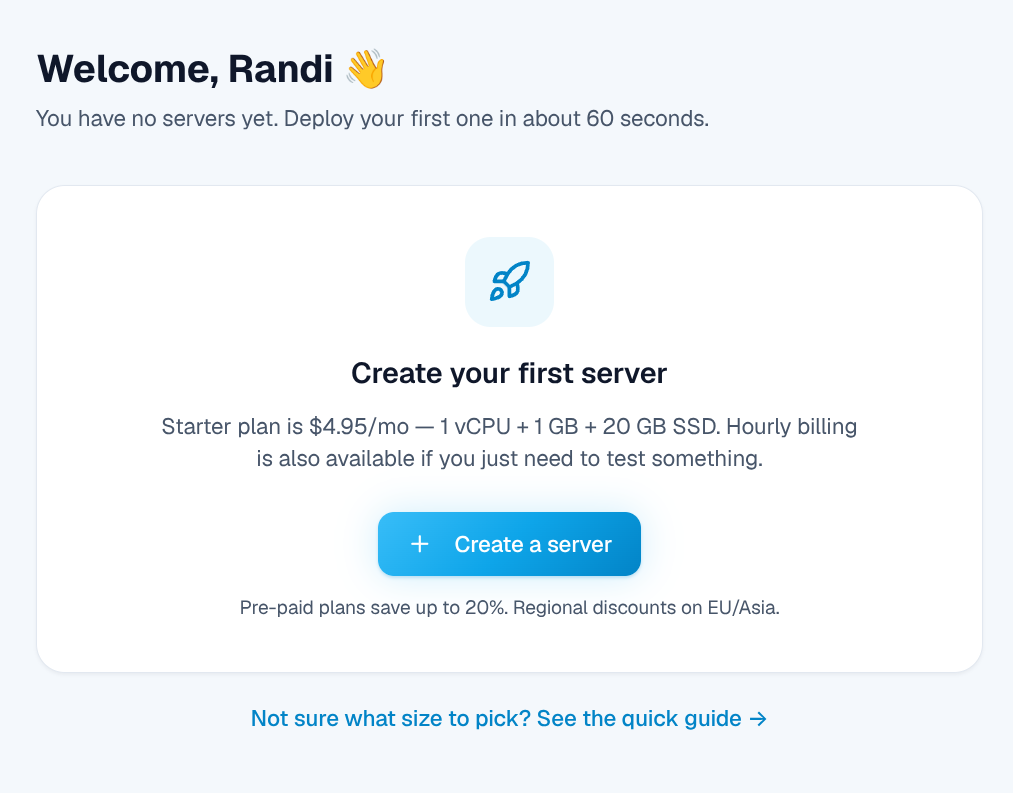
The Cloudzy dashboard is clean and uncluttered. The empty state points straight to deploying your first server with a 60-second estimate.
In practice, going from order click to SSH login in Singapore took about 1-1.5 minutes. The order flow lets you deploy with an SSH key only without setting a root password, while keeping a fallback root password behind a Show button.
One detail you rarely see from global VPS hosts: **Cloudzy's control panel supports multiple languages, including Bahasa Indonesia**. For Indonesian teams who prefer navigating billing and server controls in Indonesian, that helps right away.
Hourly pay-as-you-go billing also makes short-lived work painless. Spin up a staging or migration box for two days, delete it when done, and pay only for the hours used.
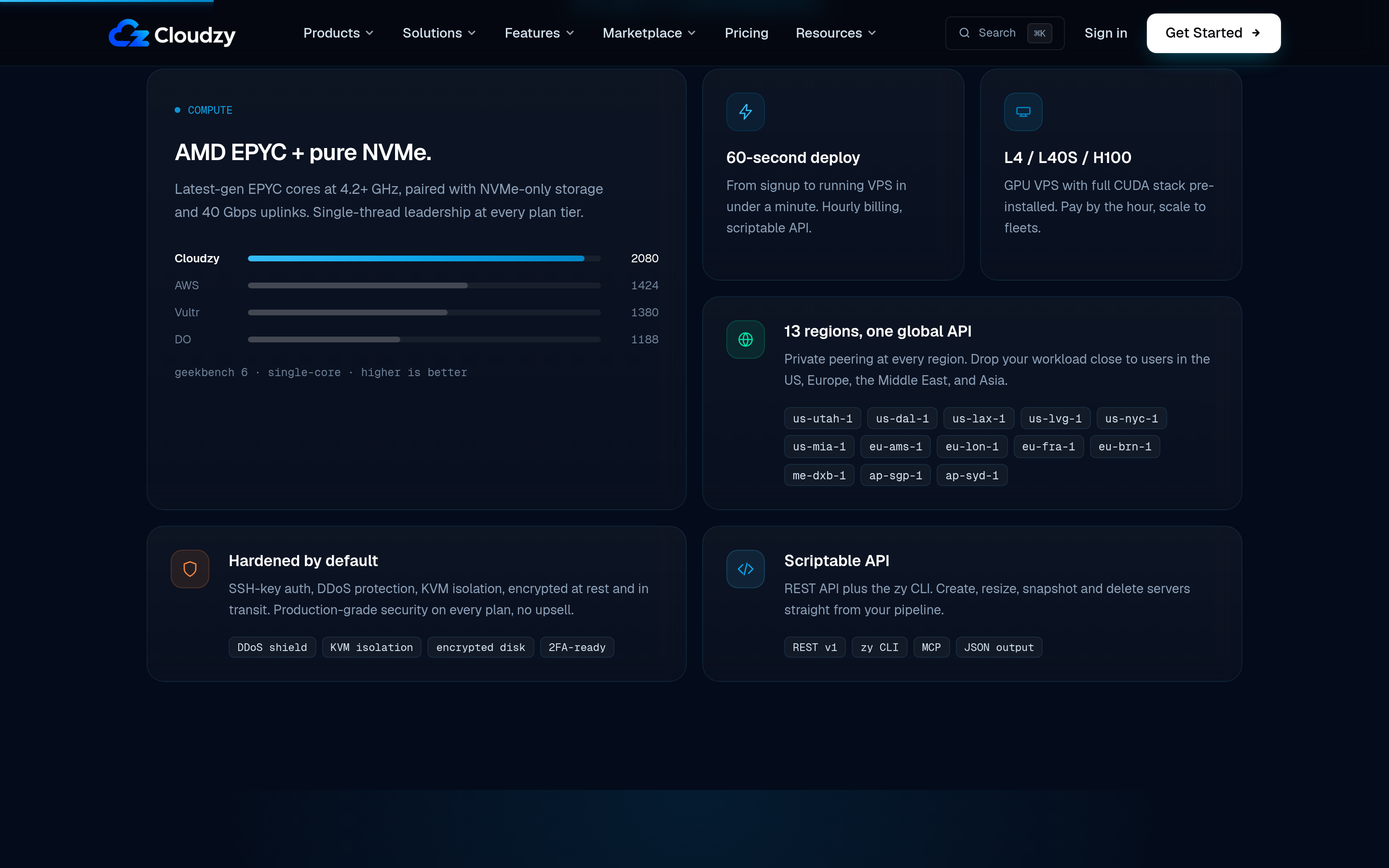
For automation, Cloudzy's documentation covers REST API v1, the `zy` CLI, scoped API tokens, custom ISO uploads, live resize without rebuilding, and a built-in MCP server so AI assistants like Claude or Cursor can manage instances via CLI.
They also advertise a 14-day money-back guarantee and a 99.95% uptime SLA. I did not test the API, CLI, live resize, or refund process directly in this review, so treat those as official documented features rather than hands-on verification.
### 7. Marketplace with 1,000+ one-click apps
If you would rather not install every service manually from a blank terminal, Cloudzy offers a Marketplace with more than 1,000 apps ready for one-click deployment.
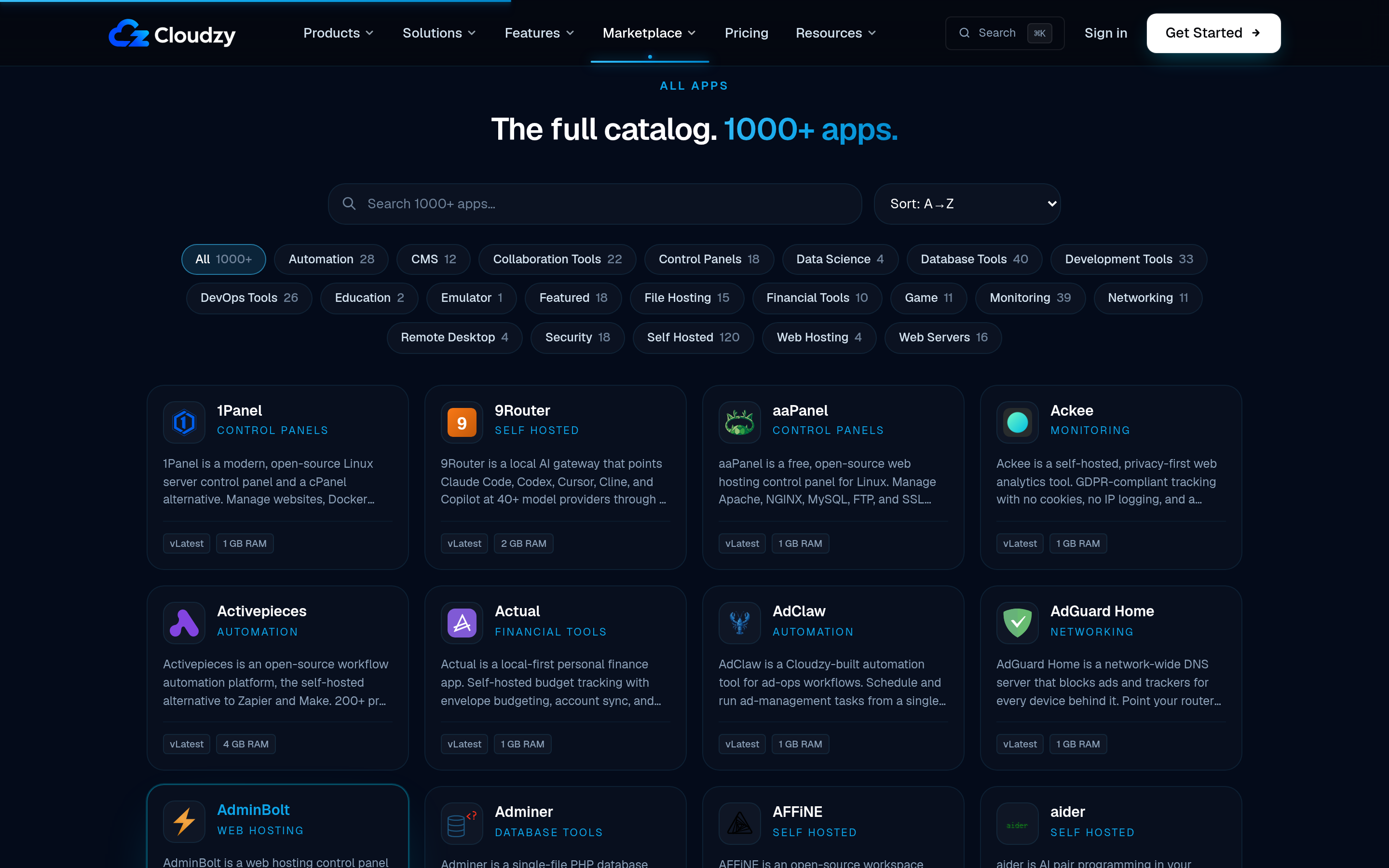
It covers CMS tools, control panels, databases, developer utilities, and popular self-hosted apps. For users moving off shared hosting, one-click templates cut down initial setup friction.
Note that I intentionally used a clean Ubuntu image for this review so WordPress benchmarks stayed controlled and comparable, so I did not test Marketplace deploys hands-on.
### 8. 24/7/365 support handled directly by human engineers
Many hosts now hide support behind layers of AI chatbots before you ever reach a person. Cloudzy claims its 24/7/365 technical support goes straight to human engineers rather than bots.
Their site also advertises a median first response time of 18 minutes. If that holds up day to day, reaching a real engineer quickly makes a real difference when something breaks in production.
I did not open a support ticket during testing, so I am listing this strictly as Cloudzy's official claim rather than a verified response test.
## Cloudzy VPS pricing: 50% promo, regional discounts, and no 11% VAT on top-ups
Here is the full pricing picture combining Cloudzy's public pricing page (checked November 23, 2026) and actual deploy and wallet billing inside the panel (November 24, 2026).
| Item | 2 GB Plan (1 vCPU) | 4 GB Plan (2 vCPU) | Notes |
| --- | --- | --- | --- |
| Promo 50% price (website) | $7.48 /month | $14.48 /month | Top promo rate shown on site (depends on region & billing cycle) |
| Upfront annual total (-50%) | $89.70 /year (list $179.45) | $173.70 /year (list $347.45) | Matches site annual table; 14-day refund applies |
| Regular / monthly price (panel) | $14.95 /month | $28.95 /month | Base rate before cycle or regional discounts |
| Hourly rate (pay-as-you-go) | $0.0222 /hour | $0.0431 /hour | Shown directly in the deploy panel |
| IPv4 & IPv6 | Free | Free | Listed as Free under Advanced features |
| Monitoring | Free | Free | Tracks CPU, memory, disk, and transfer |
| Floating / extra IPv4 | $2.50 /IP/month | $2.50 /IP/month | Reserved IP, up to 10 extra IPs |
| Snapshots | $0.0480 /GB/month | $0.0480 /GB/month | Charged hourly, separate from VM billing cycle (verified in panel) |
| Nested virtualization | Not eligible | Not eligible | Regular CPU plans with 8 GB+ RAM only (+$8.00/month) |
| Renewal policy | No auto-renew | No auto-renew | Official FAQ: invoice sent before renewal |
One detail only becomes clear once you open the deploy screen inside the panel.
On the marketing pages, the big headline figure is up to 50% off ($7.48 for 2 GB and $14.48 for 4 GB). Inside the actual deploy form, the discount **depends on both your chosen region and billing cycle**:
- **Regional discounts:** Utah goes up to **50% off**, Dallas and Las Vegas go up to **30% off**, while Singapore, Europe (London, Frankfurt, Bern), Los Angeles, New York, and Sydney go up to **20% off**.
- **Pre-paid billing cycle discounts:** Monthly 5%, Quarterly 10%, Semi-annually 15%, and Annually 30% (for regions like Dallas), while **Hourly** runs on the regular base rate ($0.0222/hour for 2 GB and $0.0431/hour for 4 GB).
- On the same screen, you can also adjust **Storage** and **Transfer** directly on the plan card or click through to build a custom plan.
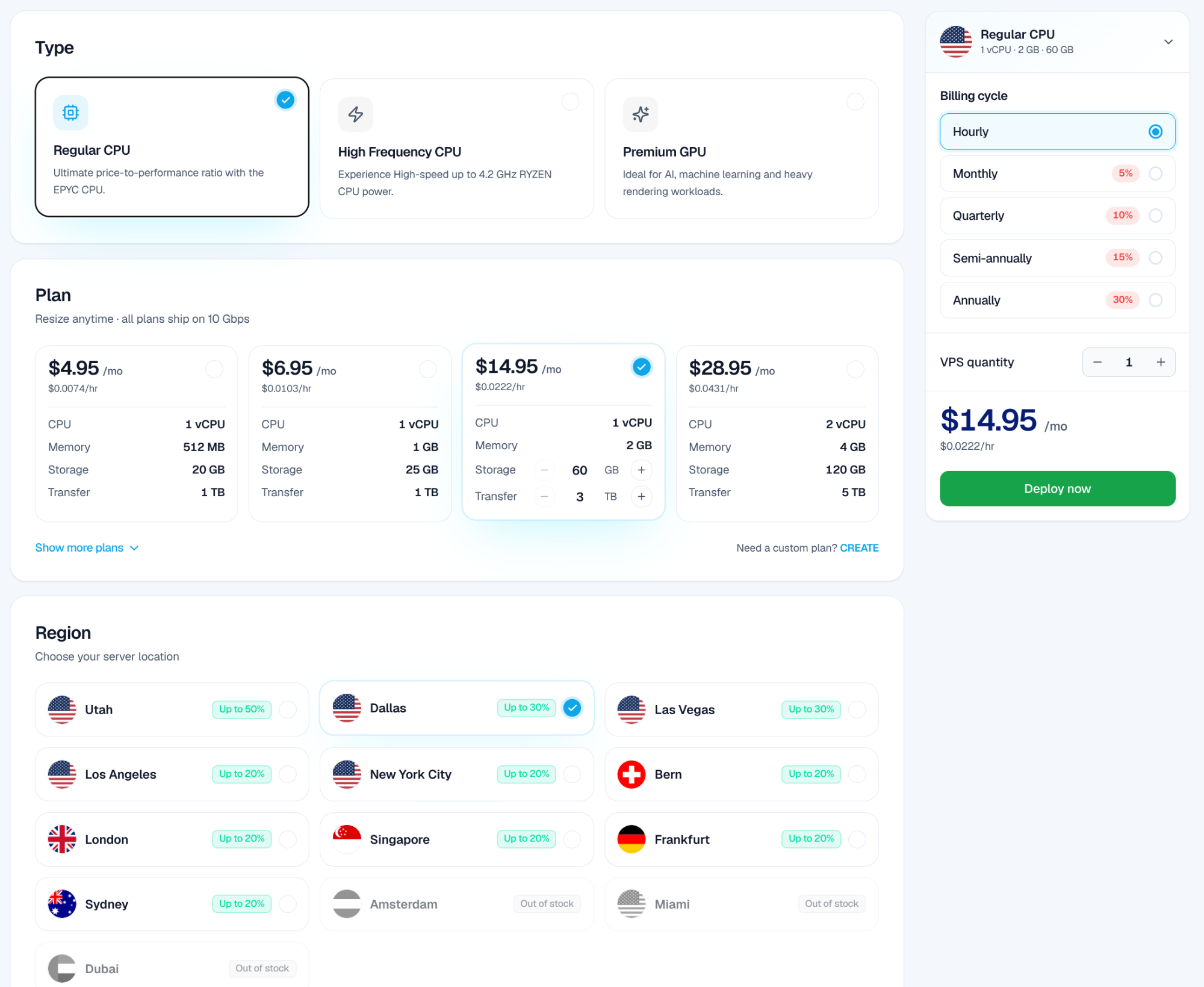
That gap between the headline promo and hourly/regional panel pricing is not a bug, just something you should know before comparing numbers. Pitting $14.48 against another host's no-commitment monthly rate is not an even comparison.
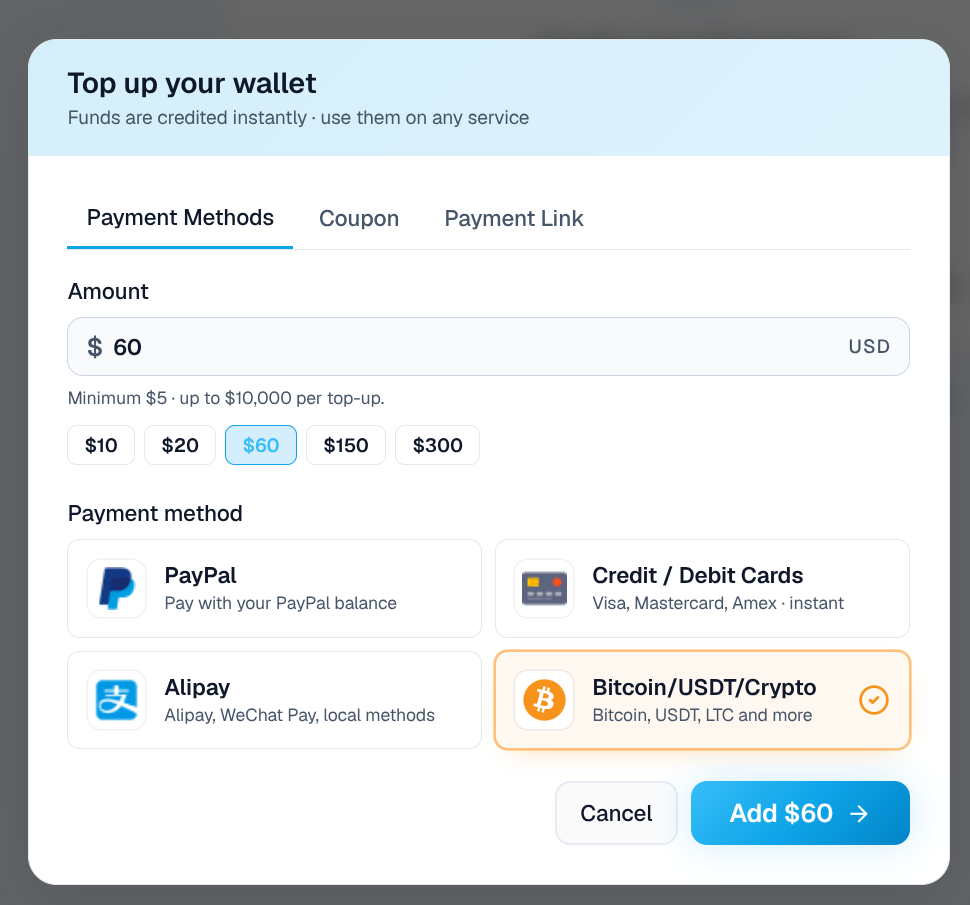
Payments run through a **wallet top-up** model starting at **$5 up to $10,000** per top-up. Supported methods include **PayPal**, **Credit/Debit Cards** (Visa, Mastercard, AmEx), and **Alipay / WeChat Pay**, alongside Coupon and Payment Link tabs.
For Indonesian buyers, there is one nice billing detail: **no 11% VAT (PPN) is added when topping up your wallet**. Adding $60 costs exactly $60, whereas most local Indonesian VPS hosts quote pre-tax prices and add 11% VAT at checkout.
Cloudzy's FAQ also states there is no silent auto-renew. They send an invoice before renewal so you can upgrade, downgrade, or stop without surprise charges.
Before ordering, decide whether you are ready to prepay upfront for regional and annual discounts, or whether paying the regular rate for hourly flexibility makes more sense for your project.
Hosting prices change often. Every price here was verified on November 23-24, 2026 and may differ when you check out.
## Comparison with local Indonesian VPS alternatives
For readers targeting Indonesia, the most relevant benchmark for Cloudzy's 4 GB plan (2 vCPU / 4 GB RAM) is local Indonesian VPS plans in the same RAM bracket, plus Hostinger KVM 2 which I tested separately.
Prices below come from official pages or November 2026 snapshots (using an approximate Rp16,000-Rp18,000 per $1 exchange rate depending on card/bank; local providers typically exclude 11% VAT, while Cloudzy wallet top-ups carry no 11% VAT).
| Provider / plan | Core specs | Listed price | Location & billing notes |
| --- | --- | --- | --- |
| Cloudzy: Regular / HF 4 GB | 2 vCPU · 4 GB · 120 GB | $14.48/mo (promo -50%) · $28.95/mo (regular) · $0.0431/hr | Singapore / 13 regions · no 11% VAT · tested here |
| Biznet Gio: NEO Lite MS 4.2 | 2 vCPU · 4 GB · 60 GB SSD | Rp139,000/mo | Indonesia · excl. 11% VAT · not tested |
| Biznet Gio: NEO Lite Pro MS.4.2 | 2 vCPU · 4 GB · 60 GB NVMe | Rp559,000/mo promo · Rp609,000/mo regular | Indonesia · AMD EPYC + dedicated IOPS · not tested |
| DomaiNesia: Cloud VPS Lite 4GB | 3 Core · 4 GB · 60 GB NVMe | Rp243,000/mo (1 yr) · Rp270,000/mo renewal | Jakarta · excl. 11% VAT · not tested |
| DomaiNesia: Cloud VPS Turbo 4GB | 3 Core · 4 GB · 80 GB NVMe | Rp320,000/mo promo · Rp640,000/mo renewal | Jakarta · EPYC Genoa + 3x HA · not tested |
| Jagoan Hosting: NextGen Galaxy | 4 Core · 4 GB · 100 GB (+100 GB*) | Rp200,000/mo | Indonesia · excl. 11% VAT · not tested |
| IDCloudHost: Cloud VPS eXtreme 4 | 2 Core · 4 GB · 80 GB NVMe | Rp360,000/mo | Indonesia / SG · not tested |
| Hostinger: KVM 2 | 2 vCPU · 8 GB · 100 GB NVMe | Rp151,900/mo (24 mo) · Rp252,900/mo (monthly) | Indonesia · 2-yr renewal Rp232,900 · tested separately |
Keep these points in mind when reading the table:
- Only Cloudzy (here) and Hostinger (in a separate review) were tested hands-on. The local hosts are included for market pricing context, not performance comparisons.
- Billing commitments differ. At the headline promo rate ($14.48/mo, around Rp230k-260k with no VAT), Cloudzy 4 GB sits nicely in the mid-range with 120 GB storage, larger than most 60-80 GB local peers. At its regular monthly rate ($28.95/mo, roughly Rp460k-520k), it costs more than entry-level local VPS plans.
- Payment methods and tax matter. Local hosts take QRIS, bank transfers, and virtual accounts (plus 11% VAT), while Cloudzy bills in USD via card, PayPal, or Alipay with no 11% VAT.
- Hourly billing, 13 global regions, and 4.2 GHz+ High Frequency CPUs at no extra CPU surcharge are hard to find on local Indonesian VPS hosts.
## Cons of using Cloudzy VPS
Now for the downsides. Four issues came up across the seven servers I tested. Not everyone will hit all four, but they are worth knowing before you sign up.
### 1. Disk speed caps around 3,000 IOPS and 120 MiB/s across every tested plan
Cloudzy markets NVMe storage on every plan. Meanwhile, the Singapore dashboard displayed "120 GB SSD", so I checked the real disk behavior from inside the VMs.
| fio metric (`direct=1`) | Regular SG (120 GB) | High Frequency Dallas (60 GB) |
| --- | --- | --- |
| 4k random read | 3,004 IOPS · 11.7 MiB/s | 3,014 IOPS · 11.8 MiB/s |
| 4k random write | 3,002 IOPS · 11.7 MiB/s | 3,014 IOPS · 11.8 MiB/s |
| 1M sequential read | 120 MiB/s | 120 MiB/s |
| 1M sequential write | 115-120 MiB/s | 119 MiB/s |
| Mixed 50/50 (64k / 512k / 1m blocks) | 126 MB/s (flat across blocks) | 120.5 / 120.0 / 99.1 MiB/s |
The pattern is virtually identical in Singapore and Dallas, across both Regular and High Frequency plans. Random reads and writes stop right at ~3,000 IOPS, while sequential and mixed throughput flatten out around 120 MiB/s.
Across all seven servers I tested (Regular 2-12 vCPU in Singapore, Regular 2 vCPU in Dallas, and High Frequency 1-2 vCPU in Dallas), disk I/O stayed within 2,622-3,014 IOPS and 94-120 MiB/s sequential.
On unlimited (uncapped) NVMe, throughput normally climbs with larger block sizes, and random writes trail random reads. When both read and write match down to the exact ceiling across two continents, the most plausible explanation is a per-VM IOPS and bandwidth limit at the hypervisor layer (though I cannot prove that directly from inside a guest VM).
In daily use, 3,000 IOPS is fine for a cached WordPress site. For disk-heavy tasks like restoring a 10 GB backup (~1.5 minutes in ideal conditions), big `composer install` runs, or write-heavy databases, 120 MiB/s will feel sluggish.
### 2. Without page caching, WordPress throughput flattens at 13-18 req/s on 1-2 vCPU plans
This is the main technical limit to keep in mind before moving a busy site onto a small VPS without caching.
| Tool (60 s, localhost) | Concurrency | Regular SG (2 vCPU) | High Frequency Dallas (1 vCPU) |
| --- | --- | --- | --- |
| wrk | 10 | 13.83 req/s | 14.59 req/s |
| wrk | 50 | 15.36 req/s | 15.02 req/s |
| wrk | 100 | 15.03 req/s | 15.81 req/s |
| ab | 10 | 15.98 req/s | 14.15 req/s |
| ab | 50 | 15.34 req/s | 16.38 req/s |
| ab | 100 | 17.73 req/s | 14.97 req/s |
Every run finished with zero errors, but the numbers look surprising at first. Even though Dallas had a 4x faster CPU per core, parallel uncached PHP throughput still plateaued at 14-16 req/s, almost identical to Regular 2 vCPU Singapore at 13-18 req/s.
The explanation is simple: Dallas only has one core, so five PHP workers still wait in line one by one. Singapore has two cores working in parallel, but each core is slower.
Bumping `pm.max_children` from 5 to 25 actually lowered throughput on both machines (12.42 req/s in Singapore and 13.06 req/s in Dallas at 100 concurrency) because of extra context switching.
That ceiling showed up again when I pushed Singapore to a 50-virtual-user k6 stress test (5-minute ramp from Indonesia):
| k6 metric (stress test: 1-50 VU, 5 min) | Regular SG (2 vCPU / 4 GB) |
| --- | --- |
| Threshold p95 < 1.5 s | Fail (1.98 s) |
| HTTP failure | 0% |
| Total requests | 3,838 (12.67 RPS, peak 21) |
| Median response time | 880.6 ms |
| p95 response time | 1.98 s |
| Max response time | 3.06 s |
| Requests > 1.5 s | 943 (24.6%) |
The server stayed up with 0% HTTP errors, but response queues stretched past the 1.5-second p95 bar. Note that this 50-VU retest gave 1.98 s p95 compared with 3.47 s on an earlier run with identical settings, which I record as normal run-to-run variance.
For production sites running page caching, object caching, and a CDN, this ceiling rarely gets hit because nginx handles thousands of static requests per second. If you intentionally run uncached dynamic workloads on a small 1-2 vCPU tier, enable caching or step up to at least 4 vCPU.
### 3. Regional and High Frequency stock can sell out, and a second server requires KYC
Stock availability is the main reason I tested High Frequency in Dallas instead of Singapore. When I ordered on November 17, 2026, High Frequency plans were out of stock everywhere, and Regular CPU was only available in Las Vegas, Los Angeles, and Singapore. In the November 24 deploy panel screenshot, Amsterdam, Miami, and Dubai were also marked Out of stock.
To Cloudzy's credit, stock is shown upfront in the deploy form rather than hidden until checkout. Still, if you specifically want High Frequency in Singapore, you may need to wait for capacity to reopen.
Adding a second server on my test account also triggered identity verification (KYC). That is understandable anti-abuse policy, but it interrupts a quick "sign up and test for an hour" workflow.
### 4. Automatic backups are unavailable in some regions, and snapshots are paid
Cloudzy gets the networking basics right: **IPv4, IPv6, and Monitoring are all Free** directly in the deploy panel's *Advanced features*.
The catch is around built-in backups and optional protection add-ons. In the deploy panel, *Automatic backups* and *VPC network* showed as *Unavailable*, while *DDoS protection* showed as *Sold out*.
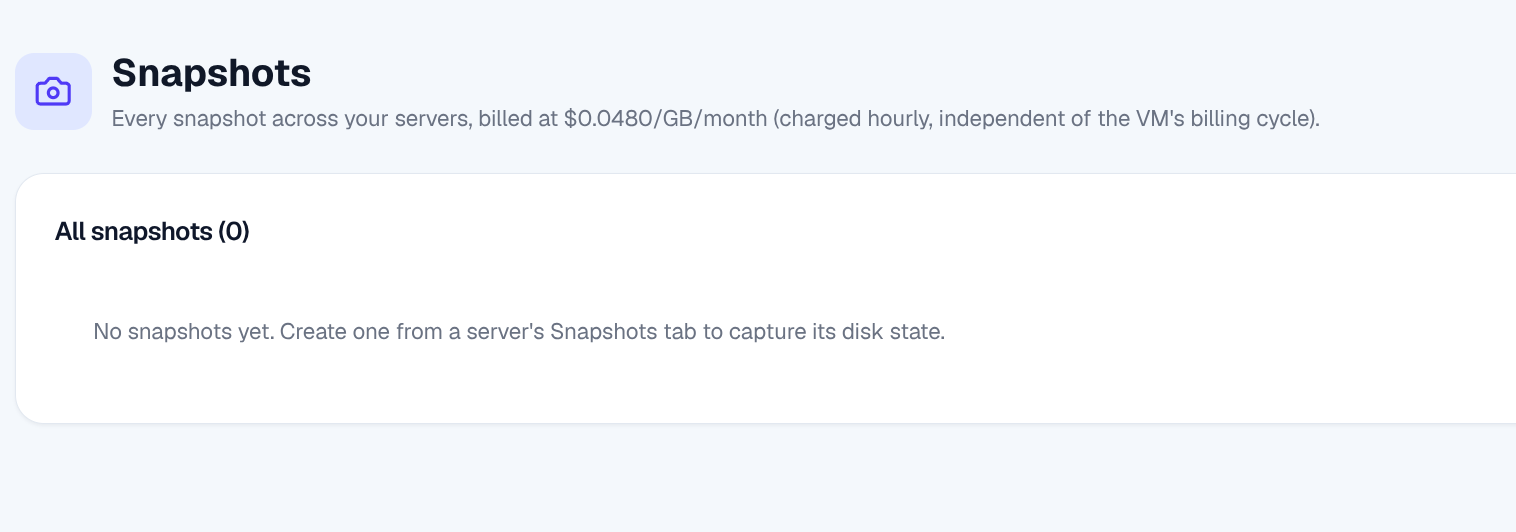
As for **Snapshots**, there was previously conflicting wording between the pricing FAQ (which called them free) and the Knowledge Base. Inside the live **Snapshots** page of the Cloudzy panel, the real rate is stated clearly: **$0.0480/GB/month**, billed hourly and separate from your VM billing cycle. So snapshots are not free, and you should budget for them if you plan to keep large disk snapshots around.
If you already push off-site backups to S3 or Cloudflare R2, this will not slow you down. If you are migrating from shared hosting for the first time, missing built-in automatic backups means setting up your own backup routine on day one.
## Conclusion: Is Cloudzy VPS right for you?
After testing seven servers across Singapore and Dallas, Cloudzy's strengths and limits are clear.
Where Cloudzy shines is networking, CPU stability, and the panel: 12-17 ms latency to Jakarta from Singapore, a 4.2 GHz+ High Frequency option that ran 3.3-3.8x faster at the same price in Dallas, clean scaling up to 12 vCPU in Singapore, free IPv4 and IPv6, a Bahasa Indonesia panel option, and wallet top-ups with no 11% VAT.
The compromises are just as concrete: a flat ~3,000 IOPS / ~120 MiB/s disk ceiling across all tested tiers, strict self-managed operations, paid snapshots at $0.0480/GB/month, intermittent stock on High Frequency and some regions, and a 50% headline discount that does not apply across every region or hourly billing.
Do I recommend Cloudzy VPS? For the right user, yes. Definitely not for everyone.
I recommend Cloudzy VPS if:
- Your audience is primarily in Indonesia or Southeast Asia and you pick the Singapore region (12-17 ms to Jakarta, 0% loss)
- You run WordPress, WooCommerce, or web apps with standard production optimization (page cache, object cache, CDN), with clean scaling from 2 up to 12 vCPU as traffic grows
- You need fast single-thread CPU speed (PHP, build servers, APIs, or AI automation) and can catch High Frequency 4.2 GHz+ stock at zero CPU surcharge
- You are already comfortable using AI tools, whether to help set up and manage a Linux server without being a full-time sysadmin (backed by Cloudzy's REST API, `zy` CLI, and built-in MCP server) or to host AI agents and bots such as Grok Bot, ChatGPT bots, Muse, and other self-hosted AI workflows
- You want hourly billing for staging, migration tests, or short projects, or need a high-bandwidth US node like Dallas
- You want a clean multilingual panel (including Indonesian) and flexible top-ups (card, PayPal, Alipay) without 11% VAT
And I would skip Cloudzy VPS if:
- You want a 100% hands-off fully managed host (bundled cPanel/hPanel and application support) without touching server setup at all, even with AI assistance
- Your workload depends heavily on raw disk I/O above 3,000 IOPS or sequential read/write speeds of several hundred MB/s
- You rely on built-in panel automatic backups being available in every region instead of running your own off-site backup setup
- You need local IDR payment rails (QRIS/bank transfer) or Indonesian-language technical support (the panel supports Indonesian, but technical support is in English)
For WordPress and WooCommerce, the winning recipe is still standard production caching: page cache, object cache, and a CDN. With that in place, nginx on Cloudzy serves thousands of requests per second easily, and if dynamic traffic grows you can move up to 4 vCPU or higher.
If your audience is in Indonesia, start with Singapore on hourly billing (top-ups start at $5) or use the 14-day money-back guarantee to benchmark your own stack before locking in a long cycle. If you need IDR payments (QRIS/bank transfer), Indonesian-language technical support, or a turnkey control panel, local providers like Biznet Gio and DomaiNesia or a panel-assisted host like Hostinger KVM will fit better.
 In practice, going from order click to SSH login in Singapore took about 1-1.5 minutes. The order flow lets you deploy with an SSH key only without setting a root password, while keeping a fallback root password behind a Show button.
One detail you rarely see from global VPS hosts: **Cloudzy's control panel supports multiple languages, including Bahasa Indonesia**. For Indonesian teams who prefer navigating billing and server controls in Indonesian, that helps right away.
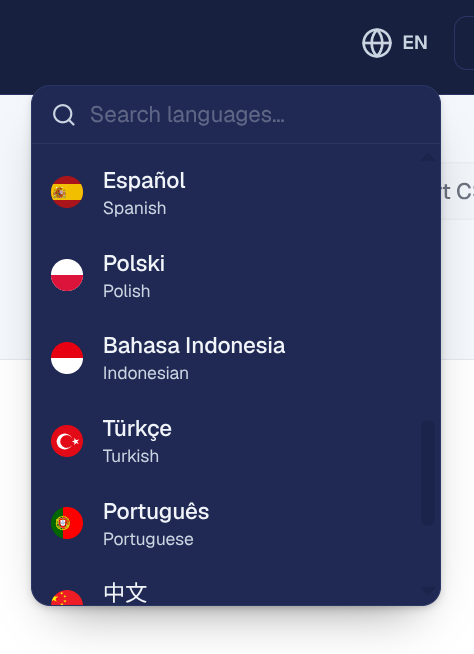 Hourly pay-as-you-go billing also makes short-lived work painless. Spin up a staging or migration box for two days, delete it when done, and pay only for the hours used.

For automation, Cloudzy's documentation covers REST API v1, the `zy` CLI, scoped API tokens, custom ISO uploads, live resize without rebuilding, and a built-in MCP server so AI assistants like Claude or Cursor can manage instances via CLI.
They also advertise a 14-day money-back guarantee and a 99.95% uptime SLA. I did not test the API, CLI, live resize, or refund process directly in this review, so treat those as official documented features rather than hands-on verification.
### 7. Marketplace with 1,000+ one-click apps
If you would rather not install every service manually from a blank terminal, Cloudzy offers a Marketplace with more than 1,000 apps ready for one-click deployment.

It covers CMS tools, control panels, databases, developer utilities, and popular self-hosted apps. For users moving off shared hosting, one-click templates cut down initial setup friction.
Note that I intentionally used a clean Ubuntu image for this review so WordPress benchmarks stayed controlled and comparable, so I did not test Marketplace deploys hands-on.
### 8. 24/7/365 support handled directly by human engineers
Many hosts now hide support behind layers of AI chatbots before you ever reach a person. Cloudzy claims its 24/7/365 technical support goes straight to human engineers rather than bots.
Their site also advertises a median first response time of 18 minutes. If that holds up day to day, reaching a real engineer quickly makes a real difference when something breaks in production.
I did not open a support ticket during testing, so I am listing this strictly as Cloudzy's official claim rather than a verified response test.
## Cloudzy VPS pricing: 50% promo, regional discounts, and no 11% VAT on top-ups
Here is the full pricing picture combining Cloudzy's public pricing page (checked November 23, 2026) and actual deploy and wallet billing inside the panel (November 24, 2026).
| Item | 2 GB Plan (1 vCPU) | 4 GB Plan (2 vCPU) | Notes |
| --- | --- | --- | --- |
| Promo 50% price (website) | $7.48 /month | $14.48 /month | Top promo rate shown on site (depends on region & billing cycle) |
| Upfront annual total (-50%) | $89.70 /year (list $179.45) | $173.70 /year (list $347.45) | Matches site annual table; 14-day refund applies |
| Regular / monthly price (panel) | $14.95 /month | $28.95 /month | Base rate before cycle or regional discounts |
| Hourly rate (pay-as-you-go) | $0.0222 /hour | $0.0431 /hour | Shown directly in the deploy panel |
| IPv4 & IPv6 | Free | Free | Listed as Free under Advanced features |
| Monitoring | Free | Free | Tracks CPU, memory, disk, and transfer |
| Floating / extra IPv4 | $2.50 /IP/month | $2.50 /IP/month | Reserved IP, up to 10 extra IPs |
| Snapshots | $0.0480 /GB/month | $0.0480 /GB/month | Charged hourly, separate from VM billing cycle (verified in panel) |
| Nested virtualization | Not eligible | Not eligible | Regular CPU plans with 8 GB+ RAM only (+$8.00/month) |
| Renewal policy | No auto-renew | No auto-renew | Official FAQ: invoice sent before renewal |

One detail only becomes clear once you open the deploy screen inside the panel.
On the marketing pages, the big headline figure is up to 50% off ($7.48 for 2 GB and $14.48 for 4 GB). Inside the actual deploy form, the discount **depends on both your chosen region and billing cycle**:
- **Regional discounts:** Utah goes up to **50% off**, Dallas and Las Vegas go up to **30% off**, while Singapore, Europe (London, Frankfurt, Bern), Los Angeles, New York, and Sydney go up to **20% off**.
- **Pre-paid billing cycle discounts:** Monthly 5%, Quarterly 10%, Semi-annually 15%, and Annually 30% (for regions like Dallas), while **Hourly** runs on the regular base rate ($0.0222/hour for 2 GB and $0.0431/hour for 4 GB).
- On the same screen, you can also adjust **Storage** and **Transfer** directly on the plan card or click through to build a custom plan.

That gap between the headline promo and hourly/regional panel pricing is not a bug, just something you should know before comparing numbers. Pitting $14.48 against another host's no-commitment monthly rate is not an even comparison.
Payments run through a **wallet top-up** model starting at **$5 up to $10,000** per top-up. Supported methods include **PayPal**, **Credit/Debit Cards** (Visa, Mastercard, AmEx), and **Alipay / WeChat Pay**, alongside Coupon and Payment Link tabs.
For Indonesian buyers, there is one nice billing detail: **no 11% VAT (PPN) is added when topping up your wallet**. Adding $60 costs exactly $60, whereas most local Indonesian VPS hosts quote pre-tax prices and add 11% VAT at checkout.
 Cloudzy's FAQ also states there is no silent auto-renew. They send an invoice before renewal so you can upgrade, downgrade, or stop without surprise charges.
Before ordering, decide whether you are ready to prepay upfront for regional and annual discounts, or whether paying the regular rate for hourly flexibility makes more sense for your project.
Hosting prices change often. Every price here was verified on November 23-24, 2026 and may differ when you check out.
## Comparison with local Indonesian VPS alternatives
For readers targeting Indonesia, the most relevant benchmark for Cloudzy's 4 GB plan (2 vCPU / 4 GB RAM) is local Indonesian VPS plans in the same RAM bracket, plus Hostinger KVM 2 which I tested separately.
Prices below come from official pages or November 2026 snapshots (using an approximate Rp16,000-Rp18,000 per $1 exchange rate depending on card/bank; local providers typically exclude 11% VAT, while Cloudzy wallet top-ups carry no 11% VAT).
| Provider / plan | Core specs | Listed price | Location & billing notes |
| --- | --- | --- | --- |
| Cloudzy: Regular / HF 4 GB | 2 vCPU · 4 GB · 120 GB | $14.48/mo (promo -50%) · $28.95/mo (regular) · $0.0431/hr | Singapore / 13 regions · no 11% VAT · tested here |
| Biznet Gio: NEO Lite MS 4.2 | 2 vCPU · 4 GB · 60 GB SSD | Rp139,000/mo | Indonesia · excl. 11% VAT · not tested |
| Biznet Gio: NEO Lite Pro MS.4.2 | 2 vCPU · 4 GB · 60 GB NVMe | Rp559,000/mo promo · Rp609,000/mo regular | Indonesia · AMD EPYC + dedicated IOPS · not tested |
| DomaiNesia: Cloud VPS Lite 4GB | 3 Core · 4 GB · 60 GB NVMe | Rp243,000/mo (1 yr) · Rp270,000/mo renewal | Jakarta · excl. 11% VAT · not tested |
| DomaiNesia: Cloud VPS Turbo 4GB | 3 Core · 4 GB · 80 GB NVMe | Rp320,000/mo promo · Rp640,000/mo renewal | Jakarta · EPYC Genoa + 3x HA · not tested |
| Jagoan Hosting: NextGen Galaxy | 4 Core · 4 GB · 100 GB (+100 GB*) | Rp200,000/mo | Indonesia · excl. 11% VAT · not tested |
| IDCloudHost: Cloud VPS eXtreme 4 | 2 Core · 4 GB · 80 GB NVMe | Rp360,000/mo | Indonesia / SG · not tested |
| Hostinger: KVM 2 | 2 vCPU · 8 GB · 100 GB NVMe | Rp151,900/mo (24 mo) · Rp252,900/mo (monthly) | Indonesia · 2-yr renewal Rp232,900 · tested separately |
Keep these points in mind when reading the table:
- Only Cloudzy (here) and Hostinger (in a separate review) were tested hands-on. The local hosts are included for market pricing context, not performance comparisons.
- Billing commitments differ. At the headline promo rate ($14.48/mo, around Rp230k-260k with no VAT), Cloudzy 4 GB sits nicely in the mid-range with 120 GB storage, larger than most 60-80 GB local peers. At its regular monthly rate ($28.95/mo, roughly Rp460k-520k), it costs more than entry-level local VPS plans.
- Payment methods and tax matter. Local hosts take QRIS, bank transfers, and virtual accounts (plus 11% VAT), while Cloudzy bills in USD via card, PayPal, or Alipay with no 11% VAT.
- Hourly billing, 13 global regions, and 4.2 GHz+ High Frequency CPUs at no extra CPU surcharge are hard to find on local Indonesian VPS hosts.
## Cons of using Cloudzy VPS
Now for the downsides. Four issues came up across the seven servers I tested. Not everyone will hit all four, but they are worth knowing before you sign up.
### 1. Disk speed caps around 3,000 IOPS and 120 MiB/s across every tested plan
Cloudzy markets NVMe storage on every plan. Meanwhile, the Singapore dashboard displayed "120 GB SSD", so I checked the real disk behavior from inside the VMs.
| fio metric (`direct=1`) | Regular SG (120 GB) | High Frequency Dallas (60 GB) |
| --- | --- | --- |
| 4k random read | 3,004 IOPS · 11.7 MiB/s | 3,014 IOPS · 11.8 MiB/s |
| 4k random write | 3,002 IOPS · 11.7 MiB/s | 3,014 IOPS · 11.8 MiB/s |
| 1M sequential read | 120 MiB/s | 120 MiB/s |
| 1M sequential write | 115-120 MiB/s | 119 MiB/s |
| Mixed 50/50 (64k / 512k / 1m blocks) | 126 MB/s (flat across blocks) | 120.5 / 120.0 / 99.1 MiB/s |
The pattern is virtually identical in Singapore and Dallas, across both Regular and High Frequency plans. Random reads and writes stop right at ~3,000 IOPS, while sequential and mixed throughput flatten out around 120 MiB/s.
Across all seven servers I tested (Regular 2-12 vCPU in Singapore, Regular 2 vCPU in Dallas, and High Frequency 1-2 vCPU in Dallas), disk I/O stayed within 2,622-3,014 IOPS and 94-120 MiB/s sequential.